# How To Get The Primary Category Of A Post Only - Reusable Function
In light of WordPress's primary category feature, we sometimes just want to just retrieve that one primary category, not a list of all. In this post, I'll show you how to get the primary category of a post only.
First off, whether a post should have multiple categories or not is for another discussion. The answer is no….I mean…
Second, and more importantly, the functions the_category and get_the_category both return a list of categories. When we select more than one category in a post we get this option to make one of them primary.
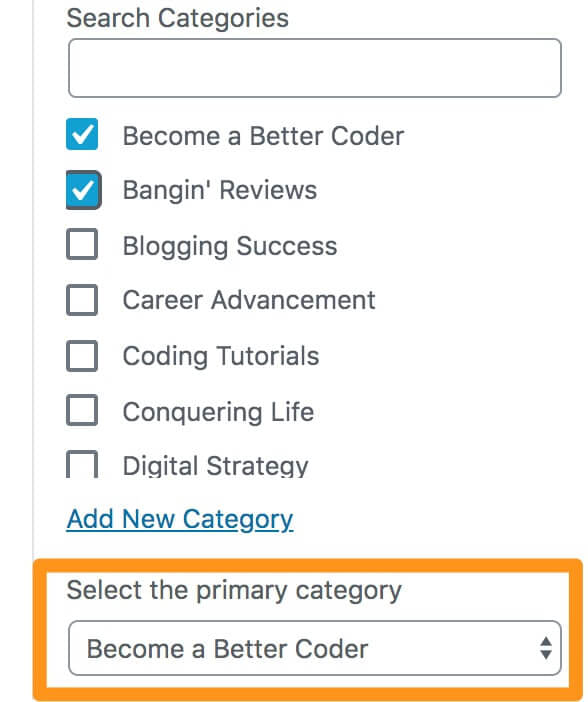
But often the need arises to restructure a breadcrumb, post meta layout, etc. and we just want to get the primary category of a post only.
Here’s how to do it:
## How to get the primary category of a post only
Shoutout to Jawinn for the actual code. All I did was “functionize” it to make it reusable.
So the function gets one parameter, the list of categories. So whenever using it, be sure to call the get_the_category function beforehand and then place the results in a variable which will be passed to the function.
To make it reusable, place the function in your functions.php, or more preferably in a custom plugin.
```php
function get_primary_category($category){
$useCatLink = true;
// If post has a category assigned.
if ($category){
$category_display = '';
$category_link = '';
if ( class_exists('WPSEO_Primary_Term') )
{
// Show the post's 'Primary' category, if this Yoast feature is available, & one is set
$wpseo_primary_term = new WPSEO_Primary_Term( 'category', get_the_id() );
$wpseo_primary_term = $wpseo_primary_term->get_primary_term();
$term = get_term( $wpseo_primary_term );
if (is_wp_error($term)) {
// Default to first category (not Yoast) if an error is returned
$category_display = $category[0]->name;
$category_link = get_category_link( $category[0]->term_id );
} else {
// Yoast Primary category
$category_display = $term->name;
$category_link = get_category_link( $term->term_id );
}
}
else {
// Default, display the first category in WP's list of assigned categories
$category_display = $category[0]->name;
$category_link = get_category_link( $category[0]->term_id );
}
// Display category
if ( !empty($category_display) ){
if ( $useCatLink == true && !empty($category_link) ){
return ''.htmlspecialchars($category_display).'';
} else {
return ''.htmlspecialchars($category_display).'';
}
}
}
}
// And for an example of its use:
$category = get_the_category();
echo '';
echo get_primary_category($category);
echo '
';
```
### Conclusion
And that’s how to get the primary category of a post in a reusable function!!