# How To Run Gulp Tasks According To Environment: Production or Development

<div class="lead-paragraph"><span class="dropcap">I</span>recently redesigned my website and in doing so I wanted to really dig into the benefits of gulp and Sass in website development. I'm not new to gulp or Sass, using it regularly in the freelance work that I do, but often the gulp file, or gulp template, is pre-determined by another designer, developer, or agency. So in taking the time to rebuild my own site from scratch with gulp and Sass, I want to share specifically an easy way to run gulp tasks according to environment; whether production or development.</div><div class="max-w-4xl mx-auto px-4 sm:px-6 pt-4">             <div class="border-t dark:border-slate-700"></div>           </div>
<p>I had two reasons for the need to run gulp tasks according to environment:</p>
<ol>
<li>I wanted a sourcemap in development, but have it removed in production.</li>
<li>I wanted to minify my style.css in production only.</li>
</ol>
<p>So if this peaks your interest, here is how to easily do it:</p>
<h2>Run Gulp Tasks According To Environment</h2>
<h3>Step 1: Install node-gulp-mode</h3>
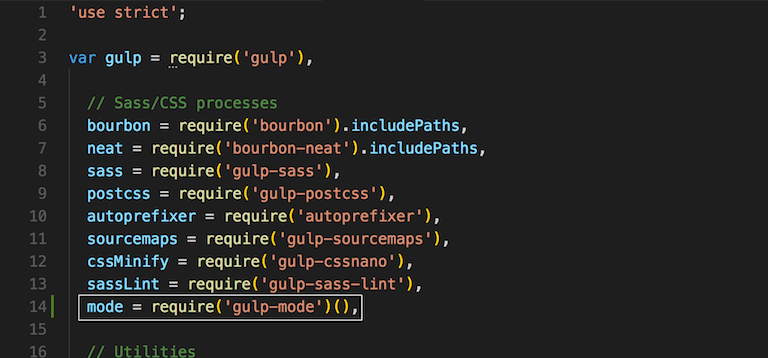
<p>In your terminal run the command: <code>npm i gulp-mode</code> (or <code>npm i gulp-mode --save-dev</code> to save as a dependency in your json file (recommended)).</p>
<p>Now require it at the top of your gulp file:</p>
<p class="textcenter"><img src="https://travismedia.gumlet.io/public/images/2019/12/gulp-tasks-according-to-environment-require-gulp-mode.png" alt="gulp tasks according to environment require gulp mode" /></p>
<h3>Step 2: Choosing Production or Development</h3>
<p>So nothing has changed. Your gulp still runs normally.</p>
<p>But with our gulp-mode package, we can now tell specific tasks to only run on production or only run on development.</p>
<p>How does it know what environment we are on? Well, we tell it.</p>
<p>Here are my two examples, sourcemaps and minification.</p>
<p><strong>Example 1: Disable sourcemaps on production</strong></p>
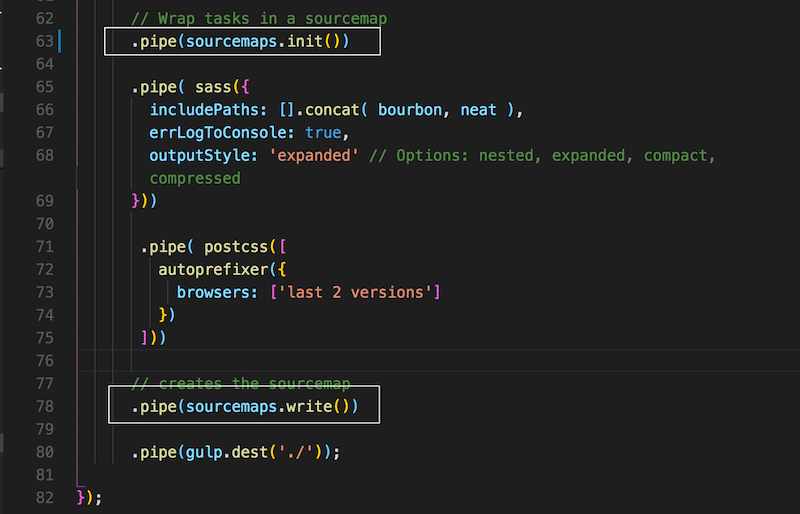
<p>To do this I need to locate the sourcemaps code in my gulpfile:</p>
<p class="textcenter"><img src="https://travismedia.gumlet.io/public/images/2019/12/gulp-tasks-according-to-environment-sourcemaps.png" alt="gulp tasks according to environment sourcemaps" /></p>
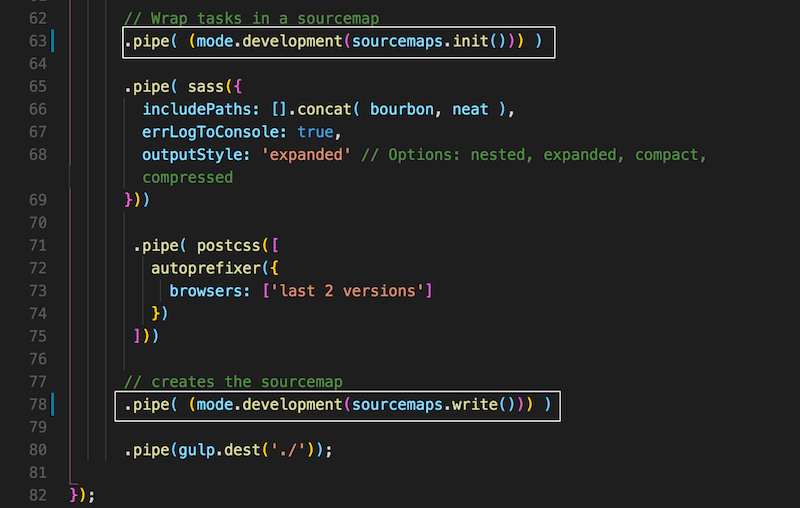
<p>And since I want this to happen only in development, I simply add <code>mode.development</code> to my desired function:</p>
<p class="textcenter"><img src="https://travismedia.gumlet.io/public/images/2019/12/gulp-tasks-according-to-environment-sourcemaps-development.png" alt="gulp tasks according to environment sourcemaps development" /></p>
<p><strong>Still, how does it know what is development and what is not?</strong></p>
<p>Because you tell it when you run gulp by adding the suffix <code>--development</code> or <code>--production</code>.</p>
<p>So if you are doing a gulp build, then <code>gulp build --development</code>; a gulp watch, then <code>gulp watch --development</code> or <code>gulp watch --production</code>. You get the point.</p>
<p><strong>Example 2: Enable minification only on production</strong></p>
<p>I wanted gulp to minify my style.css on production, not development.</p>
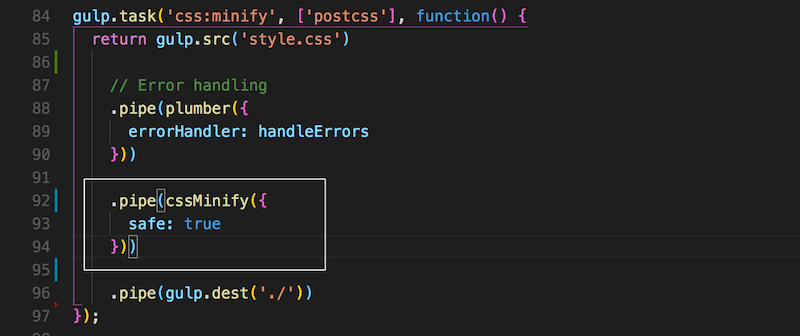
<p>Just as we did above, I took my minification code in my gulpfile:</p>
<p class="textcenter"><img src="https://travismedia.gumlet.io/public/images/2019/12/gulp-tasks-according-to-environment-minify-only-on-production.png" alt="gulp tasks according to environment minify only on production" /></p>
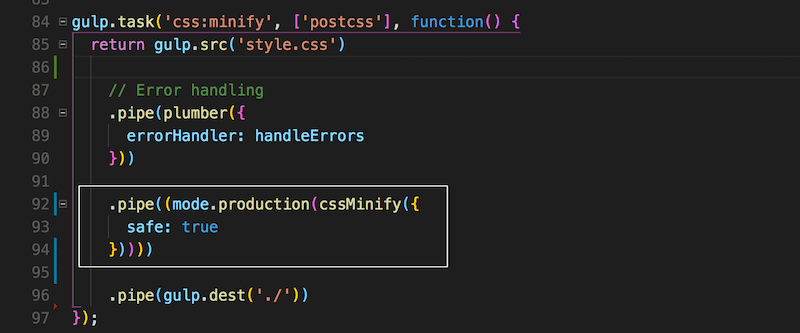
<p>and told it to run with production only with <code>mode.production</code></p>
<p class="textcenter"><img src="https://travismedia.gumlet.io/public/images/2019/12/gulp-tasks-according-to-environment-minify-only-on-production-2.png" alt="gulp tasks according to environment minify only on production 2" /></p>
<p>&nbsp;</p>
<p>In my instance, I can run <code>gulp watch --development</code> up until I'm ready to FTP it over to my live site, which I will then run a <code>gulp --production</code>.</p>
<h3>Conclusion</h3>
<p>And this is how to run gulp tasks according to environment. Let me know if you have any questions or have anything to add.</p>