# How To Use the C# AWS SDK Documentation: A Guide For Developers
The C# AWS SDK is a complete set of libraries that allow you to develop applications that interact with Amazon Web Services. This article will provide you with the real-world examples needed to set up and use this AWS SDK in your next C# project.
Create a New Project
First, let's create a new folder for our project:
```bash
mkdir aws-sdk-app && cd aws-sdk-app
```
Since this isn't a C# tutorial, I'm going to provide the starter code for us to use.
Here's the repository and you can clone it with the following command:
```bash
https://github.com/rodgtr1/aws-sdk-csharp-starter-guide.git
```
And cd into your project.
For a quick explanation of the starter code:
1. In Program.cs services we are using "GetSection" to access a custom section of our appsettings.json file, namely the AWS section. There is also a corresponding Model, AwsOptions.
2. Instead of using the credentials already on our computer, we are creating a new profile programmatically called "test-profile" that will be added to our .aws/credentials file. I included this code so that you can deploy this anywhere and it create a new credentials file (or add to it) and you won't be stuck only being able to auth on your local computer.
3. This is a C# Worker app and is set to run every 10 seconds. I chose a Worker over a Console app because it includes a lot of the Host/Config/DI already and wanted to get you up and running without lots of code to explain.
After cloning the repo, run `dotnet build` to pull the dependencies.
AWS Credentials Setup
If you look in the appsettings.json file of our starter project, you'll see a section to add your AWS credentials.
Go ahead and create a new AWS user and add your Access Key, Secret Key, and Region.
As mentioned above, this adds a new user to your .aws/credentials file. Feel free to change "test-user" to whatever you like in the credentials part of the code.
For a more detailed understanding of the C# AWS SDK Credential classes and how it works, check out another I post I have on the topic..
Learning the C# AWS SDK by example
Let's learn how to "describe" our EC2 instances. Go ahead and launch a new EC2 instance in your AWS environment to follow along.
Reading the Documentation
The API reference for all AWS SDK interaction can be found here: https://docs.aws.amazon.com/sdkfornet/v3/apidocs/Index.html
Here are few important things to note about the API:
1. You'll want to use the Async version of most of the calls.
2. There is a **Request** and a **Response** part to each method.
3. For each service, you'll want to find the Client (for example AmazonEC2Client) and click on that. There you will find all the sought after methods.
And let's add the EC2 package. You can search something like `aws sdk c# ec2 nuget` (or s3 or ssm) on Google and it will be the first result. To add the package we need, run the following in your console:
```bash
dotnet add package AWSSDK.EC2
```
...and then add the using statements at the top of Worker.cs:
```cs
...
using Amazon.EC2;
using Amazon.EC2.Model;
...
```
So first let's scroll down in our documentation until we see **Amazon.EC2** (not Import or Model or Util, etc.) and look for AmazonEC2Client. Click on that. (Remember, for each service you'll want to find the Client.)
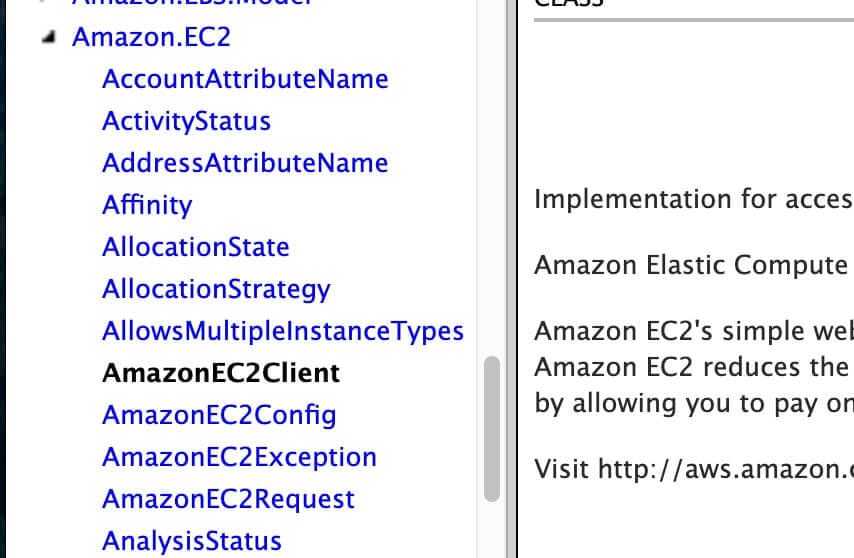 On the Client page, scroll down to take a look at all the methods you can use. If you are used to the AWS CLI, then they're the same methods.
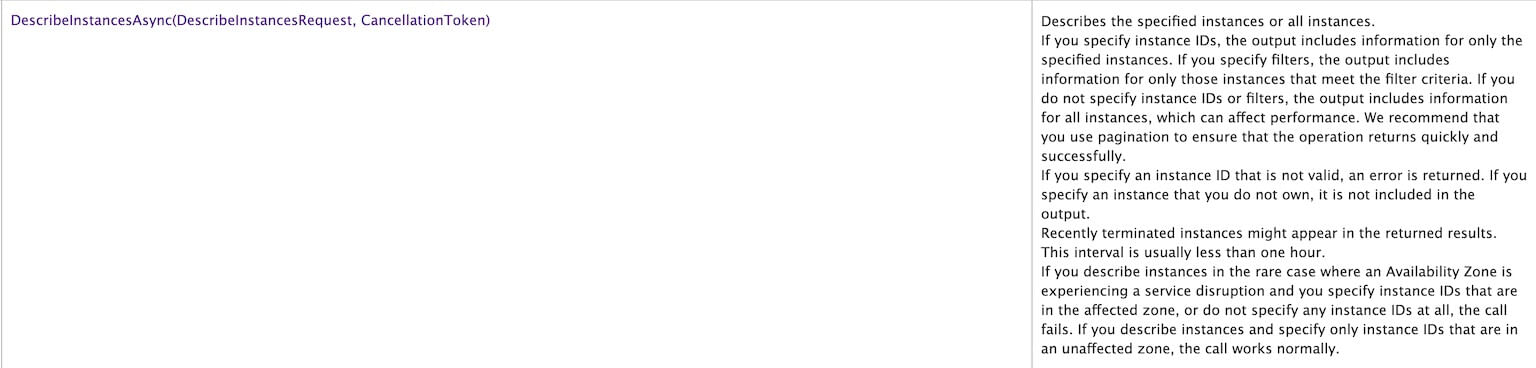
We'll be using the `DescribeInstancesAsync(DescribeInstancesRequest, CancellationToken)` method today.
On the Client page, scroll down to take a look at all the methods you can use. If you are used to the AWS CLI, then they're the same methods.
We'll be using the `DescribeInstancesAsync(DescribeInstancesRequest, CancellationToken)` method today.
Setting up your Client
Setting up an EC2 client can be done with the following code:
```cs
AmazonEC2Client client = new AmazonEC2Client(awsCredentials);
```
We've already defined the awsCredentials and Profile, so we just need to pass those as parameters.
Request and Response
Each method call involves a Request and a Response.
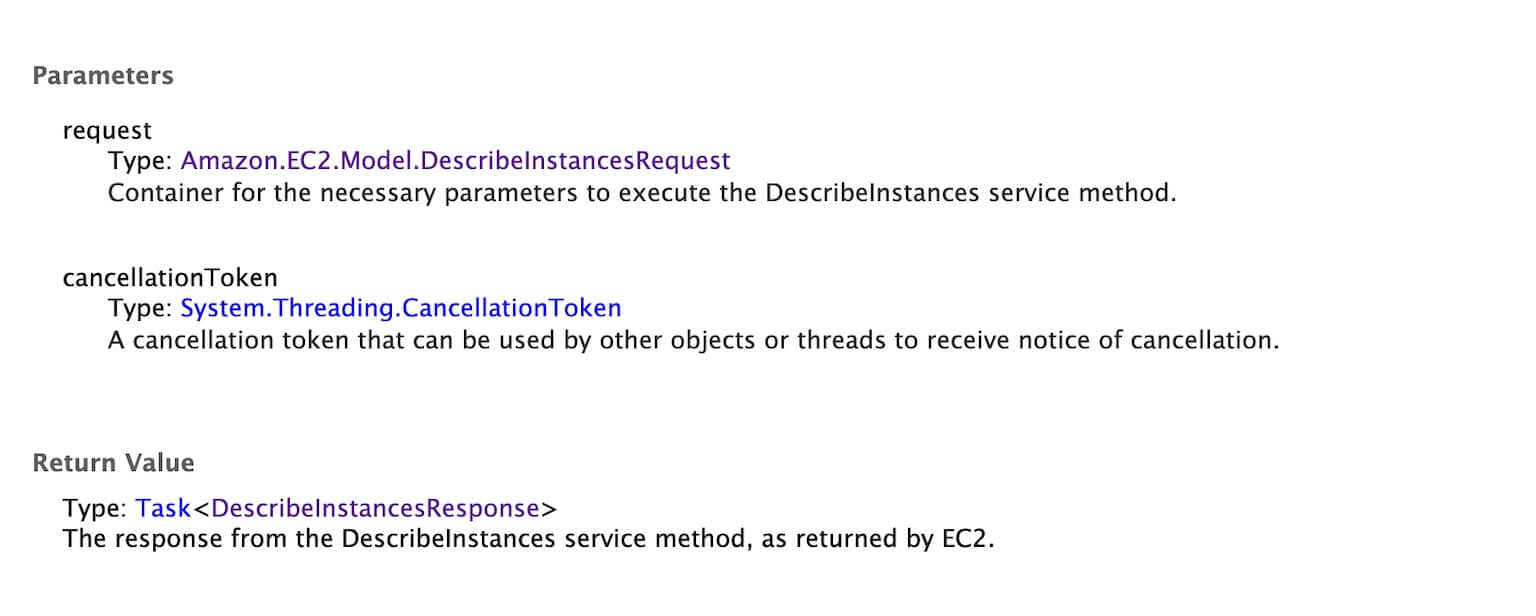 There is a Request called `Amazon.EC2.Model.DescribeInstancesRequest` and a Response called `Amazon.EC2.Model.DescribeInstancesResponse`.
If you click on the Request link you'll see that you can include Filters, InstanceIds, MaxResults, and NextToken parameters in your request. You'll also note the Type and some Description information for each.
So let's say we want to make a request for a specific instance ID. The type is a list of strings. So we could use:
```cs
var request = new DescribeInstancesRequest {
InstanceIds = new List {
"i-032b4d4040b286794"
}
};
```
But in our example, we want all the instances so we can leave the properties blank like so:
```cs
var request = new DescribeInstancesRequest();
```
Next, click on the `Amazon.EC2.Model.DescribeInstancesResponse` link to look at the Response information.
Under properties, we'll want to use the **Reservations** property, and you'll note that it returns a List of . If we click on that, we'll see the properties of that Model. What we want here is the **Instance** property and that is a List of . And if we click on that we'll see all the properties of the specific instance we can gather from.
Do you see the pattern here? We:
1. Put together our Request and the properties we want to include
2. We select properties we need from the response that comes back.
That's it!
And in total, our code would look like this:
```cs
AmazonEC2Client client = new AmazonEC2Client(awsCredentials);
// Make the request for ALL instances, no parameters.
var request = new DescribeInstancesRequest();
// Make the call and capture the response
var response = await client.DescribeInstancesAsync(request);
// Loop through each Reservation
foreach(var reservation in response.Reservations)
{
//Loop through each instance outputting instance properties
foreach(var instance in reservation.Instances)
{
Console.WriteLine($"Instance {instance.InstanceId} is {instance.State.Name}.");
}
}
```
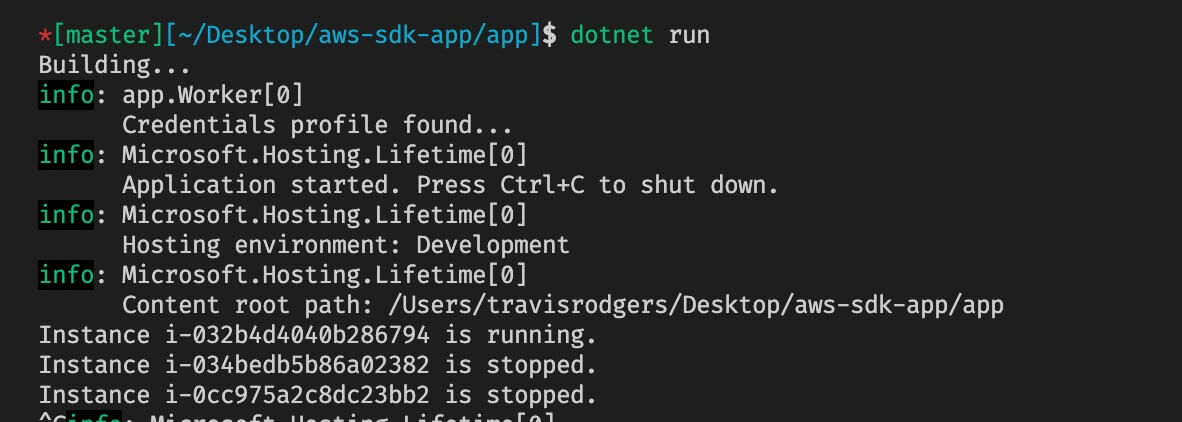
And our output like so:
There is a Request called `Amazon.EC2.Model.DescribeInstancesRequest` and a Response called `Amazon.EC2.Model.DescribeInstancesResponse`.
If you click on the Request link you'll see that you can include Filters, InstanceIds, MaxResults, and NextToken parameters in your request. You'll also note the Type and some Description information for each.
So let's say we want to make a request for a specific instance ID. The type is a list of strings. So we could use:
```cs
var request = new DescribeInstancesRequest {
InstanceIds = new List {
"i-032b4d4040b286794"
}
};
```
But in our example, we want all the instances so we can leave the properties blank like so:
```cs
var request = new DescribeInstancesRequest();
```
Next, click on the `Amazon.EC2.Model.DescribeInstancesResponse` link to look at the Response information.
Under properties, we'll want to use the **Reservations** property, and you'll note that it returns a List of . If we click on that, we'll see the properties of that Model. What we want here is the **Instance** property and that is a List of . And if we click on that we'll see all the properties of the specific instance we can gather from.
Do you see the pattern here? We:
1. Put together our Request and the properties we want to include
2. We select properties we need from the response that comes back.
That's it!
And in total, our code would look like this:
```cs
AmazonEC2Client client = new AmazonEC2Client(awsCredentials);
// Make the request for ALL instances, no parameters.
var request = new DescribeInstancesRequest();
// Make the call and capture the response
var response = await client.DescribeInstancesAsync(request);
// Loop through each Reservation
foreach(var reservation in response.Reservations)
{
//Loop through each instance outputting instance properties
foreach(var instance in reservation.Instances)
{
Console.WriteLine($"Instance {instance.InstanceId} is {instance.State.Name}.");
}
}
```
And our output like so:
 Now a lot of services only return a page of results, totaling like 20 or 25 instances or users or whatever AWS object you are looking for.
In that case, you'll need to use something like NextToken to "paginate" or grab all the pages so that you get all the results.
I believe EC2 instances default at 1000 so if you have over 1000 you'll need to paginate. However, other services like SSM Managed Instances only retrieve 25 at a time I believe, so you would want to paginate from the outset.
So let's look at an example of pagination with S3. Here's we'll list the contents of an S3 bucket.
If you visit the Amazon.S3 documentation in the API Reference, you'll see the ListObjectsV2Async Method (remember to look in the AmazonS3Client page).
For the Request we'll use the BucketName property and MaxResults to 20. MaxResults can go up to 1000, so under 1000 you wouldn't need to paginate. But we'll set it to 20 to demonstrate.
And for the Response we'll paginate the Keys.
Note that NextToken isn't used but instead ContinuationToken on the request and NextContinuationToken on the response. The response NextContinuationToken gets passed back to the request each time until null. This keeps the pagination retrieval going until it's empty.
And to do this you'll use a Do-While loop like so:
```cs
var client = new AmazonS3Client(awsCredentials);
var request = new ListObjectsV2Request
{
BucketName = "amplifynotetaker-20201211154701-hostingbucket-dev",
MaxKeys = 20
};
do
{
var response = await client.ListObjectsV2Async(request);
foreach(var s3Object in response.S3Objects)
{
Console.WriteLine(s3Object.Key);
}
Console.WriteLine("----Page Ends----"); // Adding for example only.
request.ContinuationToken = response.NextContinuationToken;
}
while (request.ContinuationToken != null);
```
And you'll see 20 coming in at a time:
Now a lot of services only return a page of results, totaling like 20 or 25 instances or users or whatever AWS object you are looking for.
In that case, you'll need to use something like NextToken to "paginate" or grab all the pages so that you get all the results.
I believe EC2 instances default at 1000 so if you have over 1000 you'll need to paginate. However, other services like SSM Managed Instances only retrieve 25 at a time I believe, so you would want to paginate from the outset.
So let's look at an example of pagination with S3. Here's we'll list the contents of an S3 bucket.
If you visit the Amazon.S3 documentation in the API Reference, you'll see the ListObjectsV2Async Method (remember to look in the AmazonS3Client page).
For the Request we'll use the BucketName property and MaxResults to 20. MaxResults can go up to 1000, so under 1000 you wouldn't need to paginate. But we'll set it to 20 to demonstrate.
And for the Response we'll paginate the Keys.
Note that NextToken isn't used but instead ContinuationToken on the request and NextContinuationToken on the response. The response NextContinuationToken gets passed back to the request each time until null. This keeps the pagination retrieval going until it's empty.
And to do this you'll use a Do-While loop like so:
```cs
var client = new AmazonS3Client(awsCredentials);
var request = new ListObjectsV2Request
{
BucketName = "amplifynotetaker-20201211154701-hostingbucket-dev",
MaxKeys = 20
};
do
{
var response = await client.ListObjectsV2Async(request);
foreach(var s3Object in response.S3Objects)
{
Console.WriteLine(s3Object.Key);
}
Console.WriteLine("----Page Ends----"); // Adding for example only.
request.ContinuationToken = response.NextContinuationToken;
}
while (request.ContinuationToken != null);
```
And you'll see 20 coming in at a time:
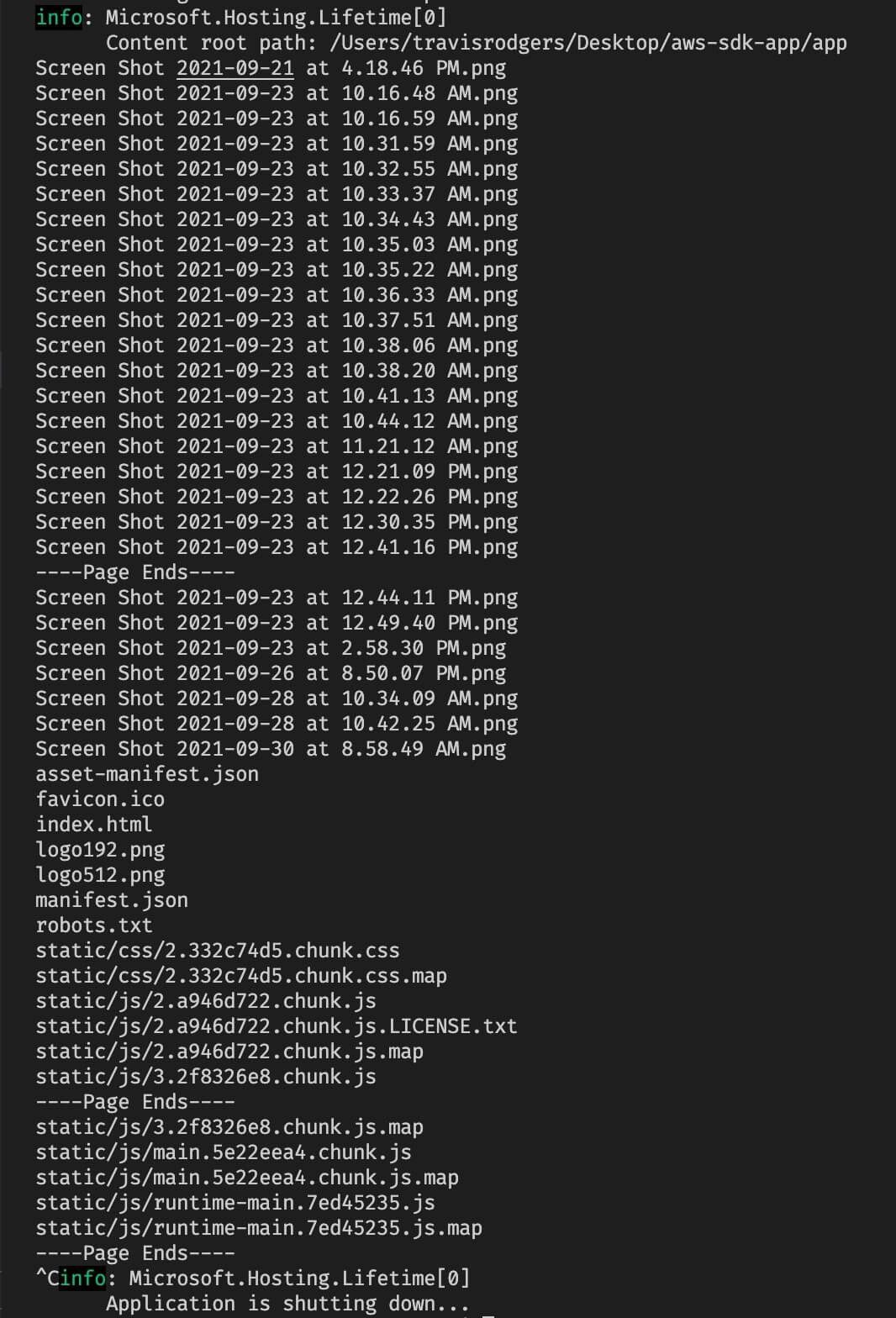 And that's how you paginate in the AWS SDK for C#.
More Examples Please!
I'm sure by now you are looking for more examples.
I am putting together a continuation of tutorials and AWS SDK examples on how to interact with different services in the C# AWS SDK.
These will be much shorter and to the point. Be on the lookout soon or comment below what examples you want to see.
Conclusion
So as you've seen, understanding the documentation and the request/response pattern make it easy to interact with the C# AWS SDK.
As the need arises to use other AWS services, you'll simply follow the same cycle.
As mentioned above, if there are any specific examples you want to see let me know down in the comments.
Be sure to share if you've found this helpful.