# How to Use Subcommands in Cobra | A Go Cobra Tutorial
Cobra is a powerful command line package for Golang. In this Cobra tutorial we'll look at how to use commands and subcommands as we build out a CLI called remindercli.
Project Overview
In our project today, we'll create a CLI called remindercli that creates reminders to alert us of special events. So alerts like creating birthday reminders or creating appointment reminders.
We'll have a `create` command. But we'll want to create resources as subcommands of the create command. So:
- create birthday travis-birthday
- create appointment doctor-visit
- create event 5K-race
..with the argument being the name of the reminder.
The full command with flags would be structured like
| root command | command | resource | arguments | flags |
| ------------ | ------- | ----------- | ------------ | -------------------- |
| reminderctl | create | birthday | travis-bday | alertTime, alertType |
| reminderctl | create | appointment | doctor-visit | alertTime, alertType |
So let's get started.
Project Setup
Create a new folder to work in and cd into it:
```bash
mkdir reminderctl && cd reminderctl
```
Now create your go module and get the Cobra package
```go
go mod init reminderctl
go get -u github.com/spf13/cobra/cobra
```
Finally initialize Cobra in your project
```go
cobra init --pkg-name reminderctl
```
Now you should have a project directory that looks like such:
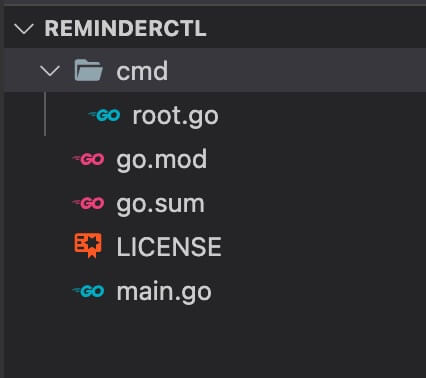
How to use Subcommands in Cobra?
First, let's create our `create` command, our `birthday` subcommand, and our `appointment` subcommand with Cobra by running:
```go
cobra add create
cobra add birthday
cobra add appointment
```
So you see can that we want our _birthday_ and _appointment_ commands to be **subcommands** of _create_.
And that brings us to the million dollar question of the post.
How do we use subcommands in Cobra?
**To do this you'll want to add the birthday and appointment commands NOT to the root command but to the create command.**
The root command is the base command of any CLI and if you look in root.go you'll see it defined in the variable rootCmd.
Every newly added command points to it. Again, we want to change these "subcommands" to instead point to the create command (the variable createCmd in create.go).
So currently if you look in the birthday command, you'll see this code in the init function:
```go
func init() {
rootCmd.AddCommand(birthdayCmd)
...
```
This adds the birthday command to root (rootCmd) which is the default.
What we want is to change this to create (createCmd) instead to add this command as a subcommand of create (not root):
```go
func init() {
createCmd.AddCommand(birthdayCmd)
...
```
And now if you call the command with the subcommand you'll get
```bash
go run main.go create birthday
# returns "birthday called"
```
Birthday is now a subcommand of Create. Be sure to update the appointment command as well.
Let's finish our Cobra CLI
So now that you know how to create subcommands. Let's finish our project.
Go ahead and compile it by running `go install`. Now you can use the `reminderctl` root command as needed. Just be sure to recompile after changes.
Alert when running without a subcommand
First, we don't want people running just `reminderctl create`. We need them to specify a resource. So let's update our message in create.go to let them know.:
```go
...
Run: func(cmd *cobra.Command, args []string) {
fmt.Println("Error: must also specify a resource like birthday, appointment or event")
},
...
```
And let's update the birthday function to spit out the information we're passing in. We normally want our logic to go here, but for sake of this tutorial, we'll print the arguments and the flags.
Note that I am only allowing 1 argument, which is the name of the reminder.
```go
...
Run: func(cmd *cobra.Command, args []string) {
if len(args) > 1 {
fmt.Println("Too many arguments. You can only have one which is the name of your reminder")
} else {
alertTime, _ := cmd.Flags().GetString("alertTime")
alertType, _ := cmd.Flags().GetString("alertType")
fmt.Println("birthday called")
fmt.Println("You're arguments were: " + strings.Join(args, ","))
fmt.Println("Value of alertTime flag: " + alertTime)
fmt.Println("Value of alertType flag: " + alertType)
}
},
...
```
Adding Cobra flags to the subcommands and marking Required
Next, let's add the appropriate flags to our subcommands and make them required. In birthday.go we'll add:
```go
...
func init() {
createCmd.AddCommand(birthdayCmd)
// Flags
// Format: birthdayCmd.PersistentFlags().StringP(name string, shorthand string, value string, usage string)
birthdayCmd.PersistentFlags().StringP("alertTime", "t", "", "Formatting example: 07-07-2021-13:00")
birthdayCmd.PersistentFlags().StringP("alertType", "y", "", "Possible values: email, sms")
// Making Flags Required
birthdayCmd.MarkPersistentFlagRequired("alertTime")
birthdayCmd.MarkPersistentFlagRequired("alertType")
}
...
```
Running the CLI
Run `go install` to recompile with your changes.
Now if you run `reminderctl create birthday` you'll get an Error about your required three flags. This is intended as we marked these required.
But if we run our full command, with our flags, we'll see that everything runs smoothly.
Try it out:
```bash
reminderctl create birthday travis-bday -t 07-07-2021-1300 -y sms
```
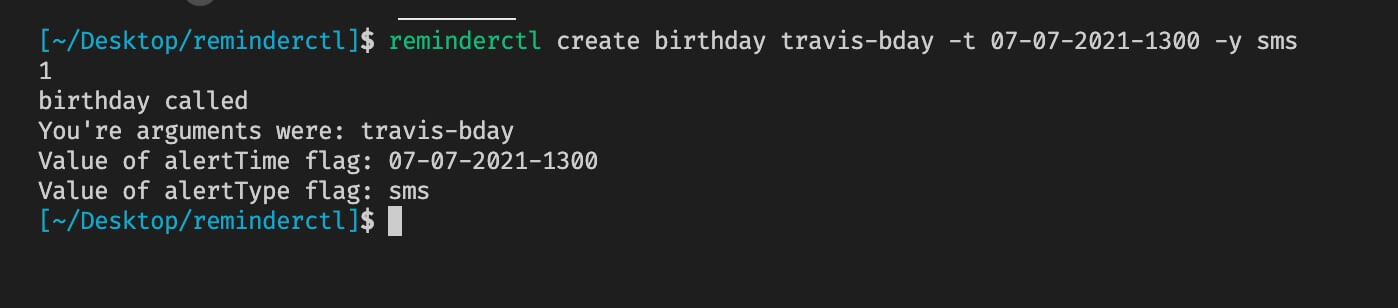 Great job. You'll, of course, want to mirror the changes over to appointment.go.
Further Changes
At this point you could remove all the "Println" statements and add real logic.
Perhaps you want to add this data to a database. Then add an Update and Delete command to update and delete the reminder.
You may want to link it to Twilio for SNS or with AWS SNS which would cover SMS and email.
The point of the CLI is to quickly run commands via the command line in a structured, almost predictable, manner. The possibilities are endless.
Conclusion
There's obviously much more we could do here in this Go Cobra tutorial, but I think we've understood the basics and most importantly how to use subcommands in Cobra with Go.
If you want to see more Go CLI tutorials, let me know down in the comments below.
Thanks for reading!