# Where Do I Store An API Key in WordPress?

<div class="lead-paragraph"><span class="dropcap">W</span>here can I safely store an API Key in WordPress and not expose it to the public or in the code? In this post, I'll show you two ways.</div><div class="max-w-4xl mx-auto px-4 sm:px-6 pt-4">             <div class="border-t dark:border-slate-700"></div>           </div>

<h2>Two ways to store an API key in WordPress:</h2>

<h3>1. In wp-config.php</h3>

<p>Define the API key in the wp-config.php file. For example:</p>

```php
define( 'API_KEY', 'ieifkasdfasdf939390' );
```

<p>This definition can be used anywhere without resorting to a global variable. </p>

<p>So when you need to use it just:</p>

```php
echo API_KEY;
```

<p>Or simply use it as a variable where needed. For example:</p>

```php
$MailChimp = new \DrewM\MailChimp\MailChimp(API_KEY);
```

<p>To further secure your wp-config.php file overall, check out my post on this:  <a rel="noreferrer noopener" aria-label="How to Easily Secure your wp-config.php File (opens in a new tab)" href="/easily-secure-wp-config-file" target="_blank">How to Easily Secure your wp-config.php File</a>. </p>

<h3>2. In the database</h3>

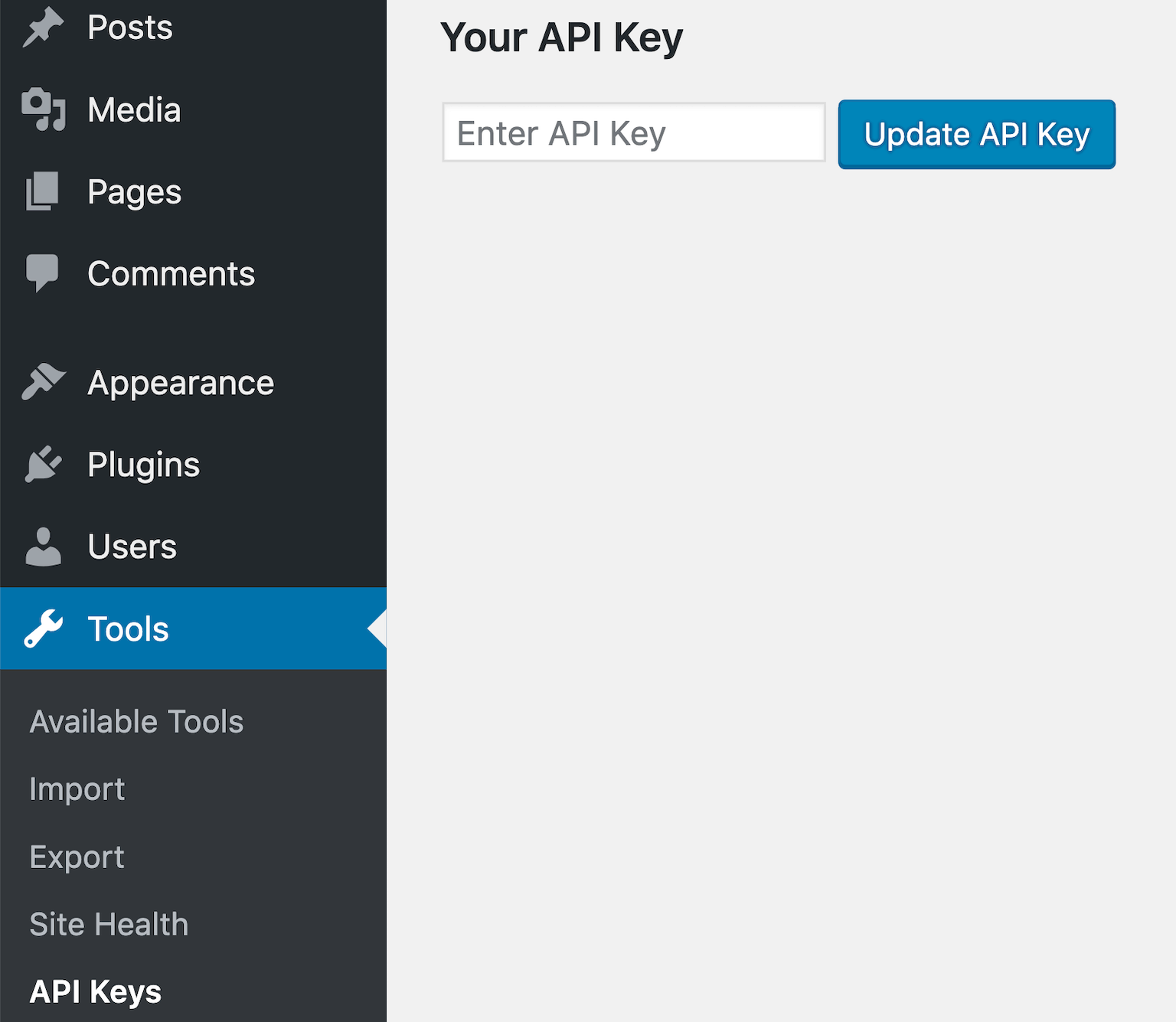
<p>So for this example, I'll create an option in the WordPress admin for us to enter/update the API key to store in the database. In the end, it will look like this:</p>

<figure class="textcenter"><img src="https://travismedia.gumlet.io/public/images/2019/12/store-an-api-key-in-wordpress.png" alt="" /></figure>

<p>In the following code we will:</p>

<ol><li>Create an API Keys under the Tools section</li><li>Create an admin page containing our form to enter they key</li><li>The submit functionality to send the value to the options table</li></ol>

```php
// Creates a subpage under the Tools section
<?php
add_action('admin_menu', 'wpdocs_register_my_api_keys_page');
function wpdocs_register_my_api_keys_page() {
    add_submenu_page(
        'tools.php',
        'API Keys',
        'API Keys',
        'manage_options',
        'api-keys',
        'add_api_keys_callback' );
}

// The admin page containing the form
function add_api_keys_callback() { ?>
    <div class="wrap"><div id="icon-tools" class="icon32"></div>
        <h2>My API Keys Page</h2>
        <form action="<?php echo esc_url( admin_url('admin-post.php') ); ?>" method="POST">
            <h3>Your API Key</h3>
            <input type="text" name="api_key" placeholder="Enter API Key">
            <input type="hidden" name="action" value="process_form">
            <input type="submit" name="submit" id="submit" class="update-button button button-primary" value="Update API Key"  />
        </form>
    </div>
    <?php
}

// Submit functionality
function submit_api_key() {
    if (isset($_POST['api_key'])) {
        $api_key = sanitize_text_field( $_POST['api_key'] );
        $api_exists = get_option('api_key');
        if (!empty($api_key) && !empty($api_exists)) {
            update_option('api_key', $api_key);
        } else {
            add_option('api_key', $api_key);
        }
    }
    wp_redirect($_SERVER['HTTP_REFERER']);
}
add_action( 'admin_post_nopriv_process_form', 'submit_api_key' );
add_action( 'admin_post_process_form', 'submit_api_key' );
```

<p>Simply put, add_option adds our key to the database and update_options updates it when we already have a value there. </p>

<p>Now whenever we need to get access to the api key on our site we use:</p>

```php
get_option('api_key');
```

<a href="https://geni.us/S88q9L" target="_blank"><img data-rjs="2" src="https://travismedia.gumlet.io/public/images/banners/recommended-managed-hosting-banner.jpeg"></a>

<h3>What about encryption?</h3>

<p>Shouldn't we encrypt this key when we insert it into the database and decrypt it when we retrieve it?</p>

<p>We probably should, however, it's beyond the scope and purpose of this tutorial. If you'd like an example, let me know down in the comments below and I'll do a follow up post. </p>

<h3>Conclusion</h3>

<p>And there you have two ways to store an API key in WordPress. </p>

<p>Do you have a method by which you store api keys? I'd love to hear about it below.</p>
