
Now that the GDPR D-Day has arrived, everyone has a cookie plugin. These cookie policy plugins have popped up everywhere in the WordPress plugin repository. But here’s the million dollar question: Are these plugins by default doing anything after activation or are they simply just displaying messages? Let’s take a look.
Now I’ve tried a number of cookie plugins on my own site and most of them say something like “Just activate the plugin and you’re done!” It’s that simple!
Wrong.
One of the more popular of the cookie plugins is Cookie Notice by dFactory with over 700,000 active installations and lots of great reviews. And it’s a good plugin and one that I would recommend. But what does it do by default?
Well, I chose the Cookie Notice plugin as my test subject and here are the findings:
So what happens when you activate the Cookie Notice plugin?
You get a notification bar displaying a message and your desired buttons. For example:

If you are using Chrome, and you check in Settings –> Advanced –> Content Settings –> Cookies –> see all cookies and site data –> and search for the site, you will see that there are still cookies being set. Nothing different here.
So for all the people who installed the plugin, it is technically doing nothing but displaying a message. If the visitor does not accept, it still sets cookies.
So it’s a placebo.
Now I have only tried a few of these cookie plugins, but the purpose seems to be the same:
To block desired scripts until the visitor accepts your disclaimer.
This may be Google Tag Manager, Crazy Egg, Google Analytics, or whatever script you are pulling into the page.
So essentially you can block something like Google Analytics from tracking until your site visitor accepts the agreement.
In the case of the Cookie Notice plugin by dFactory, you need to look in the Settings panel.
There is a text area where you will enter in the scripts you want to block:
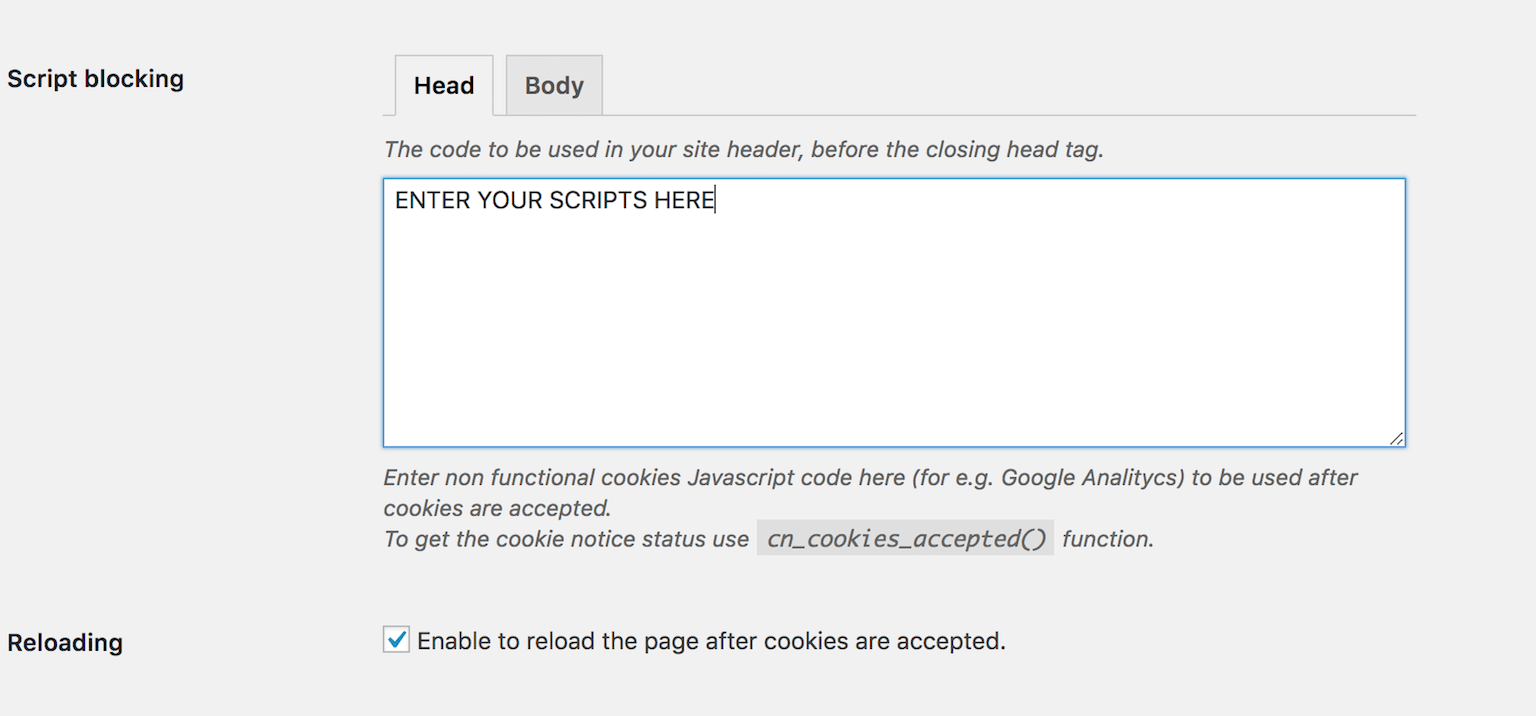
So normally, where you would insert your third-party scripts like Google Analytics, etc. into your header somewhere, you would put them in this box instead.
Let me explain what this does:
If your scripts are being loaded through an add_action hook or something similar and you need to block this elsewhere, you can use the following PHP code:
```php if (function_exists('cn_cookies_accepted') && cn_cookies_accepted()) { ...ENTER YOUR SCRIPTS HERE } ```ONE MORE THING:
Be sure you check the box “Enable to reload the page after cookies are accepted” so when they accept, the page will reload with the scripts running again.
The scripts will now load normally until the cookies expire (you can set this duration too) or until they clear them from your browser.
How will your analytics or other tracking applications fare without being able to track visitors? Should you allow visitors to browse your site while refusing cookies to be set? I don’t know. Share your thoughts in the comments.
Cookie Notice gives the option to allow the visitor to refuse third-party functional cookies. Perhaps if they click the button to refuse, you could redirect them to a page by which you can have them “rick-rolled.”
It also gives you the option to “accept cookies on scroll,” which adds the acceptance cookie if they decide to disregard and scroll the page anyways. Perhaps not the most GDPR-compliant approach, but an option.
Another option is to take a reverse approach and say something like “We use cookies on our site to enhance your user experience. Unless you explicitly refuse them, we assume you agree,” and then give them the option to refuse.
Either way, how do you handle cookies on your website? Are you blocking scripts? Is your cookie plugin actually doing anything? I would love to discuss it below.