The Best Desk Microphone for AI Dictation in 2026: Why Every Developer Needs the MXL AC-44
Here’s the thing nobody is talking about in the AI productivity conversation: your microphone matters.
We’re all using ChatGPT, Claude, Copilot, Cursor, and talking to LLMs has become a core part of how developers and content creators work. But most of us are still typing every prompt.
Every question. Every instruction. Every debugging session.
Meanwhile, the people who’ve figured out voice dictation are working at 2-3x the speed. And they’re not going back.
I wanted in on this.
So, a few months ago, I switched to voice-first AI approach and the tool that made it all click wasn’t a fancy AI app. It was an $40 microphone that sits flat on my desk and works from anywhere in my room.
Let me explain.
The Voice-First AI Movement Is Here
This isn’t hype. The LA Times just published a major piece on how AI voice dictation is fundamentally changing how people work.
The headline stat: Gavin McNamara averages 125 words per minute using voice dictation (Wispr Flow), twice the average typing speed, and has dictated nearly 300,000 words in five months across 77 apps.
The article quotes CJ Pais, creator of dictation app Handy: “AI and LLMs have changed the dynamic. Using your voice is much faster than typing.”
On Reddit, the trend is everywhere:
- 📈 r/Frontend: “Voice dictation is my new coding life hack” — developers explaining how speaking prompts to Cursor and Copilot is fundamentally faster than typing them
- 📈 r/AI*Agents: *“How many of you are using voice input for AI now?”_ — devs sharing hotkey setups where they press a key, speak, and the transcription pastes wherever their cursor is
- 📈 r/vibecoding: FAANG engineers describing how they use voice dictation to speed up test-driven development with AI coding agents
Tools like Wispr Flow, Willow Voice, WhisperTyping, and Serenade are exploding in popularity. OpenAI open-sourced Whisper (their speech recognition model trained on 680,000 hours of data), and suddenly anyone can run high-quality transcription locally.
The shift is prettyclear: if you’re working with AI and you’re still only typing, you’re leaving speed on the table.
The Microphone Problem Nobody Talks About
So here’s the gap. You decide to start talking to your AI tools. Great. But what microphone do you use?
Your laptop mic? Terrible. It picks up fan noise, keyboard clatter, and sounds like you’re talking from inside a tin can. AI transcription accuracy drops when audio quality drops. In addition, many of us work with closed laptops which disables the microphone.
Your gaming headset? Sure, it works. But are you really going to wear a headset all day just in case you want to ask Claude a question? That’s not sustainable.
Your podcasting mic on a boom arm? I have a Shure SM7B for recording. It’s incredible for that purpose. But it sits off to the side, and I’m not going to swing a boom arm over every time I want to dictate a prompt. The friction kills the workflow.
Your AirPods/earbuds? Decent for calls, but the audio quality isn’t great for speech recognition, and you have to keep them charged and in your ears.
What I actually needed was something always there, always ready, and invisible. Something I didn’t have to think about. Something that just sits on my desk and captures my voice clearly whenever I decide to speak.
That’s a boundary microphone. Specifically, the MXL AC-44.
The MXL AC-44: A Mic That Disappears Into Your Desk
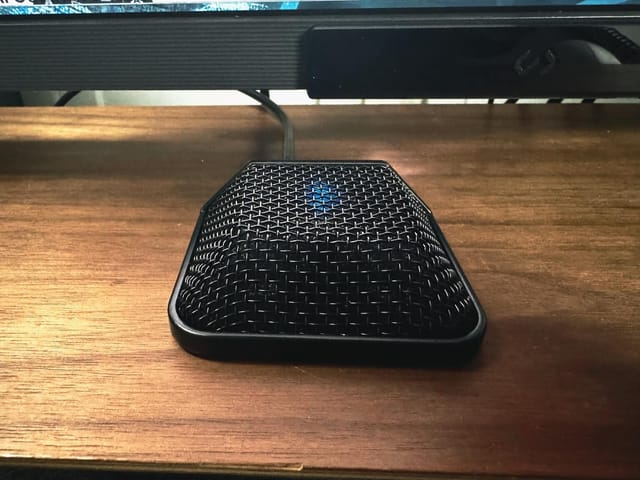
The MXL AC-44 is a USB boundary microphone. If you’ve never seen one, imagine a flat disc about the size of a hockey puck that sits directly on your desk surface. No boom arm. No stand. No repositioning. It’s just… there.
What Makes It Perfect for AI Dictation
It’s always ready. The AC-44 sits on your desk 24/7. When you want to talk to an LLM, you just… talk. No reaching for a mic, no putting on a headset, no adjusting a boom arm. The friction between “I have a thought” and “the AI heard it” is essentially zero.
3-capsule boundary design. The AC-44 uses three condenser capsules in a boundary configuration, which means it uses your desk surface to enhance direct sound while reducing room noise and echoes. The wide 180-degree cardioid pickup pattern captures your voice clearly even when you’re not directly hovering over it.
USB-C plug and play. One cable. No drivers. No software. No audio interface needed. Plug it into your computer and it works instantly on Mac, Windows, and Linux. I run Arch Linux (btw) and it was recognized immediately. No configuration required.
Built like a tank. All-metal frame, durable metal grill. This isn’t a cheap plastic conference puck. MXL makes professional microphones, and the build quality reflects that.
It’s discreet. This is the underrated killer feature. In a world where every developer’s desk has a massive mic on a boom arm, the AC-44 is practically invisible. It looks professional in video calls, doesn’t dominate your desk space, and nobody needs to know it’s there.
The Specs
- Type: USB boundary condenser microphone
- Capsules: 3 condenser elements
- Pickup Pattern: 180° cardioid
- Connection: USB-C (plug and play)
- Additional Output: Line-level auxiliary out
- Build: All-metal construction
- Colors: Black, White, Cobalt
- Price: ~$40
My Actual Workflow: Voice + AI
Here’s how I actually use the AC-44 in my daily workflow:
Dictating Prompts to AI Coding Assistants
When I’m working in Claude Code, ChatGPT or Codex, I use voice dictation to speak my prompts instead of typing them. Things like:
- “Refactor this function to use async/await and add error handling”
- “Write a unit test for the user authentication module”
Speaking complex technical requirements is significantly faster than typing them out. A FAANG engineer on Reddit described it as “a major accelerator” for test-driven development with AI agents.
Talking to ChatGPT and Claude Code
For longer conversations with LLMs like brainstorming, debugging, architectural discussions, voice is a game changer. You can think out loud, explain context naturally, and do so all while leaning back in your chair staring out the window. It feels like pair programming with a colleague rather than typing into a chat box.
Content Creation
Blog posts, documentation, README files, commit messages, code comments, anything text-based gets faster with voice. I’m literally dictating parts of this article right now. The average person types 40 words per minute. The average person speaks 125-150 words per minute. That’s 3x faster, and AI-powered transcription handles the formatting.
Quick Commands and Searches
Need to look something up? Instead of alt-tabbing and typing a search query, I just speak it. It’s a small thing, but those micro-interactions add up across a day.
Linux Voice Dictation with Voxtype
On my Linux desktop (running Omarchy), I use Voxtype — a push-to-talk voice-to-text tool built for Linux. It’s optimized for Wayland but works on X11 too. I have it mapped to a hotkey toggle: just start talking, and the small local Whisper model that ships with Voxtype does an amazing job transcribing what I say.
It’s fully offline by default (uses whisper.cpp), types directly at your cursor position, and has Waybar integration to show recording state. Hold the hotkey while speaking, release to transcribe, or use toggle mode like I do. Combined with the AC-44 sitting on my desk, it’s seamless. I just talk, and text appears wherever my cursor is. No cloud dependency, no latency, no nonsense.
Why a Boundary Mic Beats Every Other Option for This Use Case
Let me be specific about why the boundary mic form factor is ideal for AI dictation, and why other popular mic types fall short:
| Mic Type | Always Ready? | Hands Free? | Discreet? | Good Audio? | AI Dictation Score |
|---|---|---|---|---|---|
| Boundary (MXL AC-44) | ✅ | ✅ | ✅ | ✅ | ⭐⭐⭐⭐⭐ |
| Boom Arm (SM7B, etc.) | ❌ | ✅ | ❌ | ✅✅ | ⭐⭐⭐ |
| USB Desktop (Blue Yeti) | ⚠️ | ✅ | ❌ | ✅ | ⭐⭐⭐ |
| Headset | ❌ | ✅ | ❌ | ✅ | ⭐⭐⭐ |
| Laptop Built-in | ✅ | ✅ | ✅ | ❌ | ⭐⭐ |
| AirPods/Earbuds | ❌ | ✅ | ✅ | ⚠️ | ⭐⭐ |
The boundary mic is the only option that scores high across all the criteria that matter for an always-available AI dictation setup. A boom arm mic sounds better, sure, but it’s not always in position. A headset works, but nobody wants to wear one all day. The boundary mic is the Goldilocks solution.
Who This Is For
Developers using AI coding assistants. If you’re using Cursor, Copilot, Claude Code, or any AI-powered dev tool, voice input will speed up your prompt workflow significantly.
Content creators. Writers, bloggers, YouTubers who script, dictation is faster than typing for first drafts, and AI transcription has gotten remarkably accurate.
Anyone who talks to ChatGPT/Claude daily. If you’re having multiple conversations with LLMs throughout the day, the switch to voice is transformative.
Remote workers on video calls. The AC-44 doubles as an excellent conferencing mic. One Amazon reviewer put it perfectly: “FORGET the boom and big mic for your home office, this on the desk works amazing.”
People who want a cleaner desk. No boom arm, no mic stand, no clutter. The AC-44 is practically invisible.
The Honest Downsides
No product is perfect. Here’s what to know:
- No gain control. The AC-44 has no physical gain knob and no companion software. What you get out of the box is what you get. For most AI dictation and conferencing use cases, it’s fine. But if you’re used to fine-tuning audio levels, this may bother you.
- It’s not a recording mic. Don’t buy this expecting podcast or streaming quality. It’s not competing with your SM7B or Blue Yeti for recording purposes. It’s a dictation and conferencing mic that excels at being always-available.
- Built-in noise cancellation. The automatic noise reduction can sometimes make you sound slightly distant. For AI transcription this doesn’t matter (Whisper and similar models handle it perfectly), but it’s noticeable on video calls if people are used to hearing you on a different mic.
- No mute button on the base model. If you want tap-to-mute, look at the AC-44TAP variant instead.
The Bottom Line
We’re at an inflection point. Voice dictation for AI interaction isn’t a novelty. It’s becoming the default for productive developers and creators. The LA Times is writing about it. Reddit is buzzing about it. FAANG engineers are using it in production workflows.
But the hardware side of this equation gets overlooked. You need a mic that’s always there, always ready, and doesn’t add friction to your workflow. That rules out boom arms, headsets, and anything you have to consciously set up.
The MXL AC-44 is the mic I reach for, or rather, the mic I never have to reach for because it’s always sitting right there on my desk. At around $40, it’s a fraction of what most developers spend on keyboards, monitors, or chairs, and it unlocks a fundamentally faster way to work with AI.
If you’re still typing every prompt, every question, every instruction to your AI tools, try speaking them instead. Your future self will thank you.
Frequently Asked Questions
Is the MXL AC-44 good for speech recognition and AI dictation?
Yes. The 3-capsule boundary design provides clear voice capture optimized for speech intelligibility. It works excellently with Whisper-based transcription tools, built-in OS dictation, and AI voice input across ChatGPT, Claude, Cursor, and similar tools.
Does the MXL AC-44 work on Linux?
Yes. It's a USB-C plug-and-play device that requires no drivers. I use it daily on Arch Linux with zero configuration. It works on Mac, Windows, and Linux.
Is a boundary microphone better than a regular USB mic for dictation?
For always-available dictation, yes. A boundary mic sits flat on your desk and is always ready. No positioning, no boom arms, and no headsets required. For dedicated recording or streaming, a traditional condenser mic on a boom arm will sound better. The boundary mic wins on convenience and zero-friction availability.
How far away can the MXL AC-44 pick up your voice?
The AC-44 performs best within a few feet — ideal for desk use while sitting in your chair. Amazon reviewers confirm it works well for individual use and small groups of 2-3 people. For larger rooms or distances beyond 6-8 feet, audio quality drops off.
What's the difference between the AC-44 and AC-44TAP?
The AC-44TAP includes a capacitive touch mute toggle on the surface of the microphone. If you want the ability to quickly mute/unmute during calls, go with the TAP version. Otherwise, the standard AC-44 is identical in audio performance.
Can I use the MXL AC-44 for video calls and Zoom meetings?
Absolutely. The AC-44 was originally designed as a conferencing microphone. It provides clear, professional-sounding audio for Zoom, Teams, Google Meet, and any other video calling platform. Multiple reviewers specifically praise it for this use case.
Is voice dictation actually faster than typing for coding?
For writing prompts to AI coding assistants, yes. The average typing speed is 40 WPM; the average speaking speed is 125-150 WPM. More importantly, you can express complex technical requirements more naturally by speaking than by typing. Developers on Reddit consistently report that voice dictation is a "major accelerator" for AI-assisted coding workflows.
This page may contain affiliate links. Please see my affiliate disclaimer for more info.