
Google’s new Gemini 4 Neon model is all over X this week, and nobody agrees on it. Depending on who you ask, it’s the best coding model out, a cheap Opus killer, or a quota-eating mess. I read the official docs, the independent benchmarks, and a pile of posts to sort it out.
Short version: Neon is good, the hype is a little ahead of the data, and you should spend an afternoon testing it on your own code before you switch anything.
Neon is the model, Antigravity is where you run it
Google announced Gemini 4 Neon on November 18, 2026. It sits in the middle of the Gemini 4 family. Carbon is the big model for long, hard projects, Hydrogen is the fast everyday one, and Neon is the balance between them. Google’s model card says Neon is adapted from Carbon.
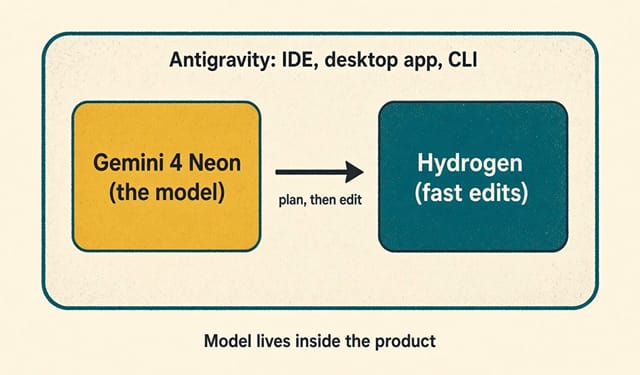
A lot of posts use Neon and Antigravity like they’re the same thing. They aren’t. Neon is a Gemini model. Antigravity is Google’s agent-first development platform, available as an IDE, a desktop app, and a CLI, and Neon is the default model inside it. Most of the excitement on X is about using the two together. In Orchestrator mode, Neon plans the work and the faster Hydrogen model makes the edits.
As for the name, Antigravity’s Varun Mohan told Logan Kilpatrick on a podcast in late 2025 that the team wanted an experience with no limits and liked the space theme. I only found that in secondhand summaries, and Google hasn’t said anything more official.
The specs that matter
Neon has a 1M token context window and costs $3 per million input tokens and $15 per million output tokens, with cached input at $0.15. You get four thinking levels: Low, Medium, High, and Extra (called xhigh in the CLI). It’s available in the Gemini API, AI Studio, the Gemini app on Pro and Ultra, and Antigravity on paid plans. For comparison, Opus 5.5 is $4 and $20.
How Neon compares to Opus 5.5 on benchmarks
It depends on who ran the test. On Google’s own model card, Neon scores 61 on the Artificial Analysis Intelligence Index against 59 for Opus, and 65.4% vs 58.1% on CursorBench 4.1. But Opus is slightly ahead on Terminal-Bench 4.1 (65.8% vs 65.2%) and FrontierCode 2.0 (47.3% vs 46.2%).
The independent numbers from Artificial Analysis are closer to a tie on real coding work. Their Coding Agent Index, which runs Neon in the Antigravity CLI and Opus in Claude Code, comes out at 58.6 vs 58.2 (recap here). Opus still leads on FrontierCode and a physics reasoning test. Cost is where Neon pulls away: about $3.74 per task at high, $6.44 at xhigh, and $10.04 for Opus at max.
So “better than Opus” holds up on price and a few benchmarks, and agentic coding is a tie. Keep in mind that Google chose which benchmarks went on its card, settings differ between runs, and the same test can flip depending on who runs it. Don’t put much weight on any single headline number, and don’t compare numbers from different sources.
What developers on X are saying
The reaction is split. Theo posted a 30 minute video called “Gemini 4 Neon is an incredible model”. Posts summarizing it say he had Neon shrink a TypeScript checker from 47 MB to 8 MB over about 10 hours. I haven’t watched the video yet, so take that number as secondhand. @ai_for_success says Antigravity is the best harness for Neon.
Hands-on reports are mixed. @lethalminority found it surprisingly good for programming, maybe better than Opus 5.5, but called the Antigravity CLI “horrible” and Neon slow. @nelson687 ran the same prompt on both, said Neon took much longer, and preferred Opus’s result. @harshmanojjain put it bluntly: “Still don’t get the hype around neon. Opus is next level.”
Several people also say Neon burned through Antigravity limits fast at launch. One reply claims Google has since improved cache hits (@SiftByte), but that’s a single post and unverified, so check your own usage. Speed is the recurring complaint, and Artificial Analysis calls Neon “notably slow per task and very verbose.”
How to test it in one afternoon
If you already pay for Google AI Pro, this is the quickest comparison that tells you anything.
- Pick one real task from your backlog, like a small refactor or a failing test, and run it on Neon and on Opus 5.5 with the same prompt.
- Compare the diffs, not the chat output. Count how many follow-up fixes each one needed.
- Leave thinking on High for everyday work. It’s the default and much cheaper per task than Extra.
- Try Orchestrator mode in Antigravity on a bigger refactor, where Neon plans and Hydrogen edits.
- Watch your quota while you do it, and treat launch week numbers loosely because rollout bugs and limits are still shifting.
If you’re building agent loops through the API, Neon’s $3 and $15 pricing is worth a look. If you’re wondering how to split work across models, my ChatGPT vs Claude model guide covers the same idea on the other side, and how to safely use AI coding agents applies no matter which model you pick.
Bottom line
Neon is worth taking seriously. It’s cheaper than Opus 5.5 and beats it on several benchmarks. It about ties Opus on agentic coding, loses a few coding tests, and is slower. Test it on a real project before you change your daily driver.
Have you tried it yet? I’d like to hear how it did on your code.
This page may contain affiliate links. Please see my affiliate disclaimer for more info.