
An MCP server is a lightweight program that gives your AI app a standard way to connect to an external system: your repositories, browser, database, cloud account, or production errors. Once connected, the model can call that system’s tools and read its data instead of waiting for you to paste things into chat.
There are tens of thousands of MCP servers now. Anyone can publish one, most go unmaintained within months, and many ask for more access than the job needs. To pick the ten below, I put every candidate through five questions:
- Does it solve a developer task I run into regularly?
- Is it official or actively maintained?
- Can I limit what it reads and writes?
- Is the setup documented well enough to audit?
- Is it better through MCP than through a normal CLI or built-in agent tool?
That last question matters. Your coding agent probably already knows how to read files and run shell commands. You do not need an MCP server for everything.
If MCP itself still feels fuzzy, read my plain-English MCP explanation first. Otherwise, these are the ten servers I would start with in 2026.
Before you install anything: the July 28 spec update
MCP just went through its largest revision since launch. The 2026-07-28 spec, published July 28, makes the protocol stateless, formalizes OAuth 2.1 authorization for remote servers, and changes how requests are routed. It is not compatible with older versions in either direction. Clients and servers both need updated SDKs, and a migration is a refactor, not a version bump.
That changes how you should read any MCP server list, including this one:
- Maintenance stopped being a nice-to-have. Estimates in the launch discussion put the actively maintained share of the 62,000+ open-source servers near 30 percent. Servers nobody maintains will fall behind this revision and every one after it. All ten servers below are official or actively maintained.
- The hosted servers here already authenticate the way the new spec requires. OAuth 2.1 resource servers with scoped access went from best practice to the standard.
Your day-to-day setup does not change; the client handles the protocol version. But when you evaluate a server that is not on this list, check whether the maintainer has shipped a release since the spec landed. That one check now filters out most of the ecosystem.
The best MCP servers at a glance
| MCP server | Best for | Start with this access |
|---|---|---|
| GitHub | Repositories, issues, and pull requests | Read-only plus selected toolsets |
| Context7 | Current library documentation | Public docs only |
| Playwright | Browser automation and end-to-end tests | Isolated browser profile |
| Chrome DevTools | Console, network, and performance debugging | Clean Chrome profile |
| Sentry | Production error investigation | One project through OAuth |
| Postgres MCP Pro | Query plans and database health | Restricted mode plus a read-only role |
| Terraform | Provider docs, modules, and HCP Terraform | Public registry tools only |
| Cloudflare Observability | Workers logs and application debugging | One domain-specific server |
| Azure | Azure resources, logs, and diagnostics | Read-only plus selected namespaces |
| Atlassian Rovo | Jira, Confluence, Bitbucket, and Compass | Normal user OAuth permissions |
I ranked these by broad developer usefulness, not by GitHub stars. If you spend all day in Azure, Azure belongs near the top of your personal list. If you never touch Jira, skip Atlassian entirely.
1. GitHub MCP Server: best overall
GitHub’s official MCP server is my easiest recommendation. It gives an agent structured access to repositories, commits, issues, pull requests, releases, Actions, and GitHub security features.
That structure is why I prefer it over telling an agent to scrape GitHub pages. It can read a pull request as a pull request, including its review comments and changed files, instead of trying to piece everything together from rendered HTML.
GitHub also gives you unusually good permission controls. The local server supports --read-only, individual tools, and toolsets such as repos, issues, and pull_requests. Lockdown mode filters untrusted content from public repository contributors, which matters because an issue comment can contain a prompt injection aimed at your agent.
A conservative Docker setup looks like this:
{
  "mcpServers": {
    "github": {
      "command": "docker",
      "args": [
        "run", "-i", "--rm",
        "-e", "GITHUB_PERSONAL_ACCESS_TOKEN",
        "-e", "GITHUB_READ_ONLY=1",
        "-e", "GITHUB_TOOLSETS=repos,issues,pull_requests",
        "ghcr.io/github/github-mcp-server"
      ],
      "env": {
        "GITHUB_PERSONAL_ACCESS_TOKEN": "${GITHUB_TOKEN}"
      }
    }
  }
}
Use a fine-grained token limited to the repositories the agent needs. Do not hand it your broad personal token because that token already exists.
Try this workflow:
Read pull request 482, summarize the unresolved review feedback, and show me which comments require code changes. Do not post or modify anything.
That is faster and cleaner than copying five review threads into chat. I would leave writes disabled until I specifically need the agent to create an issue or update a pull request.
2. Context7: best for current library documentation
Models remember old APIs. Context7 exists to pull current, version-aware documentation into the conversation before the agent writes code.
The Context7 MCP server is a good fit for fast-moving frameworks such as Next.js, Astro, React, and any SDK that changes faster than model training data. It resolves a library and fetches the relevant documentation, giving the agent a smaller body of source material than a general web search.
You can use the hosted endpoint:
{
  "mcpServers": {
    "context7": {
      "url": "https://mcp.context7.com/mcp",
      "headers": {
        "CONTEXT7_API_KEY": "${CONTEXT7_API_KEY}"
      }
    }
  }
}
This is one of the safer servers in the list because its normal job is reading documentation, not changing your systems. An API key raises rate limits and can enable private repository access, so do not send proprietary code or internal package names unless you understand the account settings you enabled.
Try this workflow:
Use Context7 to check the current Astro content collection API. Then update this schema using only APIs present in the current documentation.
Context7 is most useful when you tell the agent to consult it before coding. If you leave it installed and never mention it, some clients will not choose it reliably.
3. Playwright MCP: best for browser automation
Microsoft’s Playwright MCP server lets an agent navigate pages, fill forms, click controls, inspect accessibility snapshots, and preserve browser state across a debugging session.
It is a good fit for exploratory browser work and self-healing end-to-end tests. Playwright’s own documentation now points out that its CLI plus agent skills can be more token-efficient for high-volume coding tasks. I agree with that distinction. Use MCP when the agent benefits from a persistent browser session and repeated inspection. Use the CLI when you already know the exact test you want to run.
The standard local setup is short:
{
  "mcpServers": {
    "playwright": {
      "command": "npx",
      "args": ["-y", "@playwright/mcp@latest", "--isolated"]
    }
  }
}
I would keep --isolated on for general agent use. The default persistent profile stores cookies and login state, while isolated mode throws that state away at the end of the session. Playwright restricts file access to workspace roots by default. Do not add --allow-unrestricted-file-access unless the task genuinely needs it.
Try this workflow:
Open the local checkout flow, complete an order with the test card, and report any console errors, inaccessible controls, or broken redirects. Do not use a real account.
Use test credentials and a test environment. A browser session can see whatever a logged-in user can see.
4. Chrome DevTools MCP: best for debugging the browser
Playwright and Chrome DevTools overlap, but I use them for different jobs. Playwright is the better choice for driving a user flow. Chrome DevTools MCP is the better choice when the page is already broken and you need to know why.
The Google-maintained server exposes console messages, network requests, screenshots, DOM interaction, and performance traces. It can also connect to a running Chrome instance, which is handy when you have already reproduced a problem manually.
{
  "mcpServers": {
    "chrome-devtools": {
      "command": "npx",
      "args": [
        "-y",
        "chrome-devtools-mcp@latest",
        "--no-usage-statistics",
        "--no-performance-crux"
      ]
    }
  }
}
The server can inspect and modify anything visible in its Chrome session. Do not connect it to your everyday browser profile with email, billing, and production admin tabs open. Use a clean profile or Chrome for Testing.
Try this workflow:
Load the local product page, capture a performance trace, and identify the three requests delaying Largest Contentful Paint. Tie each request back to the source code if possible.
The opt-out flags above disable the server’s usage statistics and CrUX lookups. Remove --no-performance-crux if you want Chrome field data alongside the local trace.
5. Sentry MCP: best for production debugging
The official Sentry MCP server brings errors, events, traces, releases, and project context into your coding agent. This is where MCP earns its keep: the agent can inspect the production exception, trace it to code in the current repo, and propose a fix without you shuttling stack traces between browser tabs.
Sentry recommends its hosted service at mcp.sentry.dev, which uses OAuth. Its authorization can be narrowed to an organization or project through scoped MCP URLs. The remote service keeps Sentry credentials server-side instead of exposing the upstream API token to the MCP client.
The server is designed for human-in-the-loop coding agents. Keep it that way. Start with one non-sensitive project, check the scopes during OAuth, and review any action that changes an issue or invokes an AI-assisted Sentry feature.
Try this workflow:
Investigate the most frequent new error in the checkout project since the latest release. Find the likely code path in this repository and propose a fix with a regression test. Do not resolve the Sentry issue.
That prompt keeps the useful investigation inside the agent while leaving the production state alone.
How to judge whether an MCP server is safe
MCP servers inherit the access you grant them, and then expose some of that access to a model. The server’s permission controls matter, but they are only one layer.
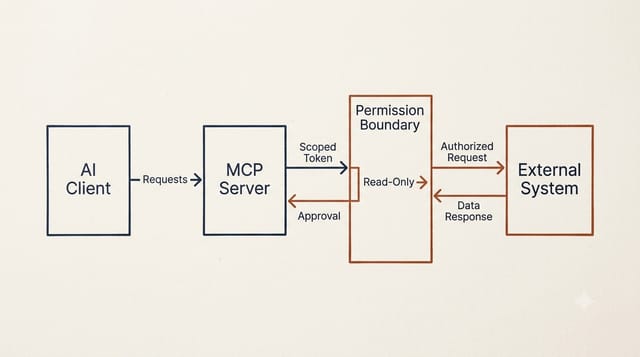
Before I keep any server enabled, I run through six checks:
- Verify that the package is linked from an official repository or product documentation. Package names are easy to imitate.
- Look for a way to expose one repository, project, database, subscription, or tool group instead of the whole account.
- Turn on read-only mode. If the server does not have one, create read-only credentials at the external service.
- Pass credentials through environment variables, OAuth, or a secret store. Never hardcode them in a committed config file.
- Work out where the server runs. A local process with filesystem and network access has different risks from a hosted service receiving your data.
- Check recent releases and security fixes. A popular server abandoned last year is still abandoned.
I also keep the server disabled outside the project that needs it. Fewer enabled tools make tool selection easier for the model and reduce the number of trust decisions you have to make.
For the wider agent setup around these servers, see my practical guardrails for AI coding agents. MCP permissions do not replace a sandbox, a branch, or a diff review.
6. Postgres MCP Pro: best for database performance
Postgres MCP Pro is the one server here not maintained by the company behind the product. Crystal DBA maintains it, and I included it because it goes well beyond a thin SQL wrapper.
It can inspect schemas, explain queries, find slow statements, check database health, and recommend indexes. With pg_stat_statements and hypopg, it can analyze real workload data and simulate hypothetical indexes before you create them.
Run it in restricted mode:
{
  "mcpServers": {
    "postgres": {
      "command": "uvx",
      "args": ["postgres-mcp", "--access-mode=restricted"],
      "env": {
        "DATABASE_URI": "${POSTGRES_READ_ONLY_URI}"
      }
    }
  }
}
Restricted mode wraps SQL in read-only transactions, rejects transaction-control statements that could bypass the wrapper, and limits execution time. I would still connect with a database role that has read-only permissions. Server safeguards can have bugs. Database permissions are the backstop.
Try this workflow:
Find the five queries consuming the most total execution time, explain the worst one, and recommend indexes. Show the evidence and SQL, but do not create anything.
Do not point an agent at a production database full of customer data merely because the server cannot write. Read access can still leak data.
7. Terraform MCP Server: best for infrastructure as code
HashiCorp’s official Terraform MCP server searches public and private Registry data, retrieves provider and module details, and can work with HCP Terraform or Terraform Enterprise workspaces.
Its safest default is also its most useful for day-to-day coding: run only the public Registry toolset with no HCP token.
docker run -i --rm \
  hashicorp/terraform-mcp-server:1.0.0 \
  --toolsets=registry
That gives the agent current provider and module information without access to your workspaces. Add the terraform or registry-private toolset and TFE_TOKEN only when a task requires them. The server also supports selecting individual tools, which is preferable to loading every operation.
Try this workflow:
Check the current AWS provider documentation for
aws_ecs_service, review this resource block, and flag arguments that are deprecated or conflict with the current schema.
If you enable HCP Terraform operations, use a team token with the minimum workspace permissions. A personal admin token is far too broad for an agent session.
8. Cloudflare Observability MCP: best for Workers debugging
Cloudflare publishes a collection of official remote MCP servers. I would not connect the broadest server first. Pick the smallest domain-specific endpoint that solves the problem.
For most Workers developers, that is the Observability server:
{
  "mcpServers": {
    "cloudflare-observability": {
      "url": "https://observability.mcp.cloudflare.com/mcp"
    }
  }
}
It can inspect Workers logs and analytics to help debug an application. Cloudflare has separate servers for documentation, bindings, builds, browser rendering, audit logs, DNS analytics, and other product areas. Separate endpoints are a feature because you can authorize the job you need instead of exposing a general Cloudflare control surface.
Try this workflow:
Inspect errors for the
checkout-apiWorker during the last deployment window. Group repeated failures, identify the likely cause, and suggest the smallest code change. Do not change the Worker or its configuration.
OAuth still grants access to real account data. Check which account you authorize, and do not connect a production account to a client you would not trust with its logs.
9. Azure MCP Server: best for Microsoft cloud developers
The official Azure MCP Server covers a huge amount of Azure: Storage, Cosmos DB, Monitor, App Service, Key Vault, Azure SQL, AKS, resource groups, pricing, and more.
That breadth is useful, but it is also the reason not to accept the default surface blindly. Azure supports a read-only flag, namespace filtering, and individual tool selection. It uses your Azure identity or managed identity, so normal Azure RBAC still applies.
A narrow local server command can start like this:
npx -y @azure/mcp@latest server start \
  --read-only \
  --namespace monitor
Run a separate instance with --namespace storage when you need Storage tools. Confirm the current flags in the Azure MCP setup documentation for your client. Microsoft warns against disabling user confirmation for high-risk operations, especially requests that return Key Vault secrets or connection strings.
Try this workflow:
Query the application logs for errors in the last hour, correlate them with resource health events, and give me a diagnosis. Do not retrieve secrets or change any resources.
Use a developer subscription or a tightly scoped resource group while learning the server. An Azure identity with Owner across multiple subscriptions defeats every other control in the setup.
10. Atlassian Rovo MCP Server: best for Jira and Confluence
The official Atlassian Rovo MCP server connects Jira, Confluence, Jira Service Management, Bitbucket, and Compass to compatible AI clients. It became generally available in 2026 and uses OAuth 2.1 or API tokens.
I use this one to pull the ticket, linked documentation, and repository context into one place while I work. It can create and update issues too, but those write tools deserve the same review you would give a human editing the project board.
Atlassian provides one-click setup for several clients. Actions respect the user’s existing access controls, and Atlassian Cloud admins can use client controls and audit logs. Start with your normal user account rather than an administrator or service account.
Try this workflow:
Read DEV-214, fetch the linked Confluence acceptance criteria, and compare them with the current implementation. Draft a comment describing any gap, but do not post it.
If your company does not use Atlassian Cloud, check compatibility before planning around this server. The official hosted service is built around Atlassian Cloud products.
The MCP servers I would install first
Do not install all ten because they appeared in a list. Start with one server tied to a task you already do.
For a typical developer, I would begin with GitHub and Context7. Add Playwright when the agent needs to interact with a browser. Add Sentry, Postgres, or a cloud server only inside the project where that access makes sense.
Then remove what you stop using. An MCP config should look like a small toolbox, not an app store account you forgot to clean up.
If you are deciding between MCP and reusable agent instructions, my guide to Agent Skills and SKILL.md explains the difference. Skills teach an agent how to do a repeatable job. MCP gives it a live connection to the system where the job happens. Many good workflows use both.
Best MCP Servers FAQ
What is the best MCP server for developers?
GitHub is the best general-purpose choice because it supports repositories, issues, pull requests, Actions, and strong scope controls. Context7 is a close second for developers who frequently work with changing library APIs.
Are MCP servers safe to install?
They can be, but safety depends on the server, the client, and the credentials you grant. Prefer official sources, read-only modes, narrow tokens, project-level scopes, and human approval for writes.
How many MCP servers should I enable?
Enable only the servers needed for the current project. A smaller tool list reduces context use, improves tool selection, and limits the damage a compromised or confused tool can cause.
Did the July 2026 MCP spec update break existing servers?
The 2026-07-28 revision is not wire-compatible with earlier versions in either direction, so clients and servers need updated SDKs. Official and actively maintained servers updated quickly; abandoned servers will lag or break. Prefer servers with a release since July 28, 2026.
Should I use an MCP server or a CLI?
Use MCP when an agent needs structured, persistent access to a service during a conversation. Use a CLI for predictable commands, scripts, and high-volume workflows where lower context overhead matters more.
This page may contain affiliate links. Please see my affiliate disclaimer for more info.