Docker rebranded on November 19, and the new pitch is all about AI agents. Since then I keep seeing the same takeaway: Docker is giving up on containers and moving to VMs.
It isn’t. docker run, Compose, and your Kubernetes images all work the way they did last month. What changed is where Docker wants your AI agents to run, which is inside a small VM with containers running inside that VM.
If you run a coding agent on your laptop, this one affects you, and the fix is free.
What Docker announced
The November 19 post is called Meet the New Docker: Built to Run on Trust. It comes from Docker’s CMO, and it’s mostly a brand change: a redesigned Moby whale and a new message built around trusting agents.
The pitch fits in one line:
Containers isolate workloads. But agents aren’t workloads. Agents are actors.
And this one is for anyone panicking:
the containers you know and love aren’t going anywhere
The post points you at two products, Docker Sandboxes and Docker AI Governance. It never mentions VMs.
The VM part comes from Sandboxes, and that work is older than the rebrand. Back on April 16, Docker published the architecture behind Docker Sandboxes, where each agent session runs in its own microVM. On September 24, Cloud Sandboxes put the same microVMs on Docker-managed compute. A month later InfoQ covered Harbor running agent evals in Docker Sandboxes, one microVM per eval task, which Docker says it tested at 64 concurrent tasks.
The marketing caught up to something the product team started in the spring.
Why a container is not enough for an agent
A container is a process on your machine with a restricted view of the world. It shares your host’s kernel. For a web app you wrote yourself, that’s a fine trade, and it’s why containers start in milliseconds.
A coding agent is different because it runs commands nobody reviewed first. It also needs Docker itself, since building images and running Compose are normal parts of the job. Inside a container you have two ways to give it Docker, and I wouldn’t use either.
One is mounting the host’s Docker socket:
docker run -it \
  -v "$(pwd)":/workspace \
  -v /var/run/docker.sock:/var/run/docker.sock \
  my-agent-image
Anything that can talk to that socket controls your host’s Docker daemon. It can start a new container with your entire home directory mounted, so the isolation is gone.
The other is Docker-in-Docker, which needs a privileged container. Docker’s own architecture post says this “requires elevated privileges that undermine the isolation you set up in the first place.”
I recommended a throwaway container as the easy version of a sandbox in my guide to using AI coding agents safely. That still beats running an agent bare on your laptop, but it stops working the moment the agent needs to run Docker.
How a Docker Sandbox is built
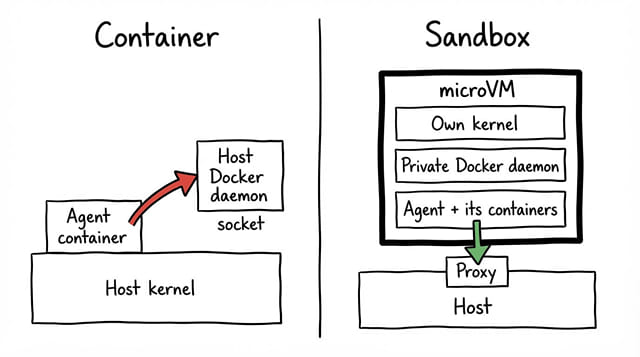
A sandbox puts a hypervisor boundary where the kernel boundary used to be. The details below come from Docker’s architecture docs and the April post.
Each sandbox is a microVM with its own kernel. A kernel exploit inside it hits the guest kernel and stops there.
The agent gets its own Docker daemon inside the VM, so docker build, docker run, and docker compose all work without a socket mount or privileged mode. Sandboxes don’t share images or layers with each other or with your host.
Your project directory is mounted with virtiofs at the same path it has on your host. Edits show up instantly in both directions because nothing is being synced.
All outbound TCP goes through a proxy on your host, and that proxy enforces a network policy. The same proxy handles credentials: the agent sees a placeholder value in place of your API key, and the proxy swaps in the real key after the request has left the VM.
Docker wrote its own VM monitor for this. Firecracker, the obvious choice, has no macOS or Windows support, so Docker’s version sits on Apple’s Hypervisor.framework, Windows Hypervisor Platform, and KVM on Linux.
Notice that containers are still here. They just run one level down, inside the VM.
Run an agent in a sandbox
The CLI is called sbx. It’s a standalone install, so you don’t need Docker Desktop or even Docker Engine. Local sandboxes are free, including for commercial work.
Requirements, per the install docs:
- macOS Sonoma 14 or later, on Apple silicon
- Windows 11 with Windows Hypervisor Platform enabled
- Ubuntu 24.04 or later with KVM (Docker doesn’t support derivatives like Mint or Pop!_OS)
Install on macOS:
brew trust docker/tap
brew install docker/tap/sbx
On Windows:
winget install -h Docker.sbxSign in with your Docker account, then start an agent from your project directory:
sbx login
cd ~/code/my-project
sbx run --name my-sandbox claude
The first run asks you to pick a network policy preset. Balanced allows common development services and blocks the rest until you approve them. Locked Down blocks everything you haven’t explicitly allowed. You can set it ahead of time and add your own rules:
sbx policy init balanced
sbx policy allow network registry.npmjs.org
sbx policy ls
To hand the agent a credential without putting it in the VM:
sbx secret set github --command 'gh auth token'And the housekeeping commands:
sbx ls                # list sandboxes
sbx stop my-sandbox   # stop it, keep the VM and its state
sbx rm my-sandbox     # delete the VM and everything in it (host files are untouched)
Swap claude for another agent. The supported agents page lists Claude Code, Codex, Copilot, Cursor, Devin, Docker Agent, Droid, Kiro, and OpenCode, plus a plain shell sandbox with no agent in it.
What the microVM does not protect
The VM wall protects your host. Anything you hand the agent on purpose is still exposed.
Start with your project directory, which is mounted read-write by default. An agent that decides to delete your repo can do it from inside the best sandbox in the world, so commit before you start a session. Docker also has a clone mode where the host repo is mounted read-only and the agent works on a private copy inside the VM. I’d use that for anything unattended.
The network policy is only as tight as you make it. balanced is a convenience preset, and an agent that can reach GitHub and npm can still push code or pull a bad package.
Keep in mind that everything in the last section is Docker describing its own product. I couldn’t find an independent security audit of the sandbox VM monitor. Hypervisor boundaries have a much better track record than shared-kernel ones (it’s why AWS runs Lambda on microVMs), but Docker’s VMM is new code and nobody outside Docker has vouched for it yet.
So I’d treat the sandbox as one layer and keep the others: permission rules inside the agent, and your own eyes on the diff.
Cloud Sandboxes, briefly
The same sandbox can run on Docker’s infrastructure with a --cloud flag, so an agent keeps working after you close your laptop:
sbx --cloud secret set anthropic
sbx --cloud create --name cloud-project --allow-network github.com:443 claude
sbx --cloud attach cloud-project
sbx move my-project --to cloud moves a local sandbox up. A cloud sandbox cannot mount your host directory, so the agent clones the repo instead. Sessions expire after one hour by default and can run up to 24.
This part costs money. It’s pay-as-you-go and billed by the second, though a paused sandbox costs nothing. Launch pricing:
| Size | vCPU | Memory | Per hour |
|---|---|---|---|
| Micro | 1 | 2 GiB | $0.07 |
| Small (default) | 2 | 4 GiB | $0.14 |
| Medium | 4 | 8 GiB | $0.28 |
| Large | 8 | 16 GiB | $0.56 |
| XL | 16 | 32 GiB | $1.12 |
Cloud needs a recent sbx (the docs say 0.45.0 or later, the launch post says 0.45.1), so update first.
So is Docker ditching containers?
No, and Docker says the opposite: “AI is going to result in more container workloads, not fewer.” Every sandbox exists so an agent can build and run containers inside it.
The critics still have a point. Cloud Native Now ran a piece headlined Containers Became the Unit of Speed. AI Agents Are Making VMs the Unit of Trust, and I think that is the fair read. The company that made containers mainstream now says a container is not a strong enough wall for code you did not write and cannot predict. Kata Containers and Firecracker were built on that same argument years before agents showed up. Agents just moved the problem from cloud providers onto your laptop.
For regular apps, nothing changes. Your Dockerfiles and Compose files are fine, and if you’re new to Docker, learning it in an hour is still time well spent.
The change is for people running coding agents. If you’ve been mounting the Docker socket into an agent container, stop, install sbx, and run the agent there. On your own laptop that’s free. Rolling out one policy across a whole team is a separate paid subscription, so expect a sales call.
Docker Sandboxes and MicroVMs FAQ
Is Docker replacing containers with VMs?
No. Regular Docker containers work the same as before. Docker added Sandboxes, which run each AI agent session inside a microVM with its own kernel and its own Docker daemon. The agent still builds and runs normal containers inside that VM.
What is the difference between a Docker container and a Docker Sandbox?
A container shares the host kernel. A Docker Sandbox is a microVM with its own kernel, a private Docker daemon, a host-side network proxy, and credentials that are injected outside the VM. The boundary is a hypervisor, not kernel namespaces.
Do I need Docker Desktop to use Docker Sandboxes?
No. The sbx CLI is a standalone install and does not need Docker Desktop or Docker Engine. Local sandboxes are free, including for commercial work. You do need to sign in with a Docker account.
How much do Docker Sandboxes cost?
Local sandboxes are free. Cloud Sandboxes are pay-as-you-go and billed by the second, from $0.07 per hour for a Micro (1 vCPU, 2 GiB) to $1.12 per hour for an XL (16 vCPU, 32 GiB) at launch. Organization-wide policy management is a separate paid subscription.
Which AI agents work with Docker Sandboxes?
The Docker docs list Claude Code, Codex, Copilot, Cursor, Devin, Docker Agent, Droid, Kiro, and OpenCode, plus an agent-less shell sandbox for manual setup and testing.
This page may contain affiliate links. Please see my affiliate disclaimer for more info.