
You install an MCP server. It gives your agent 40 tools. Then you go find the skill that teaches the agent how to use those tools, copy its folder into your agent’s skills directory, and hope it stays in sync with the server.
Skills over MCP gets rid of that copy step.
It’s an official MCP extension, defined in SEP-2640, that lets an MCP server serve agent skills itself. The host discovers them when it connects, shows you where they came from, and loads them on demand like any local skill.
I’ll go through the wire format, what servers and hosts each have to do, and who supports it right now. Then the security rules, which you should read before you click Allow on anything.
Quick refresher
If you need the background, start with these two:
- What are agent skills? A Skill packages repeatable instructions, workflows, and reference material into a folder an AI agent can find and load when needed. The required file is
SKILL.md. - What is MCP? MCP is a standard way for AI apps to connect to external tools, data, and systems.
In the skills post I put it this way: MCP gives the agent the kitchen, Skills give it the recipes. Until now you got the kitchen and the recipes from two different stores. This extension lets the kitchen ship with its own recipe binder.
What problem it solves
SEP-2640 lists three problems in its motivation section:
- Fragmented distribution. A server and the skill that teaches an agent to use it are versioned and installed separately. Installing a server from a registry gives you no signal that a companion skill exists.
- Server instructions are too small. MCP servers can already send an
instructionsstring, but it is practically bounded in size. A real workflow skill with references and scripts doesn’t fit. - Everyone invented their own
skill://. Several projects had already started serving skills as MCP resources, each with a different URI layout. The SEP standardizes one.
What I like about the design is that it adds no new primitive. Skills ride on MCP’s existing Resources primitive, so each file in a skill directory becomes a resource. The skill format itself (frontmatter, naming rules, progressive disclosure) is delegated entirely to the Agent Skills specification. MCP only defines the transport.
Where the spec stands
A few dates and names, because older articles will confuse you otherwise:
- SEP-2640 is Final. Its pull request merged on September 13, 2026. The SEP page itself says it is preserved as a historical record and points to the current spec.
- The current spec lives in modelcontextprotocol/ext-skills, at
specification/beta/skills.mdx. The extension is at the Beta stage, written against base protocol revision2026-07-28. The oldexperimental-ext-skillsrepo URL redirects there. - The extension identifier is
io.modelcontextprotocol/skills. - The Skills Over MCP Working Group maintains it.
One thing to watch for: earlier drafts used a well-known skill://index.json resource as the catalog. The Agentic AI Foundation’s June 2026 write-up describes that version. The final design replaced it with a skills/list method, and the WG’s rationale doc explains why: pagination, the base protocol’s list caching, and support implied by the capability declaration instead of probing a URI. If a tutorial tells you to read skill://index.json, it’s describing the old draft.
How it works on the wire
Four pieces: a URI layout, a capability declaration, two required methods, and one optional one. Everything else is plain resources/read.
The skill:// URI layout
Every file in a skill is a resource at:
skill://<skill-path>/<file-path><skill-path> can be one segment or nested, and its last segment must equal the skill’s name from its frontmatter. Anything before it is a prefix the server picks for organization. These are the spec’s own examples:
skill://git-workflow/SKILL.md
skill://pdf-processing/references/FORMS.md
skill://pdf-processing/scripts/extract.py
skill://acme/billing/refunds/SKILL.md
skill://acme/billing/refunds/examples/email.md
In skill://acme/billing/refunds/SKILL.md, the prefix is acme/billing and the skill name is refunds. You can recover the name from the URI without reading the file.
A few more rules:
- The skill root is
skill://acme/billing/refunds, with no trailing slash. - Relative links inside
SKILL.mdresolve against the skill’s root, exactly like on disk.references/GUIDE.mdin the refunds skill becomesskill://acme/billing/refunds/references/GUIDE.md. - The spec says servers SHOULD use
skill://. A server can still use its own scheme, likegithub://..., as long as the path still ends in the skill name andSKILL.md. - A URI scheme does not make something a skill. A host learns a resource is a skill from a
skills/listentry or by confirming it withskills/get.
The capability declaration
A server opts in through the extensions field of its capabilities. This is the shape from the spec:
{
  "capabilities": {
    "resources": {},
    "extensions": {
      "io.modelcontextprotocol/skills": {
        "directoryRead": true
      }
    }
  }
}
Declaring the extension commits the server to skills/list and skills/get. It must also declare resources. directoryRead defaults to false and gates the optional directory method. An empty object means “supported, no optional features.”
Clients only call the skills methods after they see this declaration, so a client that doesn’t know about the extension just sees skill:// files as ordinary resources.
skills/list
This is how a host builds its catalog. The request, from the current spec (on protocol 2026-07-28, every request carries _meta):
{
  "jsonrpc": "2.0",
  "id": 4,
  "method": "skills/list",
  "params": {
    "_meta": {
      "io.modelcontextprotocol/protocolVersion": "2026-07-28",
      "io.modelcontextprotocol/clientInfo": {
        "name": "ExampleClient",
        "version": "1.0.0"
      },
      "io.modelcontextprotocol/clientCapabilities": {}
    }
  }
}
The response, trimmed to two of the spec’s three example entries:
{
  "jsonrpc": "2.0",
  "id": 4,
  "result": {
    "resultType": "complete",
    "skills": [
      {
        "uri": "skill://acme/billing/refunds/SKILL.md",
        "frontmatter": {
          "name": "refunds",
          "description": "Process customer refund requests per company policy",
          "license": "Apache-2.0"
        },
        "resources": [
          {
            "uri": "skill://acme/billing/refunds/SKILL.md",
            "digest": "sha256:ae7bc7e45f44a6381977ef1f772cbad6e38d8ec78903ea7b87abb373815a8f89",
            "size": 175
          },
          {
            "uri": "skill://acme/billing/refunds/examples/email.md",
            "digest": "sha256:a724fa5ed3b9e39c0e731fe1f0e866eb46d23969af25ecf0d5f41982e3e36bea",
            "size": 58
          }
        ]
      },
      {
        "uri": "skill://reports/daily/SKILL.md",
        "frontmatter": {
          "name": "daily",
          "description": "Assemble today's operational report from live data"
        },
        "resources": "dynamic"
      }
    ],
    "ttlMs": 300000,
    "cacheScope": "public"
  }
}
Each entry is a full manifest of the skill:
frontmatteris the skill’s YAML frontmatter, verbatim, as JSON. Every field the author wrote.resourceslists every file in the skill with a SHA-256 digest and byte size.- A skill generated on the fly sets
"resources": "dynamic"instead. That skill offers no integrity guarantee, and hosts may refuse to load it. ttlMsandcacheScopeare required on this protocol revision, same astools/list.- Pagination works like the other list methods (
cursorandnextCursor), and an entry is never split across pages.
A listing can be empty or partial. A server with a huge or generated catalog doesn’t have to enumerate it, and hosts must not treat an empty list as “no skills.”
skills/get
skills/get returns one entry by its SKILL.md URI, listed or not. Servers must answer for every skill they serve.
{
  "jsonrpc": "2.0",
  "id": 5,
  "method": "skills/get",
  "params": {
    "uri": "skill://pdf-processing/SKILL.md"
  }
}
The result is { "skill": { ... } } with the same uri, frontmatter, and resources shape as a list entry. Unknown URI? The server returns JSON-RPC error -32602. (That request is the SEP’s example; the current spec adds the same _meta block shown above.)
Hosts use it for two things: refreshing one skill after a digest mismatch, and verifying a skill URI that showed up somewhere other than the listing, such as server instructions or another skill.
resources/read and resources/directory/read
Reading a file is just the base protocol’s resources/read with the file’s URI. Nothing skill-specific.
The one new read method is resources/directory/read, available only when the server declared directoryRead: true. It exists because skills say things like “pick the right template from templates/,” and the agent needs an ls. It returns the direct children of a directory, with subdirectories marked mimeType: "inode/directory", and you call it again to go deeper.
What a server author does
The work is smaller than the spec length suggests, because SDKs now do the bookkeeping (digests, sizes, frontmatter, the methods).
1. Lay out your skills folder
Same format as a local skill. Each folder with a SKILL.md is one skill, and other folders become the URI prefix:
skills/
├── git-workflow/
│   ├── SKILL.md
│   └── references/REVIEW.md
└── acme/billing/refunds/
    └── SKILL.md
The name in each SKILL.md must match its folder name. If you have never written one, how to write a good agent skill covers the content side.
2. Attach it to your server
With the official TypeScript SDK (v2.4.0 added the extension under ext/skills), this is the example from the SDK’s own guide:
import { McpServer } from '@modelcontextprotocol/server';
import { loadSkills } from '@modelcontextprotocol/server/ext/skills/node';

const skills = await loadSkills('./skills');

const server = new McpServer({ name: 'team-skills', version: '1.0.0' });
skills.attach(server);
That serves skills/list, skills/get, resources/directory/read, and the skill:// resources. The SDK keeps metadata only, reads files on request, and refuses to serve a file whose bytes no longer match the published digest. Call skills.reload() after you change files on disk. The SDK docs flag attach as experimental, so expect the wiring to shift.
Not on TypeScript? The WG’s implementations list tracks the other SDKs. As of November 20, 2026 it lists C#, Ruby, Rust (rmcp), and FastMCP as shipped, Python as merged but unreleased, and Go and Java as in progress.
3. Stay inside the rules
If you roll your own instead of using an SDK, these are the server-side MUSTs and SHOULDs worth taping to your monitor:
- Publish complete manifests: every file, each with its digest and size, computed from the bytes you actually serve.
- Pass frontmatter through verbatim. Don’t curate it.
- Answer
skills/getfor every skill you serve, even ones you leave out of the listing. - Keep each skill at or under 512 files and 16 MiB total. Hosts only have to support that much.
- If you declare
directoryRead, support it for every directory in your skill namespace.
You can still point the agent at a specific skill from your server’s instructions field. The URI is readable whether or not it shows up in a listing.
4. Verify before you ship
The MCP Inspector CLI has a --verify flag that runs the SEP-2640 conformance, digest, and frontmatter checks over everything your server lists, prints one JSON report per skill, and exits non-zero on a failure. Its README pitches it for gating CI:
mcp-inspector --cli <server> --method skills/list --verifySwap in --method skills/get --uri <skill-uri> to check a single skill.
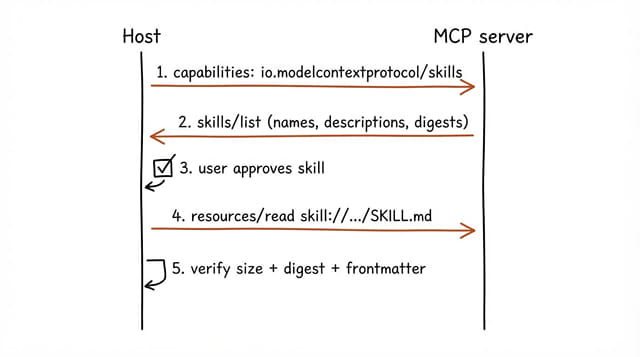
What a host or client does
Most of the spec’s MUSTs land on the host. My guess is that’s why hosts are shipping this more slowly than servers.
The flow the spec describes:
- Connect and check. If the server declares
io.modelcontextprotocol/skills, callskills/list. - Build a registry from the listing alone. Names and descriptions come from
frontmatter. The host must not fetch anySKILL.mdor supporting file at this stage. That’s progressive disclosure, applied across servers. - Key everything on origin plus URI. Two servers can both serve
skill://refunds/SKILL.md, and they are unrelated skills. The spec treats a name as a display label only. - Show the model name, description, and origin. MCP skills sit in the same list as filesystem skills, tagged with the server they came from.
- Load on demand. When the model wants a skill, the host fetches
SKILL.mdwithresources/read, checks the byte size and digest against the entry, parses the frontmatter, and compares it field by field with the listedfrontmatter. Any mismatch means don’t load it. - Read supporting files only from the manifest. While acting on a skill, a read of a file that isn’t in the entry’s
resourcescounts as a verification failure.
The SEP sketches a host design with a read_skill tool and a read_resource tool, both taking a server and a uri. The SEP calls that section illustrative, so hosts can wire it however they like.
On the client side, the TypeScript SDK wraps the verification for you:
import { SkillsClient } from '@modelcontextprotocol/client/ext/skills';

const skills = new SkillsClient(client);
const { skills: entries } = await skills.list();

const git = entries.find(entry => entry.frontmatter.name === 'git-workflow')!;
const manifest = await skills.read(git);                       // size, digest, frontmatter checked
const review = await skills.read(git, 'references/REVIEW.md'); // resolved against the skill root
A failed check throws SkillVerificationError with a reason of unlisted, size, digest, or frontmatter.
Who supports it today
This changes week to week, so check the official extension client matrix and the WG’s implementations list before you rely on anything below. I only list a product here if its own docs, changelog, or repo says it supports the extension.
| Product | Role | What its own source says |
|---|---|---|
| VS Code (GitHub Copilot) | Host | Preview in 1.146, enabled by default in 1.147. You approve a server’s skills the first time you connect; opt out with chat.agentHost.mcpSkills.enabled. |
| fast-agent | Host | Uses skills/list and skills/get, downloads every manifest file, checks size and digest, then writes a local copy. Won’t install "dynamic" skills. |
| MCP Inspector | Dev tool | CLI skill verification. The client matrix marks it Partial. |
| GitHub MCP Server | Server | v2.2.0 (“The one with Skills”). The local server bundles workflow skills, off by default, enabled with --features=skills, filtered to the toolsets you enabled. |
| TypeScript SDK | SDK | v2.4.0 adds ext/skills for servers and clients. |
| C# SDK | SDK | Merged October 23, 2026. |
Look at who’s missing, too:
- Claude Code, Claude Desktop, and Cursor have no Skills mark on the client matrix. The SEP says Claude Code support was “prototyped internally at Anthropic; not yet public.”
- ChatGPT is marked Partial on the matrix, but the matrix links to an “import skills” section that I couldn’t find on OpenAI’s current page, and the WG’s implementations list says skill import was rolled back in November 2026. Treat it as unsupported until OpenAI’s docs say otherwise.
Servers outnumber hosts. As of November 20, 2026, the implementations list has 49 server and gateway rows (28 marked beta) against 22 host rows. Of those hosts, 10 are beta, 2 partial, 1 draft, and 9 still planned or in progress.
Fetch live or snapshot at install?
The spec allows two host styles, and current hosts split between them.
Snapshot at install. fast-agent copies a served skill into a local managed directory after verifying every file, and records the server identity, URI, and manifest alongside it. You review the copy and it doesn’t change under you.
Live from the server. VS Code’s release notes describe the connected server providing skills to the model after a one-time consent prompt. They don’t mention a local install step.
The spec has rules for both. Approval is bound to the exact set of URIs and digests you approved, so if the server rotates a file, the old approval is revoked and the host must ask again. And if a host caches skill files on disk, that cache must sit outside every filesystem-skill discovery path, and anything loaded from it is still treated as MCP-origin content, even after a restart. A cached MCP skill never gets promoted to the trust level of a skill you wrote yourself.
Trust and security
Skill content is instructions sent to a model. That makes it a prompt-injection surface, and unlike a remote tool call, a skill can put server-authored scripts on your machine and tell the agent to run them. The spec says hosts must treat MCP-served skills as “a higher-risk surface than remote tool invocation.”
The host-side requirements that matter most:
- Untrusted input. Skill content gets the same prompt-injection defenses as any server-provided text. Being connected doesn’t make a server authoritative.
- Visible origin. The model must see which server a skill came from, and an MCP skill must never look identical to a local one.
- No implicit execution. Running bundled scripts, hooks, or any command a skill asks for requires explicit per-skill user approval.
allowed-toolsis ignored for MCP-origin skills unless you explicitly approve that grant for that skill. A remote server setting it is asking for elevated access on your machine.- No cross-server reads. A skill from server A can’t make the host read resources from server B without per-call approval naming both.
- No silent shadowing. A malicious server can publish a skill called
git-workflowto hijack your local one. Hosts must namespace by origin and must not let it replace or intercept your skill. - Nested skills need their own consent. Approving a skill doesn’t approve a
SKILL.mdnested inside it.
The rule people will misread is about digests. The SHA-256 values come from the same server as the content and aren’t signed. A match proves the bytes are what the listing promised. It says nothing about whether the server or any gateway in between is honest. fast-agent’s docs put it plainly: “Integrity is not trust.”
So my practical rule: treat a skills-enabled server like a package you’re about to install, not like an API you’re about to call. Read the skills before you approve them, especially anything with a scripts/ folder.
Open questions the spec doesn’t settle
The extension defines transport and host safety rules. Several things the WG and others have raised are still open:
- Provenance and enterprise control. The AAIF post asks whether enterprise admins should be able to approve, block, or pin specific skills. The spec allows intermediaries to attach provenance annotations under their own
_metaprefix but assigns them no meaning, and its digests are unsigned. - Overlapping skills. If a vendor’s server ships a
refund-processingskill and your company has its own, which one wins? The spec forbids silent shadowing and requires disambiguation, but layering and precedence are up to hosts. - Will models use them? The AAIF post reports the WG’s early experiments found models often ignored available skills and went straight to tools. A server instruction telling the agent to read the skill first helped, but adherence dropped as context grew.
- Packaging. The WG charter puts installable bundles (skills plus servers plus configuration as one artifact) out of scope.
Should you use it?
If you maintain an MCP server, yes, start now. If you already have a skill that explains your tools, serving it from the server is a few lines with the TypeScript SDK, and it versions with your code. Hosts that don’t support the extension just see ordinary resources, so you lose nothing.
If you’re a user, it depends on your client. VS Code users have it on by default as of 1.147, so read that consent prompt instead of clicking through it. Everyone else is mostly waiting on their host.
If you build a host, budget real time for the security section. Listing and reading are the easy part. The work is in origin tagging, content-bound approval, and cache isolation.
Skills Over MCP FAQ
What is Skills over MCP?
Skills over MCP is an official MCP extension, defined in SEP-2640, that lets an MCP server serve agent skills. Each file in a skill directory is exposed as an MCP resource, usually under a skill:// URI, and hosts discover skills with the skills/list method.
What is the capability identifier for the MCP Skills extension?
Servers declare io.modelcontextprotocol/skills in the extensions field of their capabilities. Declaring it commits the server to implementing skills/list and skills/get. An optional directoryRead setting adds resources/directory/read.
Is skill://index.json still part of the spec?
No. An earlier draft used a skill://index.json catalog resource. The final design replaced it with the skills/list method, which supports pagination and the same list caching as tools/list.
Does Claude Code support Skills over MCP?
Not publicly as of November 2026. SEP-2640 says Claude Code support was prototyped internally at Anthropic and not yet public, and the official client matrix shows no Skills support for Claude Code.
Are MCP-served skills safe to load?
Treat them as untrusted. The spec requires hosts to show where a skill came from, ignore allowed-tools without explicit approval, and get per-skill consent before running any code. Digests only prove the bytes match the listing, not that the server is trustworthy.
This page may contain affiliate links. Please see my affiliate disclaimer for more info.