If you build sites with Astro, your SEO lives or dies in the <head>: title, meta description, canonical URL, Open Graph tags, Twitter cards, JSON-LD. Astro doesn’t generate any of that for you, so most of us reach for a community SEO component.
I just published a new one: astro-seo-kit. It’s on npm and already running on this site. Here’s why it exists and how to use it.
Why another Astro SEO package?
There were already two established options, and I hit real problems with both.
@astrolib/seo is unmaintained. This site ran on it for years, but the latest release is still 1.0.0-beta.8 from October 2024. Its peer dependency range stops at Astro 5, so on Astro 6 or 7 you need an overrides pin just to install it. Worse, it has a real bug: it emits article:*, profile:*, and book:* Open Graph tags with a bogus og: prefix (og:article:published_time instead of article:published_time). No crawler recognizes the prefixed form, which means article metadata on every post was silently doing nothing.
astro-seo is fine, but it has sharp edges. It ships @astrojs/check as a runtime dependency, which drags TypeScript and the Astro language server into your production node_modules. It declares no peer dependencies at all, so nothing tells you whether it supports your Astro version. There’s no JSON-LD support, by design, and its openGraph.basic object makes you restate the title and image you already passed at the top level.
I wanted one component with none of those problems, so I built it.
What astro-seo-kit gives you
The short version:
- One
<SEO />component that handles title (with templating), description, robots directives, canonical, Open Graph, Twitter/X cards, article metadata, and JSON-LD. - Astro 6 and 7 support, declared honestly in
peerDependencies. - Zero runtime dependencies. Astro is the only peer.
- Automatic absolute URLs. Relative
canonicalandog:imagevalues are resolved against thesitein your Astro config, because crawlers ignore relative ones. - JSON-LD that can’t break out of its
<script>tag (more on that below). - Dev-time warnings for the mistakes you normally discover weeks later in a bad Slack unfurl: missing title, missing description, an
og:imagewith no alt text.
Before publishing, I swapped it into this site and diffed the rendered <head> of all 462 pages against the old package. Every one came out semantically identical, and there are 88 tests behind it asserting on real rendered HTML through Astro’s Container API.
Installation
npm install astro-seo-kitSet it up once, in your layout
Set site in astro.config.mjs so relative URLs can be made absolute:
export default defineConfig({ site: 'https://travis.media' });Then put <SEO /> in your layout’s <head>. Site-wide defaults live here, and each page’s data spreads over them:
---
// src/layouts/Layout.astro
import { SEO } from 'astro-seo-kit';
import type { SEOProps } from 'astro-seo-kit';

type Props = { seo?: SEOProps };
---
<html lang="en">
  <head>
    <meta charset="utf-8" />
    <meta name="viewport" content="width=device-width" />
    <SEO
      titleTemplate="%s | Travis Media"
      twitter={{ card: 'summary_large_image', site: '@travisdotmedia' }}
      {...Astro.props.seo}
    />
  </head>
  <body><slot /></body>
</html>
That’s the whole setup, but everything is configurable beyond it. The props reference covers the full set: robots directives, Open Graph overrides, Twitter cards, JSON-LD, and more. Every field is optional, so you add the ones you want and leave the rest out. One note: Astro doesn’t hoist <meta> tags out of nested components, so <SEO /> has to sit physically inside <head>.
Your frontmatter becomes your SEO
Here’s the part I care about most. A post’s title, description, and date already live in its frontmatter, so the <head> should be derived from that data, never restated. One dynamic route reads every post’s frontmatter and feeds it to the component:
---
// src/pages/blog/[slug].astro - one file, every post
import { getCollection, render } from 'astro:content';
import Layout from '../../layouts/Layout.astro';

export async function getStaticPaths() {
  const posts = await getCollection('blog');
  return posts.map((post) => ({ params: { slug: post.id }, props: { post } }));
}

const { post } = Astro.props;
const { Content } = await render(post);
---
<Layout seo={{
  title: post.data.title,
  description: post.data.description,
  canonical: `/blog/${post.id}/`,
  image: { url: post.data.ogImage, alt: post.data.title, width: 1200, height: 630 },
  article: { publishedTime: post.data.pubDate, authors: ['Travis Rodgers'], tags: post.data.tags },
  articleJsonLd: true,
}}>
  <Content />
</Layout>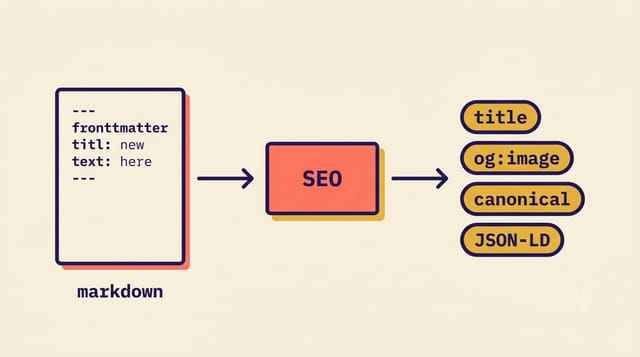
Every post now renders a complete <head>: templated title, meta description, canonical, the full og:* set, article:published_time, Twitter card, and a derived Article JSON-LD node. Notice what you never had to do: restate the title in an Open Graph object, absolutize the image URL, ISO-format the date, or write JSON-LD by hand. Publishing the next post touches no code at all, because its frontmatter is its SEO.
JSON-LD that can’t break your page
One detail worth calling out. The contents of a <script> tag are raw text, so Astro can’t escape them for you. If a component naively injects JSON.stringify(schema), a </script> sequence inside any string field (a post title, a user comment) closes the element early and starts parsing markup. That’s an XSS vector hiding inside your structured data.
astro-seo-kit escapes <, >, and the sneaky U+2028/U+2029 line terminators as JSON unicode escapes, so < becomes \u003c inside the emitted script. That blocks the breakout, and because JSON.parse turns \u003c right back into <, the decoded data stays byte-for-byte identical. Some packages solve this with HTML entity escaping instead, which is safe but mutates your data: “Tom & Jerry” in a headline arrives at the crawler as Tom & Jerry.
Where to get it
- npm: astro-seo-kit
- GitHub: rodgtr1/astro-seo-kit
- Astro integrations directory: it should appear in the integrations library the next time the catalog refreshes.
This is my second Astro package, after Astro Link Validator, and like that one it exists because I needed it on this site first. If you try it and hit anything odd, open an issue. And if it saves you from hand-writing one more og:image tag, a star on the repo helps other Astro folks find it.
Astro SEO Kit FAQ
Does astro-seo-kit work with Astro 6 and Astro 7?
Yes. The peer dependency range is astro ^6 || ^7, and it was verified against the real rendered output of a 462-page Astro 7 site.
Does it support JSON-LD structured data?
Yes. Pass any schema through the jsonLd prop, use the standalone JsonLd component, or set articleJsonLd to derive a complete Article node from the props you already passed.
Does it add any runtime dependencies?
No. Astro is the only peer dependency, and nothing else ships to your production node_modules.
This page may contain affiliate links. Please see my affiliate disclaimer for more info.