
You open Claude, ChatGPT, or whatever model you use. You type a prompt. It responds. You read the response, decide if it’s good enough, and either ask a follow-up or walk away.
That’s a conversation. And YOU are the loop.
Every iteration, you’re providing the evaluation. “Did this do what I wanted? No, let me rephrase.” You are the one deciding whether to keep going. The AI just produces output and waits.
Enter, agent loops
An agentic loop removes you from that role. The AI runs the iteration cycle itself. It takes an action, checks the result, decides if the goal is met, and if not, tries again. Repeat.
The simplest mental model looks like this:
while goal_not_met:
    action = agent.decide_next_step(context)
    result = execute(action)
    context.update(result)
    if agent.evaluate(result) == "done":
        break
The agent doesn’t wait for you to approve the output. It checks against some concrete criteria (a passing test suite, a benchmark score, a specific file state) and keeps looping until it hits that bar or gives up.
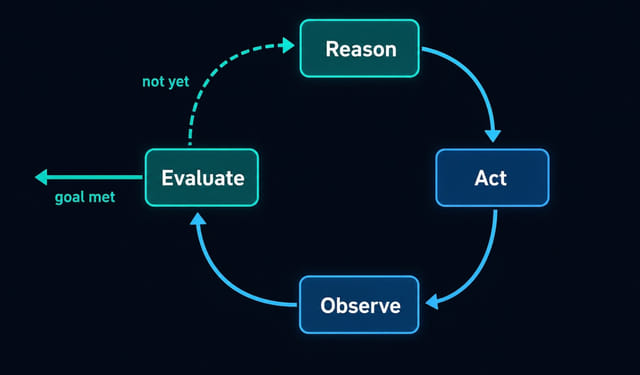
The four things every loop needs
PostHog published a piece recently on why they’re betting on loops, and they framed it well. Every working loop needs:
- a clear, bounded goal (“get all tests green” or “reduce this query’s p95 latency below 100ms”)
- context the agent can actually use (tools, data, error logs, previous attempts)
- a concrete way to measure whether the goal was met
- a model capable enough to do the work
Four things, but the hard one is the third: evaluation.
If you can’t measure “done,” the loop has no exit. Writing those measurable checks is a skill in itself, and it’s exactly what AI agent evals are for.
That evaluation piece is what separates a loop from a chatbot. A test suite is a great evaluator. A benchmark score works. A human eyeballing the output is the worst one, because you’ve just put yourself back in the loop.
Why this matters right now
A few things came together to make this practical.
Models got capable enough to do real multi-step work without falling apart after three steps. Claude Opus 4.6 reportedly handles tasks that run for hours. Context windows got large enough to hold the full history of a long-running task. And tooling inside the development workflow makes it easier to wire these loops up.
The signal that this isn’t theoretical: Stripe reportedly compressed a month of engineering migration work into a single day using an agentic approach, in production. PostHog claims their own performance loop fixed a three-year-old bug.
Two examples
Here’s the clearest practical loop I’ve seen described. You have a pull request with failing CI. Without a loop, you’d push a fix, wait for CI to run, see what broke, fix that thing, and repeat manually. You’re the babysitter.
With a loop, you point the agent at the PR, give it access to CI logs and the ability to push commits, and set the evaluation: “all checks pass.” The agent iterates. You walk away.
The CI system becomes the evaluator. Green or red. The loop runs until green, or until it hits a wall it can’t get past and surfaces the problem to you.
Another version: performance optimization. You have a slow database query. You set the target: p95 response time under 100ms. The agent writes a change, measures it, sees it’s at 180ms, tries a different approach, measures again. The loop continues until the threshold is met or it runs out of reasonable ideas.
This is a different way to use AI than prompting for suggestions and then implementing them yourself. You’re not in the feedback cycle anymore.
How Claude Code fits in: /goal vs /loop
Claude Code has two commands that implement this pattern, and they do different things. People conflate them, so it’s worth being specific.
/goal drives Claude to a finish line. You give it a condition, and Claude keeps working until that condition is true or it gives up. The loop is internal: Claude iterates on its own without you re-prompting it.
/loop polls on a clock. It re-runs a prompt or command at a set interval (you specify it, like 10m or 15m). Use it when you’re watching something that changes on its own, like a CI run or a deploy, and you want Claude to check back periodically.
Claude demo 1
Open Claude Code in your repo with the failing PR checked out. Then type:
/goal all CI checks pass on PR #42That’s it. Claude will read the CI output, figure out what’s failing, make changes, push, wait for CI to run, and check again. You walk away. When it’s done (or stuck), it surfaces the result.
If you’d rather have Claude watch a PR you’re not actively fixing, use /loop instead:
/loop 10m run `gh pr checks 42`; if all pass, tell me it's ready to merge; if any fail, summarize which checks failed and whyEvery ten minutes, Claude checks the PR status and reports back. You’re not driving it to a fix; you’re just getting notified when something changes.
Claude demo 2
Same pattern, different domain. You have a slow endpoint and a benchmark script:
/goal p95 response time for /api/search is under 100ms, verified by running `npm run bench`Claude will try an optimization, run the benchmark, see the number, and decide whether to keep going. The benchmark script is the evaluator. You defined the exit condition. Claude owns the iteration.
The key in both cases: Claude Code already runs an internal agentic loop when you give it any task (gather context, execute, verify, repeat). /goal and /loop are the controls that tell it when to stop or how often to wake back up.
The mental model shift
Using a prompt is using a tool. You pull it out, get a result, put it away.
Setting up a loop is defining a process. The agent runs the process including the quality check, and only surfaces results when it’s genuinely done or stuck.
The effort moves upstream. Instead of crafting prompts and wrangling output, you’re spending time on evaluation criteria and making sure the agent has the right tools and context. That’s a real shift in how you think about the work.
What to watch out for
Loops fail when the evaluation criteria are vague. “Make the code better” is not an exit condition. “Get all 47 unit tests to pass with no regression in the integration suite” is.
They also fail when the agent doesn’t have the right tools. If the loop needs to read a log file and the agent can’t access the filesystem, it’ll spin without progress.
And there’s a cost dimension. A loop burning compute over several hours adds up fast. Setting a max iteration count or a time cap in your stopping criteria is a practical default, not an afterthought.
The takeaway
An agentic loop is not magic. It’s a structure: goal, action, evaluation, repeat. What changed is that models are now capable enough to do useful work inside that structure without falling apart halfway through.
The developers who figure out how to write good evaluation criteria and hand off long-running, repetitive tasks to loops are going to get a lot more done than those who keep treating AI as a fast autocomplete.
The /loop command in Claude Code is a good entry point to this pattern. Try it on something with a clear success condition, like a failing test suite or a performance benchmark. (New to Claude Code? Start with the 15 commands every developer should know.) You might find that a lot of what you were manually babysitting didn’t actually need you in the loop.
This page may contain affiliate links. Please see my affiliate disclaimer for more info.