An AI coding agent will happily refactor your auth layer, write the tests, and open a pull request while you grab coffee. It will also, if you let it, run rm -rf on the wrong directory, commit a hardcoded API key, force-push over a teammate’s work, or follow a malicious instruction it read in a GitHub issue.
The agents are good enough now that the bottleneck isn’t capability. It’s trust. And the way you earn trust with an agent is the same way you earn it with a junior dev: you give it a contained space to work, you make mistakes cheap to undo, and you check the diff before anything ships.
Here is the actual setup I use to let agents work fast without putting the repo at risk. No theory, just the guardrails and the config.
Always run the agent in a branch (or a worktree)
This is rule zero. Never let an agent work directly on main. If something goes sideways, you want a clean git checkout main to be your undo button.
The simple version:
git checkout -b agent/refactor-auth
# turn the agent loose here
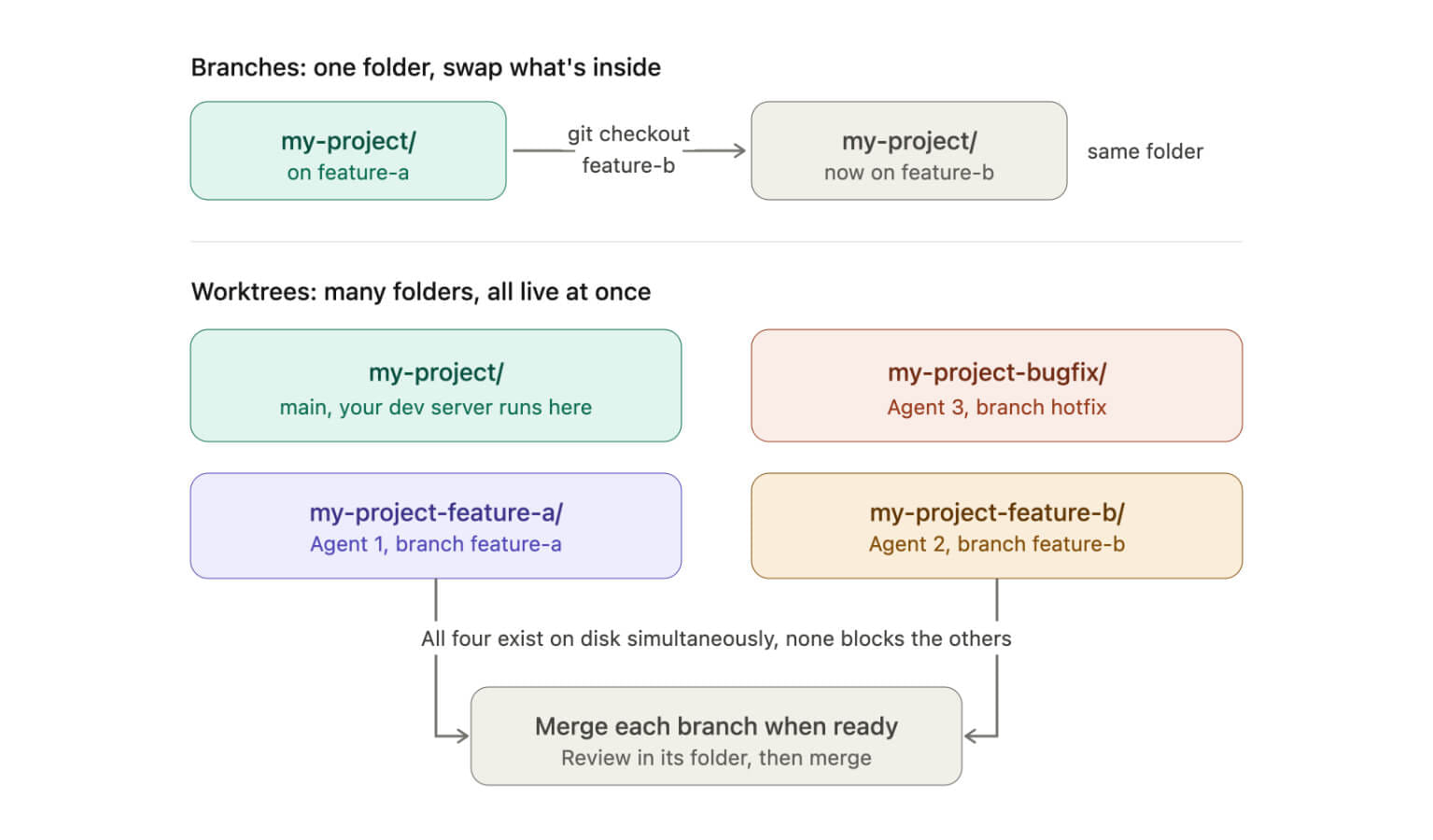
The better version, especially if you run more than one agent at a time, is a git worktree. A worktree gives the agent its own folder on its own branch, separate from the directory you’re working in, while sharing the same repo history. The -b flag creates the branch as part of the command:
git worktree add -b agent/refactor-auth ../myproject-agentNow the agent edits, builds, and runs in ../myproject-agent while your main folder stays untouched. When the work is good, you merge. When it isn’t, you delete the folder and your working directory was never touched. This is exactly why tools like Claude Code reach for worktrees on their own. I wrote a whole breakdown on that in why Claude Code keeps creating git worktrees if you want the full picture.
Be clear about what this does and doesn’t do, though. A worktree isolates the files on disk, not the agent’s powers. It still shares your git credentials, your network, and the same .git repo, and the process can still reach anything else on your machine. So a branch or worktree is your undo button for code, not a security boundary. For that you need the next two sections.
Limit what the agent can read and write
The most dangerous thing you can do is let an agent inherit your normal shell. Think about what’s sitting in your everyday terminal: cloud CLIs that are already logged in, a GitHub token, SSH keys, npm publish rights, production environment variables. An agent in that shell isn’t editing a codebase, it’s holding the keys to your whole setup.
If you use Claude Code, the cleanest control is the permission system in settings.json. You define allow, ask, and deny rules, and deny always wins. A solid starting point looks like this:
{
  "permissions": {
    "allow": [
      "Read",
      "Grep",
      "Glob",
      "Bash(npm test:*)",
      "Bash(npm run lint:*)",
      "Bash(git status:*)",
      "Bash(git diff:*)"
    ],
    "ask": [
      "Edit",
      "Write",
      "Bash(git commit:*)",
      "Bash(git push:*)"
    ],
    "deny": [
      "Read(./.env)",
      "Read(./.env.*)",
      "Read(./secrets/**)",
      "Bash(rm -rf:*)",
      "Bash(git push --force:*)",
      "Bash(curl:*)"
    ]
  }
}
The shape matters more than the exact entries. Read-only and verification commands get auto-approved so the agent isn’t nagging you about git status. Anything that changes intent (edits, commits, pushes) drops to ask. Anything irreversible or secret-touching is flat-out denied, and a deny rule blocks the call even if you later flip the agent into a more permissive mode.
One thing to understand here: Read(./.env) only blocks the Read tool. It does nothing to stop the agent from running cat .env or a script that prints the file, since that goes through Bash, not Read. So if you care about secrets, do not lean on a single Read deny. Keep Bash on a tight allowlist (only the specific commands you listed), deny shell reads of secret paths too, and best of all, keep the secrets out of the agent’s reachable directories entirely. Permission rules are a speed bump, not a wall.
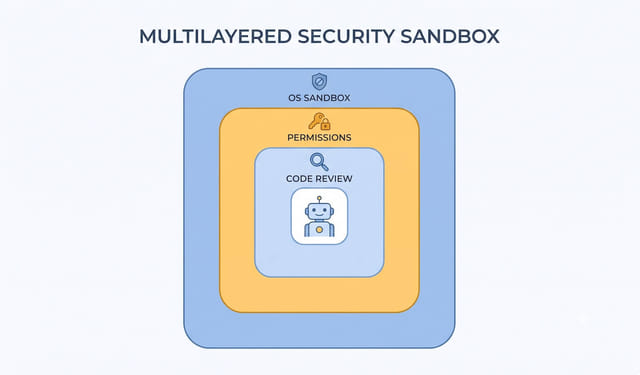
The actual wall is a layer deeper: run the agent in a container or an OS-level sandbox so the process cannot touch files or network it wasn’t granted, no matter what tool it uses to try. A throwaway Docker container with only the repo mounted is the easy 80% version. Restrict what it can read, restrict where it can write, restrict which domains it can reach.
Never hand over unrestricted production secrets
This deserves its own rule because it’s the one that ends careers. An agent does not need your production database URL, your live Stripe key, or a cloud admin credential to write a feature.
Concretely:
- Give it a
.env.examplewith fake values, not your real.env. - Use a scoped, short-lived token if it genuinely needs to hit an API, never the long-lived admin one.
- Keep secrets out of the repo and out of the agent’s reachable directories entirely.
- If you run agents in CI, use a separate, least-privilege service account, not the same identity your deploys run under.
Treat every secret an agent can see as a secret that might end up in a log, a commit, or a tool call to some external service. Because eventually one will. This identity-scoping problem is getting enough attention that there are now emerging standards for it, which I touched on in what SPIFFE means for AI agents.
Give it small tasks, not the whole feature
This one is about quality and safety at the same time. A vague prompt like “build the billing system” gives the agent enormous latitude to make decisions you never see until they’re tangled through twenty files. A scoped task like “add a formatInvoiceTotal helper and a test for it” produces a diff you can actually read in thirty seconds.
Small tasks mean small diffs. Small diffs mean you catch the mistake before it compounds. If you understand how an agent’s loop works (it plans, acts, observes, repeats), you’ll see why a tight scope keeps it honest. I broke that loop down in AI agentic loops explained.
The practical rhythm: one task, review, commit, next task. Resist the urge to let it run for an hour unattended on a big request.
Require a diff before anything gets committed
You should never merge agent work you haven’t read. Make reviewing the diff a non-negotiable step, not a thing you do “when you have time.”
git add -A
git diff --staged
Read it. Every line. You’re looking for the stuff agents quietly get wrong: a swallowed error, a loosened type, a console.log left in, a dependency added that you didn’t ask for, a test that was “fixed” by deleting the assertion. The agent wrote it in seconds, but you’re the one who owns it once it merges.
If you’re reviewing a pull request the agent opened, the same rule applies. The PR being green is not the same as the PR being correct.
Require tests, and make the agent run them
Tests are the cheapest guardrail you have, because they let the agent check its own work without you watching. Tell the agent up front that a task isn’t done until the tests pass, and give it the command to run them.
Put it right in your project instructions (a CLAUDE.md or equivalent) so it applies to every task:
## Definition of done
- All changes must pass `npm test` before you consider the task complete.
- Do not modify or delete existing tests to make them pass.
- New behavior needs a new test.
That last line matters. Agents love to make a failing test pass by editing the test. Calling it out explicitly closes that door.
Add pre-commit hooks as a backstop
Project instructions are guidance. A pre-commit hook is enforcement. It runs whether the commit came from you, the agent, or a script, and it can flat-out reject bad commits.
The easiest path is the pre-commit framework. A .pre-commit-config.yaml like this catches a lot:
repos:
  - repo: https://github.com/pre-commit/pre-commit-hooks
    rev: v5.0.0
    hooks:
      - id: trailing-whitespace
      - id: end-of-file-fixer
      - id: check-added-large-files
      - id: detect-private-key
  - repo: https://github.com/gitleaks/gitleaks
    rev: v8.21.2
    hooks:
      - id: gitleaks
Then install it once:
pre-commit installNow detect-private-key and gitleaks will catch a commit that contains a secret before it reaches your history, which is your safety net for the one time a real key slips into the agent’s reach. Add your linter and formatter to the same config and a failing commit gets rejected at the door.
Two honest caveats. Secret scanners are not perfect, they catch known patterns and miss creative ones, so treat this as a backstop and not your only line of defense. And git commit --no-verify skips hooks entirely, so this is enforcement against honest mistakes, not a determined attempt to get around it. That is fine. Most of what an agent gets wrong is an honest mistake, and this catches a lot of it.
Log the agent’s tool calls
When something weird happens, you want a record of what the agent actually did, not your memory of what you think it did. Most agent setups can log every tool call (every command, every file write, every network request) to a file you can review later.
In Claude Code you can wire this up with a PreToolUse hook. Claude Code passes hooks a JSON blob on stdin (not environment variables), so you read stdin and pull out the fields you want. Here’s a small script, say .claude/hooks/log-tool.sh:
#!/usr/bin/env bash
input=$(cat)
tool=$(echo "$input" | jq -r '.tool_name')
args=$(echo "$input" | jq -c '.tool_input')
echo "$(date -u +%FT%TZ) $tool $args" >> .agent-audit.log
exit 0
Then register it in settings.json so it fires before every tool call:
{
  "hooks": {
    "PreToolUse": [
      {
        "matcher": "*",
        "hooks": [
          { "type": "command", "command": "${CLAUDE_PROJECT_DIR}/.claude/hooks/log-tool.sh" }
        ]
      }
    ]
  }
}
Even a basic log like this turns “I have no idea what it did” into a timeline you can scan. It’s also how you catch a prompt-injection attempt, where the agent reads a malicious instruction hidden in a file or an API response and starts doing things you never asked for. If the log shows a curl to a domain you don’t recognize, you found it.
Require human approval for destructive commands
Some commands should never run without a human saying yes. rm -rf, git push --force, git reset --hard, DROP TABLE, dropping a database, anything that talks to production. These go in your deny list, or behind an ask rule that forces a prompt every single time.
The mental model: irreversible and outward-facing actions always require a human. The agent can prepare the command, explain why it wants to run it, and stage everything, but the final “yes” on anything destructive is yours. Auto-approval is fine for reading files and running tests. It is not fine for deleting things or shipping to prod.
Bundle it into a “safe agent workspace” template
Setting all this up per project gets old, so I keep a template repo I can clone for any project where an agent is going to do real work. You can build your own in about ten minutes. Here’s the skeleton:
safe-agent-workspace/
├── .claude/
│   └── settings.json        # allow/ask/deny permission rules
├── .pre-commit-config.yaml  # gitleaks, detect-private-key, lint, format
├── .env.example             # fake values only, real .env is gitignored
├── CLAUDE.md                # definition of done, "don't edit tests" rules
├── scripts/
│   ├── new-agent-task.sh    # spins up a fresh worktree + branch
│   └── review.sh            # git diff --staged + run the test suite
└── .gitignore               # .env, .env.*, secrets/, .agent-audit.log
The two scripts are the parts that save the most time. new-agent-task.sh is just a wrapper so you never forget the branch step:
#!/usr/bin/env bash
set -euo pipefail
task="$1"
git worktree add "../$(basename "$PWD")-$task" -b "agent/$task"
echo "Worktree ready. cd ../$(basename "$PWD")-$task and start the agent."
And review.sh makes “show me everything that changed and prove the tests pass” a single command. Notice it does not git add -A for you. Blindly staging everything is how a stray .env or some untracked junk the agent created ends up in your next commit. It shows you the changes and the untracked files so you decide what to stage:
#!/usr/bin/env bash
set -euo pipefail
echo "--- tracked changes ---"
git diff
echo "--- untracked files (review before adding) ---"
git ls-files --others --exclude-standard
echo "--- running tests ---"
npm test
Clone the template, drop your code in, and every project starts with the guardrails already in place. The agent gets a sandbox, you get an undo button, and your secrets stay out of reach.
Safe AI Coding Agent FAQ
Can I just trust the agent and skip all this?
For throwaway scripts and prototypes, sure. For a real codebase with real secrets and real users, no. The cost of one bad unsupervised run (a leaked key, a force-push over a teammate, a deleted directory) is far higher than the ten minutes it takes to set up a branch, a deny list, and a pre-commit hook.
What is prompt injection and why does it matter here?
Prompt injection is when an attacker hides instructions somewhere the agent will read them, like a code comment, a GitHub issue, or an API response, hoping the agent follows them as if they were your commands. It is the leading AI agent security risk right now. Limiting file and network access, denying destructive commands, and logging tool calls are your main defenses.
Do I really need a sandbox, or are permission rules enough?
Permission rules are a great start and enough for most solo work. A container or OS-level sandbox adds a hard boundary the agent cannot talk its way around, which matters more as you give agents more autonomy or run them unattended. Think of them as layers: sandbox, then permissions, then your own review of the diff.
Agents are only getting more capable, which means they’re only getting more dangerous to run unsupervised. The good news is that the guardrails are a one-time setup. Build them once, clone the template into every project, and you get the speed without lying awake wondering what the agent did at 2am.
This page may contain affiliate links. Please see my affiliate disclaimer for more info.