The agent skills ecosystem went from a single Claude feature to a cross-vendor standard in about nine months. As of mid-2026, roughly 40 products support the SKILL.md format, and community indexes have scraped something like 1.9 million public skills off GitHub. Distribution is a solved problem.
Quality is not. A benchmark called SkillsBench pulled 47,150 public skills and scored them, and the average landed at 6.2 out of 12. In plain terms: most of the skills you can install right now do very little, and some actively make your agent worse. So the useful question is no longer “what are skills.” It is “how do I avoid the slop and write one that actually helps.”
If you are still fuzzy on the format itself, I wrote a primer here: What Are AI Agent Skills (and the SKILL.md Standard). This post assumes you know the basics and want to build good ones.
The data that should change how you install skills
Here is what the research actually found, because the numbers make the case better than I can.
- Curated skills work. Random ones mostly don’t. Across 84 tasks in 11 domains, hand-curated skills raised agent pass rates by an average of +16.2 percentage points. Skills the model generated for itself scored -1.3 points, meaning slightly worse than no skill at all. That is a 17.5 point gap between “a human wrote and tested this” and “the model winged it.”
- Fewer, tighter skills beat kitchen-sink bundles. Loading 2 to 3 focused skills gave the biggest lift (about +18.6 points). Piling on 4 or more dropped the benefit to +5.9 because of the added cognitive load.
- Compact writing beats comprehensive writing. Detailed-but-tight docs outperformed exhaustive ones by a wide margin. “Comprehensive” skills actually scored around -2.9 points. More words is not more help.
- Security is a real problem. A separate audit of 22,511 skills flagged over 140,000 issues, and Snyk’s ToxicSkills research found prompt injection in 36% of the skills it tested. A skill is just Markdown plus optional scripts that your agent runs with your permissions. Installing one is a supply-chain decision.
Read that last point twice. When you install a skill, you are handing a stranger’s instructions to an agent that can touch your files, your shell, and your credentials. Treat it exactly like adding an npm dependency, because that is the risk profile.
How to spot a junk skill in 60 seconds
Before you install anything, open the SKILL.md and run through this. You can do it fast.
- Read the description field first. This is the single most important line in the file. It is what the agent uses to decide when to trigger the skill. If it is vague (“helps with code”) the skill will either never fire or fire at the wrong time. Good descriptions name the concrete trigger: “Use when the user asks to write a conventional commit message.”
- Check the length. If the
SKILL.mdbody is a 2,000-word essay, that is a red flag, not a green one. The benchmark is clear that comprehensive dumps hurt. Good skills are tight and procedural. - Look for working examples. A skill with a concrete before/after example or a real command block is worth ten skills full of adjectives.
- Grep the scripts. If the skill ships
.shor.pyfiles, actually read them. Look for network calls,curl | bash, environment variable reads, or anything that phones home. This is where malicious payloads hide. - Prefer curated registries over raw catalog size. A marketplace bragging about a million skills is bragging about the wrong number. A small, reviewed library is worth more.
If a skill fails two or more of these, skip it. There is no shortage of options.
Writing one that measurably works
Now the fun part. A skill is a directory with a SKILL.md file at its root. The file is YAML front matter plus Markdown instructions. That is the whole format. Here is a real, useful one I would actually keep in a repo.
---
name: conventional-commits
description: >-
  Use when the user asks to write, generate, or fix a git commit message.
  Produces a Conventional Commits formatted message from the staged diff.
---

# Conventional Commit Messages

## Instructions

1. Run `git diff --staged` to see what is actually being committed.
2. Pick ONE type that matches the dominant change:
   feat, fix, docs, refactor, test, chore, perf.
3. Write the subject line as `type(scope): summary`.
   - scope is optional, lowercase, one word (e.g. `auth`, `api`).
   - summary is imperative mood, no capital, no trailing period, under 60 chars.
4. If the change is breaking, add a `!` after the type and a
   `BREAKING CHANGE:` footer explaining the migration.
5. Only add a body if the "why" is not obvious from the summary.

## Examples

Staged change: added rate limiting to the login route
`feat(auth): add rate limiting to login endpoint`

Staged change: fixed a null check that crashed on empty carts
`fix(cart): guard against empty cart in total calculation`
Notice what makes that skill good, because these are the levers the data says matter.
The description is doing the heavy lifting
The description is the only part loaded into context all the time. The agent reads it on every turn to decide whether to pull in the rest. So write it for the trigger, not for a human browsing a catalog. Name the verbs the user will actually say (“write, generate, or fix a git commit message”). Skills tend to under-trigger, so lean slightly pushy here. A precise, slightly assertive description is the difference between a skill that fires when you need it and one that sits there dead.
Keep it procedural and compact
The body is numbered steps and two examples. It is not a treatise on the history of commit conventions. That restraint is not laziness, it is the finding: detailed-and-compact beat comprehensive by roughly 20 points. Give the agent the procedure and a couple of grounding examples, then stop typing. If you feel the urge to explain everything, that urge is what is dragging the average skill down to 6.2.
Use progressive disclosure for anything big
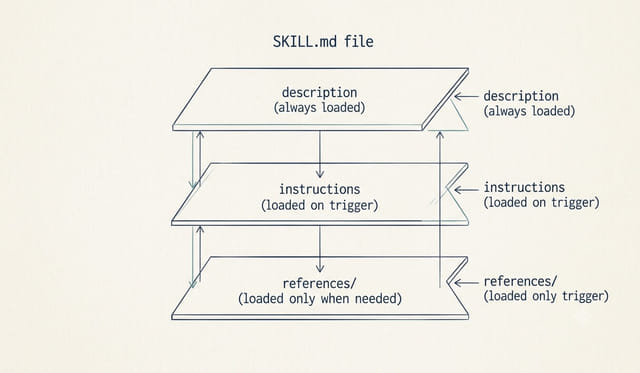
When a skill genuinely needs more, do not stuff it all into SKILL.md. Split the extra material into separate files and reference them by path, so the agent only loads them when the specific branch applies.
conventional-commits/
  SKILL.md            # always-on description + core steps
  references/
    breaking-changes.md   # loaded only when a breaking change is detected
    monorepo-scopes.md    # loaded only in a monorepo
This is the layered idea baked into the format: metadata is always in context, instructions load when the skill triggers, and deep references load only when that path is hit. It keeps your token cost low and your agent focused, which is exactly what “2 to 3 focused skills” buys you.
Prove it helped, don’t assume it did
This is the step almost everyone skips, and it is the whole reason self-generated skills score negative. You cannot eyeball whether a skill works. You have to test it.
The cheap version of a proper eval: pick 5 to 10 real tasks the skill is supposed to help with. Run them with the skill disabled, note how many the agent gets right. Turn the skill on, run the same tasks, count again. If the pass rate did not go up, the skill is not earning its place in your context window, and you should cut it or rewrite it.
# rough before/after: run your task set twice
# 1) with the skill directory removed or renamed
# 2) with it in place
# then compare how many outputs you actually accept
That is a manual eval, and it is enough to start. If you want to do this properly and repeatably, I walked through the real approach in AI Agent Evals for Beginners. The mindset shift is the point: a skill is a claim that your agent got better, and claims get tested.
Treat installed skills like dependencies
Because a skill can ship scripts your agent will run, the security story is not optional. My rules are simple:
- Read every skill before installing it, scripts included. No exceptions for popular ones.
- Pin to a specific version or commit, the same way you would a package.
- Run new skills in a contained environment first, on a branch or in a sandbox, before you trust them on a real repo. I cover the general setup for this in How to Safely Use AI Coding Agents in a Real Codebase.
- Be extra suspicious of any skill that reads secrets, makes network calls, or asks for broad permissions to do a narrow job.
A skill that fixes commit messages has no business touching your environment variables. If it does, that is your answer.
The short version
Writing a good skill is the new writing a good README: cheap, visible competence that quietly makes everything around it better. And installing a random one is the new careless npm install. The benchmark data all points the same direction. Write fewer skills. Keep each one tight and procedural. Nail the description. Split the big stuff behind references. Then actually test that it moved your pass rate before you trust it.
Do that and you will be in the top quartile without much effort, because the bar, as the numbers make painfully clear, is on the floor.
Agent Skills FAQ
What is a SKILL.md file?
It is the single file that defines an agent skill: YAML front matter with a name and description, followed by Markdown instructions. It lives at the root of a skill directory and can reference extra files and scripts.
Why do most public agent skills perform poorly?
A benchmark of 47,150 skills scored them at an average of 6.2 out of 12. The common failures are vague descriptions that never trigger correctly, overly comprehensive bodies that add noise, and skills the model generated for itself without any human testing.
How many skills should I load at once?
Two to three focused skills gave the biggest measured lift. Loading four or more cut the benefit roughly in half because of the added cognitive load on the agent.
Are agent skills a security risk?
Yes. Skills can include scripts your agent runs with your permissions, and audits have found prompt injection in about a third of tested skills. Read every skill before installing it and treat it like any other dependency.
This page may contain affiliate links. Please see my affiliate disclaimer for more info.