You fire up Claude Code, give it a task, and it goes to work. A few minutes later it’s done, you go to run your dev server to check the result, and… your changes aren’t there.
Or they’re somewhere weird.
You poke around and realize the agent did all its work inside something called a worktree, and now you’re stuck asking it to “merge that into main locally” every single time before you can actually see what it built.
If you’re a branch person (and most of us are), this feels different.
You’ve spent your whole career doing git checkout -b feature/thing, working, committing, merging. Why is the agent inventing a whole new concept and leaving your stuff stranded?
The short answer: a worktree isn’t a competitor to branches. It’s a different tool that works with branches, and once you understand what it’s doing, the friction disappears.
What a worktree actually is
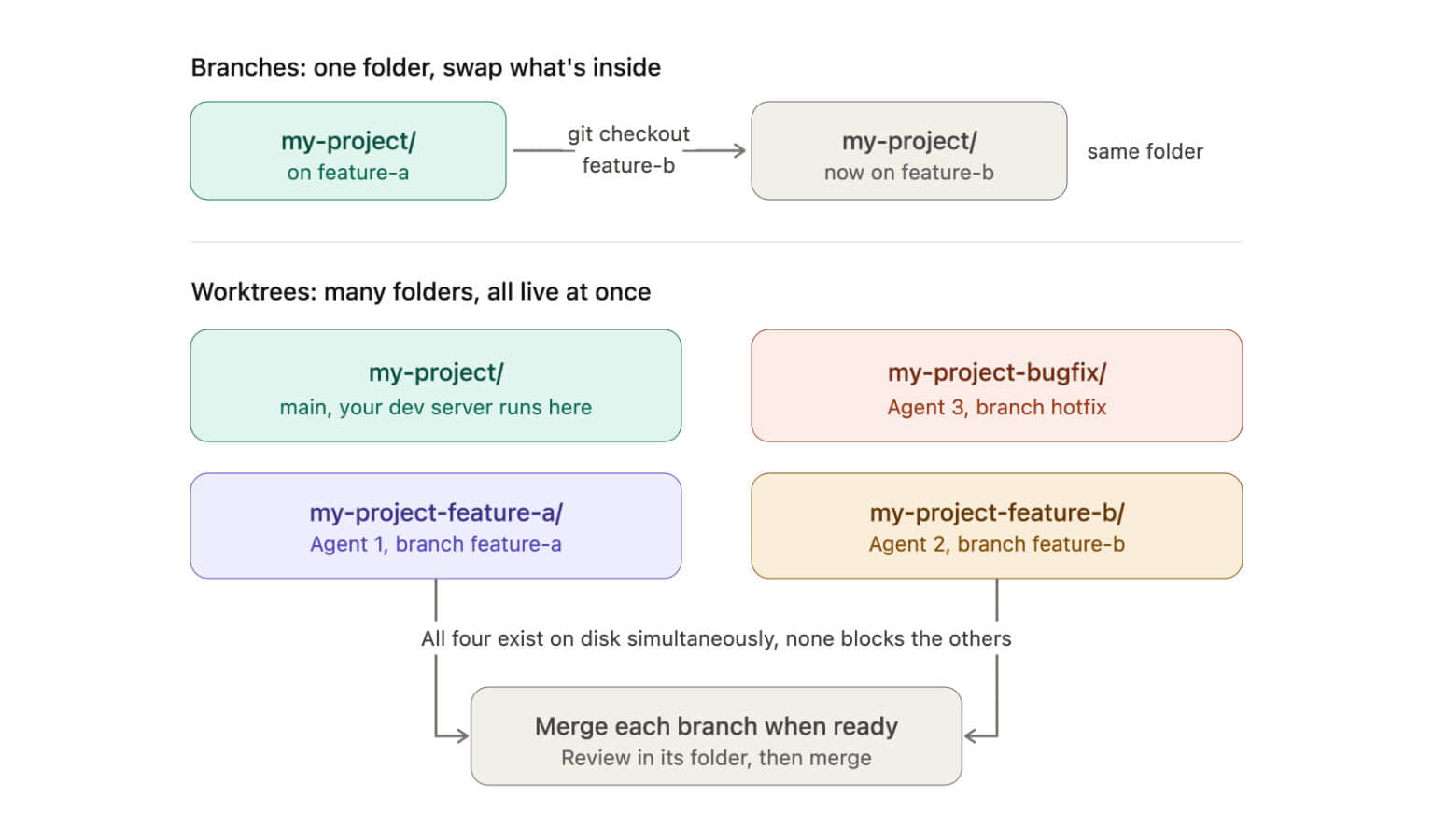
Normally a git repo has one working directory, the folder you’re sitting in. You can only have one branch checked out at a time. Want to switch branches? You stash or commit your changes, run git checkout other-branch, and your files on disk get swapped out underneath you.
A worktree lets a single repo have multiple working directories at once, each on its own branch, all sharing the same underlying .git history.
So instead of this:
my-project/ <- one folder, one branch at a timeYou can have this:
my-project/                    <- main, your normal folder
my-project-feature/            <- a second folder, on a feature branch
my-project-bugfix/             <- a third folder, on another branch
Every folder points at the same repository. Same commit history, same remotes, same objects. But each has its own checked-out branch and its own files on disk, fully independent. You can edit, build, and run in one without touching the others.
The command itself is simple:
git worktree add ../my-project-feature feature/new-thingThat creates a new folder ../my-project-feature with the feature/new-thing branch checked out. When you’re done:
git worktree remove ../my-project-featureThat’s the whole concept. A worktree is a branch with its own folder. It is not a substitute for a branch; there’s still a branch under the hood. It’s just checked out somewhere else.
By default, Claude Code drops its worktrees inside your project at
.claude/worktrees/<name>/. Many engineers also choose to create them here. You do you. Rungit worktree listat any time to see every worktree and its path.
Why agents love them
Worktrees solve a problem that’s specifically an agent problem.
When you work, you’re one person doing one thing in one folder. A branch is plenty: switch, work, commit, merge, done. But an agent breaks the “one thing at a time” assumption that branches are built on.
You can have Claude Code grinding on a feature while another agent chases a bugfix while a third refactors something, all at once. A branch can’t give you that. A branch is which code is checked out in your one folder, so the moment you want two tasks live at the same time, you’re stashing and switching and cursing constantly.
Worktrees just hand each agent its own folder on its own branch, and none of them step on each other. That’s the thing nothing else does, and it’s why agents reach for them by default. It’s also what lets an agent grind through a long agentic loop without ever touching the folder you’re working in.
Once you’ve got that, the rest falls out for free.
The agent is about to make a bunch of changes, possibly large, possibly wrong. Because it’s working in its own folder, your main checkout never sees the mess: no half-edited files, no broken intermediate states in the directory you’re actually sitting in. It’s a real, fully-functional checkout, the same as if you’d cloned the repo fresh, not a fragile stash you have to remember to pop.
That isolation is what keeps your dev server alive. If the agent worked in your main folder, every file it touched would hot-reload your running server, crashing it over and over while it’s mid-task. Instead your main folder sits untouched and stable, and your server keeps humming on the code you last had while the agent churns away next door.
And if the work turns out to be garbage, you delete the worktree. There’s nothing to revert in your main checkout, because nothing ever happened there.
So the agent isn’t avoiding branches. It’s using a branch plus a separate folder, and the separate folder is what lets several of these run at once without wrecking the one you’re living in. The behavior you’re annoyed by is the same behavior protecting your dev server and letting you point three agents at the same repo without chaos.
The actual friction (and why it happens)
Your real pain isn’t worktrees existing. It’s the last mile: the work is done, it’s sitting on a branch in a folder you’re not looking at, and you have to manually pull it into main before you can run and review it.
This happens because the agent did exactly what it should (it isolated the work) but doesn’t know your intent for what comes after. Should it merge to main? Open a PR? Leave it for review? Without direction, it leaves the work safely parked in the worktree and waits.
The fix is to take control of that last step yourself instead of asking the agent to do it conversationally every time.
How to cut the friction
You’ve got a few options, from “barely change anything” to “change your mental model.”
Option 1: Just cd into the worktree
The simplest realization: the worktree is a real, complete checkout of your project. You can run your dev server from inside it. You don’t have to merge anything to see the work.
cd ../my-project-feature
npm run dev
You’re now looking at the agent’s work, live, with zero merging. When you’re happy with it, then you merge. When you don’t like it, you delete the worktree and your main folder never knew it existed. For a lot of people this single insight is the whole fix.
Option 2: Merge it yourself, once you’ve reviewed it
When the work is good and you want it on main, do it the normal git way from your main folder:
cd ../my-project          # back to main
git merge feature/new-thing
git worktree remove ../my-project-feature   # clean up
This is the exact branch workflow you already know. The only new piece is worktree remove at the end to tidy up the extra folder. Notice you never needed the agent to merge; you’ve been doing merges your whole career.
Option 3: Tell the agent your preference up front
Claude Code reads a CLAUDE.md file in your project for standing instructions (and you can point that file at your AGENTS.md so other agents follow the same rules). Drop your worktree workflow in there so you stop repeating yourself:
## Git workflow
- Do your work in a worktree as usual.
- When the task is complete and tests pass, tell me the worktree path and pause so I can run the dev server there and review.
- After I confirm it looks good, merge the branch into `main` locally and remove the worktree.
Now the agent knows what “done” means to you, and the merge-to-main step you’ve been doing by hand happens on your say-so instead of you driving it every time. You can tune this to whatever you actually want: full auto-merge when tests pass, “always pause for review,” or “open a PR instead of merging.”
Option 4: Make a helper alias
If you review-in-worktree often, a tiny alias removes the lookup step:
# list every worktree and its branch
alias wt='git worktree list'
Run wt, see exactly where the agent put things, cd there, and run your server.
The mental model shift
A worktree is just a branch you can stand in two places at once.
You were never wrong to think in branches. The agent thinks in branches too. The worktree is just the agent renting a second room so it can make a mess without wrecking the room you’re living in. Your dev server stays up because of that second room, not in spite of it.
Once you internalize that, the workflow inverts in a good way: you stop seeing the worktree as “where my stuff got lost” and start seeing it as “the staging area where I review the agent’s work before it touches main.” That’s actually safer than the old way, where an agent editing your main folder could hose your running environment in real time.
So next time Claude Code spins up a worktree:
- Let it. That’s the isolation working for you.
cdinto the worktree to run and review without merging anything.- Merge to main yourself when you’re happy, or put your preference in
CLAUDE.mdso the agent does it. git worktree removeto clean up.
The branches haven’t changed. There’s just an extra folder now.
This page may contain affiliate links. Please see my affiliate disclaimer for more info.