The bar along the bottom of Claude Code can show anything a shell script can print. One setting turns it into a live readout of whatever you care about: the model, your git branch, how full the context window is, what the session has cost, or how close you are to your usage limit.
I wrote ten status line scripts, tested every one of them, and put them all below in full. Pick one, paste two things, and you are done. You do not need an installer or a plugin, and there is nothing to keep updated.
How the Claude Code status line works
The status line is a shell command you name in settings.json. Claude Code runs it, pipes a JSON object about the current session into it on stdin, and shows whatever it prints to stdout at the bottom of the screen.
That JSON carries a lot: the model name, the working directory, the context window size and how much of it you have used, the session cost and duration, lines added and removed, and, for claude.ai subscribers, your 5-hour and 7-day usage windows. Your script picks the fields it wants with jq, formats them, and prints. Each line you print becomes a row, and ANSI color codes work if your terminal supports them.
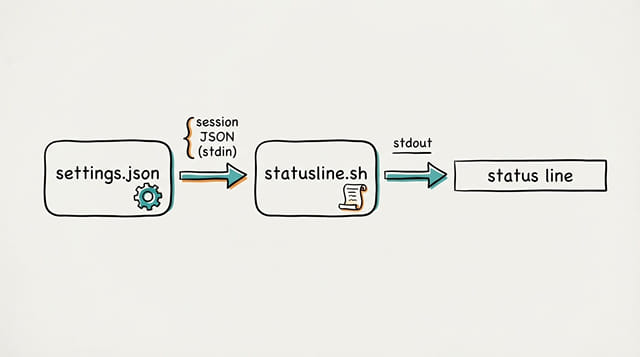
Claude Code re-runs the script when the session changes: at startup, after each new assistant message, when you switch permission modes, and after /compact, among a few others. Updates are debounced at 300ms, so a burst of activity triggers one run instead of one per event. If you want it to run on a timer too, add refreshInterval (in seconds) to the config. Preset 10 uses that.
You can also type /statusline followed by a description and Claude will write a script for you. That works, but you get whatever it decides to write that day. These presets are fixed and tested, and the official status line docs list every field if you want to build on one. If you want more built-in commands like this, I keep a list of Claude Code commands every developer should know.
How to install any preset
Every preset installs the same way. You need bash, jq, and git (the git presets call it once per refresh). Recent versions of macOS include jq, so run jq --version to check. If it is missing, brew install jq fixes that.
1. Save the script. Copy the preset’s script from below into ~/.claude/statusline.sh, then make it executable:
chmod +x ~/.claude/statusline.sh2. Point Claude Code at it. Add this statusLine block to ~/.claude/settings.json. If the file already has settings in it, add only the statusLine key next to them:
{
  "statusLine": {
    "type": "command",
    "command": "~/.claude/statusline.sh"
  }
}
3. Start a session. Open Claude Code (or send a message in an open session) and the line appears.
To switch presets later, overwrite ~/.claude/statusline.sh with a different script. The settings block stays the same for nine of the ten. Only preset 10 adds a line to it.
You can also test a script before installing it by piping a fake payload into it:
echo '{"model":{"display_name":"Opus 5.5"},"workspace":{"current_dir":"'"$PWD"'"}}' | ~/.claude/statusline.shAll ten scripts pass a fixture test suite (each preset run against nine fixtures, including an empty payload and one full of null fields) under the macOS system bash 3.2.57 with jq 1.7.1. All ten also rendered correctly against a real status line payload captured from Claude Code v2.1.330, and I ran the dashboard preset inside a live session. I have not tested them on Linux or Windows.
One thing changed after I took the first screenshots. Five of the presets used the terminal’s dim attribute for secondary text, and on my theme that text was close to invisible. Those five now use a fixed gray instead, which is why their requirements mention one 256-color gray.
1. Minimal
It shows the model name in brackets and the folder you are in, and that is all. It prints no color codes, so it works in any terminal and with any font, including over SSH.
Use it if all you want to know is which model you are talking to. It is also the smallest script here, which makes it the easiest one to start customizing.
- Nerd Font: not needed
- Truecolor: not needed
- Needs: bash, jq

Save this as ~/.claude/statusline.sh:
#!/bin/bash
# Claude Code status line preset: minimal
# Shows: model name and the current directory name. Nothing else.
# Nerd Font: not needed. Truecolor: not needed. Colors: none.
# Needs: bash, jq.

input=$(cat)

vals=$(printf '%s' "$input" | jq -r '[
  (.model.display_name // .model.id // ""),
  (.workspace.current_dir // .cwd // ""),
  "end"
] | map(tostring) | join("\u001f")' 2>/dev/null)
IFS=$'\x1f' read -r model dir end <<<"$vals"

[ -n "$model" ] || model="Claude"

name=${dir%/}
name=${name##*/}
[ -n "$dir" ] && [ -z "$name" ] && name="/"

if [ -n "$name" ]; then
  printf '%s\n' "[$model] $name"
else
  printf '%s\n' "[$model]"
fi
exit 0
2. Git
It shows the folder name, the git branch, a * when the working tree has changes (untracked files count), and ↑/↓ counts when your branch is ahead of or behind its upstream. On a detached HEAD it shows the short commit hash instead of a branch name. Outside a repo it shows the folder name only.
Pick this if you work across a lot of branches or worktrees and keep forgetting where Claude is about to commit.
- Nerd Font: not needed
- Truecolor: not needed (16 ANSI colors plus one 256-color gray)
- Needs: bash, jq, git (one
git statuscall per refresh)

Save this as ~/.claude/statusline.sh:
#!/bin/bash
# Claude Code status line preset: git
# Shows: directory name, git branch, a dirty marker (*), and ahead/behind
#        counts against the upstream branch (↑2 ↓1).
# Nerd Font: not needed. Truecolor: not needed (16 ANSI colors plus one 256-color gray).
# Needs: bash, jq, git. Makes one git call per refresh.

input=$(cat)

vals=$(printf '%s' "$input" | jq -r '[
  (.workspace.current_dir // .cwd // ""),
  "end"
] | map(tostring) | join("\u001f")' 2>/dev/null)
IFS=$'\x1f' read -r dir end <<<"$vals"

E=$'\033'
RESET="${E}[0m"; BLUE="${E}[34m"; MAGENTA="${E}[35m"; YELLOW="${E}[33m"
GREEN="${E}[32m"; RED="${E}[31m"; DIM="${E}[38;5;245m"

name=${dir%/}
name=${name##*/}
[ -n "$dir" ] && [ -z "$name" ] && name="/"
[ -n "$name" ] || name="?"
[ ${#name} -gt 40 ] && name="${name:0:39}…"

# One git call: branch, upstream counts, and changed files.
branch="" oid="" ahead=0 behind=0 dirty=0
if [ -n "$dir" ] && [ -d "$dir" ]; then
  status=$(git --no-optional-locks -C "$dir" status --porcelain=v2 --branch 2>/dev/null)
  while IFS= read -r line; do
    case "$line" in
      "") ;;
      "# branch.head "*) branch=${line#"# branch.head "} ;;
      "# branch.oid "*) oid=${line#"# branch.oid "} ;;
      "# branch.ab "*)
        ab=${line#"# branch.ab "}
        ahead=${ab%% *}; ahead=${ahead#+}
        behind=${ab##* }; behind=${behind#-} ;;
      "#"*) ;;
      *) dirty=1 ;;
    esac
  done <<<"$status"
fi
[ "$branch" = "(detached)" ] && [ -n "$oid" ] && branch="@${oid:0:7}"

out="${BLUE}${name}${RESET}"
if [ -n "$branch" ]; then
  out="$out ${DIM}on${RESET} ${MAGENTA}${branch}${RESET}"
  [ "$dirty" = 1 ] && out="$out${YELLOW}*${RESET}"
  [ "$ahead" != 0 ] && out="$out ${GREEN}↑${ahead}${RESET}"
  [ "$behind" != 0 ] && out="$out ${RED}↓${behind}${RESET}"
fi

printf '%s\n' "$out"
exit 0
3. Context bar
A 20-cell bar shows how much of the context window you have used, followed by the percent and the token count. It stays green under 50 percent, turns yellow under 80, and goes red from 80 up.
Early in a session Claude Code can send a null percentage. When that happens, this script works the percent out from the token counts so the bar still shows something useful.
This is the one I would install if you only install one. Watching the bar fill tells you when it is time to /compact or start a fresh session.
- Nerd Font: not needed
- Truecolor: not needed (16 ANSI colors plus one 256-color gray)
- Needs: bash, jq

Save this as ~/.claude/statusline.sh:
#!/bin/bash
# Claude Code status line preset: context-bar
# Shows: model name and a 20-cell bar of context window usage with the
#        percentage and token count. Green under 50%, yellow under 80%,
#        red from 80% up.
# Nerd Font: not needed. Truecolor: not needed (16 ANSI colors plus one 256-color gray).
# Needs: bash, jq.

input=$(cat)

vals=$(printf '%s' "$input" | jq -r '
  def r: if type == "number" then (. + 0.5 | floor) else "" end;
  [
    (.model.display_name // .model.id // ""),
    (.context_window.used_percentage | r),
    (.context_window.total_input_tokens | r),
    (.context_window.context_window_size | r),
    "end"
  ] | map(tostring) | join("\u001f")' 2>/dev/null)
IFS=$'\x1f' read -r model pct used size end <<<"$vals"

[ -n "$model" ] || model="Claude"
# used_percentage can be null early in a session; fall back to tokens / size.
if [ -z "$pct" ] && [ -n "$used" ] && [ -n "$size" ] && [ "$size" -gt 0 ] 2>/dev/null; then
  pct=$(( (used * 100 + size / 2) / size ))
fi
[ -n "$pct" ] || pct=0
[ "$pct" -gt 100 ] 2>/dev/null && pct=100

E=$'\033'
RESET="${E}[0m"; DIM="${E}[38;5;245m"
if [ "$pct" -ge 80 ]; then COLOR="${E}[31m"
elif [ "$pct" -ge 50 ]; then COLOR="${E}[33m"
else COLOR="${E}[32m"; fi

width=20
filled=$(( (pct * width + 50) / 100 ))
bar="" i=0
while [ $i -lt $width ]; do
  if [ $i -lt $filled ]; then bar="${bar}█"; else bar="${bar}░"; fi
  i=$((i + 1))
done

# 87400 -> 87k, 1000000 -> 1M, 1200000 -> 1.2M
fmt_tokens() {
  local n=$1 tenths
  if [ "$n" -ge 1000000 ]; then
    tenths=$(( (n + 50000) / 100000 ))
    if [ $((tenths % 10)) -eq 0 ]; then printf '%dM' $((tenths / 10))
    else printf '%d.%dM' $((tenths / 10)) $((tenths % 10)); fi
  else
    printf '%dk' $(( (n + 500) / 1000 ))
  fi
}

tokens=""
if [ -n "$used" ] && [ -n "$size" ] && [ "$size" -gt 0 ] 2>/dev/null; then
  tokens=" ${DIM}$(fmt_tokens "$used")/$(fmt_tokens "$size")${RESET}"
fi

printf '%s\n' "${DIM}${model}${RESET} ${COLOR}${bar}${RESET} ${COLOR}${pct}%${RESET}${tokens}"
exit 0
4. Cost
It shows the session cost, the wall-clock duration with the time spent waiting on the API in parentheses, and lines added and removed.
The cost figure is Claude Code’s own client-side estimate at list price, so it will not match your bill. It is still a good gauge of how heavy a session has been, and the API time shows how much of the session the model spent working versus how much you spent reading.
- Nerd Font: not needed
- Truecolor: not needed (16 ANSI colors plus one 256-color gray)
- Needs: bash, jq

Save this as ~/.claude/statusline.sh:
#!/bin/bash
# Claude Code status line preset: cost
# Shows: session cost in USD, wall-clock duration (with time spent waiting
#        on the API in parentheses), and lines added/removed.
# Cost is Claude Code's client-side estimate at list price, not your bill.
# Nerd Font: not needed. Truecolor: not needed (16 ANSI colors plus one 256-color gray).
# Needs: bash, jq.

input=$(cat)

vals=$(printf '%s' "$input" | jq -r '
  def n: if type == "number" then . else "" end;
  [
    (.cost.total_cost_usd | n),
    (.cost.total_duration_ms | n | if . == "" then . else (. / 1000 | floor) end),
    (.cost.total_api_duration_ms | n | if . == "" then . else (. / 1000 | floor) end),
    (.cost.total_lines_added | n),
    (.cost.total_lines_removed | n),
    "end"
  ] | map(tostring) | join("\u001f")' 2>/dev/null)
IFS=$'\x1f' read -r cost secs api_secs added removed end <<<"$vals"

E=$'\033'
RESET="${E}[0m"; DIM="${E}[38;5;245m"; YELLOW="${E}[33m"; CYAN="${E}[36m"
GREEN="${E}[32m"; RED="${E}[31m"

# 2843 -> 47m 23s, 7380 -> 2h 03m
fmt_time() {
  local s=$1
  if [ "$s" -ge 3600 ]; then printf '%dh %02dm' $((s / 3600)) $((s % 3600 / 60))
  elif [ "$s" -ge 60 ]; then printf '%dm %02ds' $((s / 60)) $((s % 60))
  else printf '%ds' "$s"; fi
}

[ -n "$cost" ] || cost=0
cost=$(LC_NUMERIC=C printf '%.2f' "$cost" 2>/dev/null) || cost="0.00"
out="${YELLOW}\$${cost}${RESET}"

if [ -n "$secs" ]; then
  out="$out ${DIM}·${RESET} ${CYAN}$(fmt_time "$secs")${RESET}"
  [ -n "$api_secs" ] && [ "$api_secs" -gt 0 ] && out="$out ${DIM}(api $(fmt_time "$api_secs"))${RESET}"
fi

if [ -n "$added" ] || [ -n "$removed" ]; then
  out="$out ${DIM}·${RESET} ${GREEN}+${added:-0}${RESET} ${RED}-${removed:-0}${RESET}"
fi

printf '%s\n' "$out"
exit 0
5. Powerline
These are classic powerline segments joined by arrow separators: the folder in blue, the git branch in green (yellow with a ± when dirty), the model in gray, and the context percent in gray that turns orange from 50 percent and red from 80.
If your shell prompt already uses powerline arrows, this makes Claude Code match it.
- Nerd Font: required, for the arrow separators and the branch glyph. If you do not have one yet, here are the best Nerd Fonts for developers.
- Truecolor: not needed (256 colors)
- Needs: bash, jq, git (one
git statuscall per refresh)

Save this as ~/.claude/statusline.sh:
#!/bin/bash
# Claude Code status line preset: powerline
# Shows: classic powerline segments joined by arrow separators:
#        directory, git branch (yellow when dirty), model, context percent.
# Nerd Font: REQUIRED (arrow separator and branch glyph).
# Truecolor: not needed (256-color palette).
# Needs: bash, jq, git. Makes one git call per refresh.

input=$(cat)

vals=$(printf '%s' "$input" | jq -r '
  def r: if type == "number" then (. + 0.5 | floor) else "" end;
  [
    (.workspace.current_dir // .cwd // ""),
    (.model.display_name // .model.id // ""),
    (.context_window.used_percentage | r),
    "end"
  ] | map(tostring) | join("\u001f")' 2>/dev/null)
IFS=$'\x1f' read -r dir model pct end <<<"$vals"

E=$'\033'
ARROW=$'\xee\x82\xb0'    # U+E0B0 powerline right arrow
BRANCH=$'\xee\x82\xa0'   # U+E0A0 powerline branch

name=${dir%/}
name=${name##*/}
[ -n "$dir" ] && [ -z "$name" ] && name="/"
[ -n "$name" ] || name="?"
[ ${#name} -gt 32 ] && name="${name:0:31}…"
[ -n "$model" ] || model="Claude"
[ ${#model} -gt 24 ] && model="${model:0:23}…"

branch="" oid="" dirty=0
if [ -n "$dir" ] && [ -d "$dir" ]; then
  status=$(git --no-optional-locks -C "$dir" status --porcelain=v2 --branch 2>/dev/null)
  while IFS= read -r line; do
    case "$line" in
      "") ;;
      "# branch.head "*) branch=${line#"# branch.head "} ;;
      "# branch.oid "*) oid=${line#"# branch.oid "} ;;
      "#"*) ;;
      *) dirty=1 ;;
    esac
  done <<<"$status"
fi
[ "$branch" = "(detached)" ] && [ -n "$oid" ] && branch="${oid:0:7}"

out="" prev=""
# seg BG FG TEXT: draws the arrow from the previous segment, then this one.
seg() {
  if [ -n "$prev" ]; then
    out="$out${E}[38;5;${prev}m${E}[48;5;${1}m${ARROW}"
  fi
  out="$out${E}[38;5;${2}m${E}[48;5;${1}m $3 "
  prev=$1
}

seg 31 231 "$name"
if [ -n "$branch" ]; then
  if [ "$dirty" = 1 ]; then seg 178 16 "$BRANCH $branch ±"; else seg 70 16 "$BRANCH $branch"; fi
fi
seg 238 252 "$model"
if [ -n "$pct" ]; then
  if [ "$pct" -ge 80 ]; then seg 160 231 "${pct}%"
  elif [ "$pct" -ge 50 ]; then seg 172 16 "${pct}%"
  else seg 241 231 "${pct}%"; fi
fi
out="$out${E}[0m${E}[38;5;${prev}m${ARROW}${E}[0m"

printf '%s\n' "$out"
exit 0
6. Starship pastel
This one uses rounded powerline segments in a pastel palette (plum, rose, peach, sky, teal, and navy) that I picked to sit under a Starship pastel powerline prompt. It shows the model, folder, git branch, context percent, cost, and minutes elapsed.
I built this one to pair with the Pastel Powerline preset from my Starship presets roundup. If you run that prompt, your shell and Claude Code will look like one setup.
- Nerd Font: required, for the rounded caps, arrows, and branch glyph (Nerd Font picks here)
- Truecolor: required
- Needs: bash, jq, git (one
git statuscall per refresh)

Save this as ~/.claude/statusline.sh:
#!/bin/bash
# Claude Code status line preset: starship-pastel
# Shows: rounded powerline segments in a pastel palette (plum, rose,
#        peach, sky, teal, navy) so it sits well under a Starship pastel
#        prompt: model, directory, git branch, context percent, cost, time.
# Nerd Font: REQUIRED (rounded caps, arrows, branch glyph).
# Truecolor: REQUIRED (24-bit colors).
# Needs: bash, jq, git. Makes one git call per refresh.

input=$(cat)

vals=$(printf '%s' "$input" | jq -r '
  def r: if type == "number" then (. + 0.5 | floor) else "" end;
  [
    (.model.display_name // .model.id // ""),
    (.workspace.current_dir // .cwd // ""),
    (.context_window.used_percentage | r),
    (.cost.total_cost_usd | if type == "number" then . else "" end),
    (.cost.total_duration_ms | if type == "number" then (. / 60000 | floor) else "" end),
    "end"
  ] | map(tostring) | join("\u001f")' 2>/dev/null)
IFS=$'\x1f' read -r model dir pct cost mins end <<<"$vals"

E=$'\033'
CAP_L=$'\xee\x82\xb6'    # U+E0B6 rounded left cap
CAP_R=$'\xee\x82\xb4'    # U+E0B4 rounded right cap
ARROW=$'\xee\x82\xb0'    # U+E0B0 arrow
BRANCH=$'\xee\x82\xa0'   # U+E0A0 branch

# Pastel palette, R;G;B
PLUM="154;52;142"; ROSE="218;98;125"; PEACH="252;161;125"
SKY="134;187;216"; TEAL="6;150;154"; NAVY="51;101;138"; INK="30;30;46"; WHITE="255;255;255"

name=${dir%/}
name=${name##*/}
[ -n "$dir" ] && [ -z "$name" ] && name="/"
[ -n "$name" ] || name="?"
[ ${#name} -gt 32 ] && name="${name:0:31}…"
[ -n "$model" ] || model="Claude"
[ ${#model} -gt 24 ] && model="${model:0:23}…"

branch="" oid="" dirty=0
if [ -n "$dir" ] && [ -d "$dir" ]; then
  status=$(git --no-optional-locks -C "$dir" status --porcelain=v2 --branch 2>/dev/null)
  while IFS= read -r line; do
    case "$line" in
      "") ;;
      "# branch.head "*) branch=${line#"# branch.head "} ;;
      "# branch.oid "*) oid=${line#"# branch.oid "} ;;
      "#"*) ;;
      *) dirty=1 ;;
    esac
  done <<<"$status"
fi
[ "$branch" = "(detached)" ] && [ -n "$oid" ] && branch="${oid:0:7}"

out="" prev=""
seg() { # seg BG FG TEXT
  if [ -n "$prev" ]; then
    out="$out${E}[38;2;${prev}m${E}[48;2;${1}m${ARROW}"
  else
    out="$out${E}[38;2;${1}m${CAP_L}"
  fi
  out="$out${E}[38;2;${2}m${E}[48;2;${1}m $3 "
  prev=$1
}

seg "$PLUM" "$WHITE" "$model"
seg "$ROSE" "$WHITE" "$name"
if [ -n "$branch" ]; then
  if [ "$dirty" = 1 ]; then seg "$PEACH" "$INK" "$BRANCH $branch *"; else seg "$PEACH" "$INK" "$BRANCH $branch"; fi
fi
[ -n "$pct" ] && seg "$SKY" "$INK" "ctx ${pct}%"
if [ -n "$cost" ]; then
  cost=$(LC_NUMERIC=C printf '%.2f' "$cost" 2>/dev/null) && seg "$TEAL" "$WHITE" "\$$cost"
fi
[ -n "$mins" ] && seg "$NAVY" "$WHITE" "${mins}m"
out="$out${E}[0m${E}[38;2;${prev}m${CAP_R}${E}[0m"

printf '%s\n' "$out"
exit 0
7. Catppuccin Mocha
This is colored text on your normal terminal background, in the Catppuccin Mocha palette and separated by muted dots: the model in mauve with the effort level next to it, the folder in blue, the branch in green (peach when dirty), the context percent in green, yellow, or red, and the cost in rosewater. It uses no glyphs, so it needs no special font.
Go with this one if your editor and terminal already run Catppuccin, or if you want color without the heavy blocks of a powerline style.
- Nerd Font: not needed
- Truecolor: required
- Needs: bash, jq, git (one
git statuscall per refresh)

Save this as ~/.claude/statusline.sh:
#!/bin/bash
# Claude Code status line preset: catppuccin-mocha
# Shows: model (mauve), effort level, directory (blue), git branch (green,
#        peach when dirty), context percent (green/yellow/red), and cost
#        (rosewater), separated by muted dots. Plain text, no glyphs.
# Nerd Font: not needed. Truecolor: REQUIRED (Catppuccin Mocha hex colors).
# Needs: bash, jq, git. Makes one git call per refresh.

input=$(cat)

vals=$(printf '%s' "$input" | jq -r '
  def r: if type == "number" then (. + 0.5 | floor) else "" end;
  [
    (.model.display_name // .model.id // ""),
    (.effort.level // ""),
    (.workspace.current_dir // .cwd // ""),
    (.context_window.used_percentage | r),
    (.cost.total_cost_usd | if type == "number" then . else "" end),
    "end"
  ] | map(tostring) | join("\u001f")' 2>/dev/null)
IFS=$'\x1f' read -r model effort dir pct cost end <<<"$vals"

E=$'\033'
c() { printf '%s' "${E}[38;2;$1m"; }
RESET="${E}[0m"
MAUVE=$(c "203;166;247"); BLUE=$(c "137;180;250"); GREEN=$(c "166;227;161")
PEACH=$(c "250;179;135"); YELLOW=$(c "249;226;175"); RED=$(c "243;139;168")
ROSEWATER=$(c "245;224;220"); OVERLAY=$(c "108;112;134"); SUBTEXT=$(c "166;173;200")
SEP=" ${OVERLAY}·${RESET} "

name=${dir%/}
name=${name##*/}
[ -n "$dir" ] && [ -z "$name" ] && name="/"
[ -n "$name" ] || name="?"
[ ${#name} -gt 40 ] && name="${name:0:39}…"
[ -n "$model" ] || model="Claude"
[ ${#model} -gt 24 ] && model="${model:0:23}…"

branch="" oid="" dirty=0
if [ -n "$dir" ] && [ -d "$dir" ]; then
  status=$(git --no-optional-locks -C "$dir" status --porcelain=v2 --branch 2>/dev/null)
  while IFS= read -r line; do
    case "$line" in
      "") ;;
      "# branch.head "*) branch=${line#"# branch.head "} ;;
      "# branch.oid "*) oid=${line#"# branch.oid "} ;;
      "#"*) ;;
      *) dirty=1 ;;
    esac
  done <<<"$status"
fi
[ "$branch" = "(detached)" ] && [ -n "$oid" ] && branch="@${oid:0:7}"

out="${MAUVE}${model}${RESET}"
[ -n "$effort" ] && out="$out ${SUBTEXT}(${effort})${RESET}"
out="$out$SEP${BLUE}${name}${RESET}"
if [ -n "$branch" ]; then
  if [ "$dirty" = 1 ]; then out="$out ${PEACH}${branch}*${RESET}"; else out="$out ${GREEN}${branch}${RESET}"; fi
fi
if [ -n "$pct" ]; then
  if [ "$pct" -ge 80 ]; then col=$RED; elif [ "$pct" -ge 50 ]; then col=$YELLOW; else col=$GREEN; fi
  out="$out$SEP${col}${pct}%${RESET} ${OVERLAY}ctx${RESET}"
fi
if [ -n "$cost" ]; then
  cost=$(LC_NUMERIC=C printf '%.2f' "$cost" 2>/dev/null) && out="$out$SEP${ROSEWATER}\$${cost}${RESET}"
fi

printf '%s\n' "$out"
exit 0
8. Tokyo Night
This one draws solid square blocks in the Tokyo Night palette: a blue model block first, then the folder, the branch (purple, or orange with a + when dirty), the context percent, and the session time on the dark night backgrounds.
You get the block look of a powerline style without needing a Nerd Font, which makes this a good pick for a machine where you cannot change the font.
- Nerd Font: not needed
- Truecolor: required
- Needs: bash, jq, git (one
git statuscall per refresh)

Save this as ~/.claude/statusline.sh:
#!/bin/bash
# Claude Code status line preset: tokyo-night
# Shows: solid-background blocks in the Tokyo Night palette: a blue model
#        block, then directory, git branch, context percent, and session
#        time on the dark night background. Square blocks, no glyphs.
# Nerd Font: not needed. Truecolor: REQUIRED (Tokyo Night hex colors).
# Needs: bash, jq, git. Makes one git call per refresh.

input=$(cat)

vals=$(printf '%s' "$input" | jq -r '
  def r: if type == "number" then (. + 0.5 | floor) else "" end;
  [
    (.model.display_name // .model.id // ""),
    (.workspace.current_dir // .cwd // ""),
    (.context_window.used_percentage | r),
    (.cost.total_duration_ms | if type == "number" then (. / 1000 | floor) else "" end),
    "end"
  ] | map(tostring) | join("\u001f")' 2>/dev/null)
IFS=$'\x1f' read -r model dir pct secs end <<<"$vals"

E=$'\033'
RESET="${E}[0m"
fg() { printf '%s' "${E}[38;2;$1m"; }
bg() { printf '%s' "${E}[48;2;$1m"; }
BG_DARK=$(bg "22;22;30"); BG_HL=$(bg "41;46;66"); BG_BLUE=$(bg "122;162;247")
FG=$(fg "192;202;245"); FG_BG=$(fg "26;27;38"); CYAN=$(fg "125;207;255")
MAGENTA=$(fg "187;154;247"); ORANGE=$(fg "255;158;100"); GREEN=$(fg "158;206;106")
YELLOW=$(fg "224;175;104"); RED=$(fg "247;118;142"); COMMENT=$(fg "86;95;137")

name=${dir%/}
name=${name##*/}
[ -n "$dir" ] && [ -z "$name" ] && name="/"
[ -n "$name" ] || name="?"
[ ${#name} -gt 32 ] && name="${name:0:31}…"
[ -n "$model" ] || model="Claude"
[ ${#model} -gt 24 ] && model="${model:0:23}…"

branch="" oid="" dirty=0
if [ -n "$dir" ] && [ -d "$dir" ]; then
  status=$(git --no-optional-locks -C "$dir" status --porcelain=v2 --branch 2>/dev/null)
  while IFS= read -r line; do
    case "$line" in
      "") ;;
      "# branch.head "*) branch=${line#"# branch.head "} ;;
      "# branch.oid "*) oid=${line#"# branch.oid "} ;;
      "#"*) ;;
      *) dirty=1 ;;
    esac
  done <<<"$status"
fi
[ "$branch" = "(detached)" ] && [ -n "$oid" ] && branch="@${oid:0:7}"

out="${BG_BLUE}${FG_BG} ${model} ${RESET}"
out="$out${BG_HL}${CYAN} ${name} ${RESET}"
if [ -n "$branch" ]; then
  if [ "$dirty" = 1 ]; then out="$out${BG_DARK}${ORANGE} ${branch} + ${RESET}"
  else out="$out${BG_DARK}${MAGENTA} ${branch} ${RESET}"; fi
fi
if [ -n "$pct" ]; then
  if [ "$pct" -ge 80 ]; then col=$RED; elif [ "$pct" -ge 50 ]; then col=$YELLOW; else col=$GREEN; fi
  out="$out${BG_HL}${COMMENT} ctx ${col}${pct}% ${RESET}"
fi
if [ -n "$secs" ]; then
  if [ "$secs" -ge 3600 ]; then t="$((secs / 3600))h$(printf '%02d' $((secs % 3600 / 60)))m"
  else t="$((secs / 60))m"; fi
  out="$out${BG_DARK}${FG} ${t} ${RESET}"
fi

printf '%s\n' "$out"
exit 09. Dashboard
This preset prints two lines. The first shows the path (with ~ for your home folder, shortened to the last two folders when it gets long), the branch with a dirty marker and ahead/behind counts, and the model. The second shows a 10-cell context bar with the percent, the session cost, and the session duration.
This is the “show me everything” option, and it is the one I ran inside a live session while testing. It costs you a second row of screen space, so it fits best in a tall terminal window.
- Nerd Font: not needed
- Truecolor: not needed (16 ANSI colors plus one 256-color gray)
- Needs: bash, jq, git (one
git statuscall per refresh)

Save this as ~/.claude/statusline.sh:
#!/bin/bash
# Claude Code status line preset: dashboard
# Shows two lines:
#   line 1: directory, git branch with dirty marker and ahead/behind, model
#   line 2: context bar with percent, session cost, session duration
# Nerd Font: not needed. Truecolor: not needed (16 ANSI colors plus one 256-color gray).
# Needs: bash, jq, git. Makes one git call per refresh.

input=$(cat)

vals=$(printf '%s' "$input" | jq -r '
  def r: if type == "number" then (. + 0.5 | floor) else "" end;
  [
    (.workspace.current_dir // .cwd // ""),
    (.model.display_name // .model.id // ""),
    (.context_window.used_percentage | r),
    (.cost.total_cost_usd | if type == "number" then . else "" end),
    (.cost.total_duration_ms | if type == "number" then (. / 1000 | floor) else "" end),
    "end"
  ] | map(tostring) | join("\u001f")' 2>/dev/null)
IFS=$'\x1f' read -r dir model pct cost secs end <<<"$vals"

E=$'\033'
RESET="${E}[0m"; DIM="${E}[38;5;245m"; BOLD="${E}[1m"; BLUE="${E}[34m"; MAGENTA="${E}[35m"
CYAN="${E}[36m"; GREEN="${E}[32m"; YELLOW="${E}[33m"; RED="${E}[31m"
SEP=" ${DIM}│${RESET} "

# Show the path with ~ for home, shortened to the last two folders when long.
path=$dir
case "$path" in "$HOME") path="~" ;; "$HOME"/*) path="~${path#"$HOME"}" ;; esac
if [ ${#path} -gt 40 ]; then
  tail=${path%/*}; tail=${tail##*/}/${path##*/}
  path="…/$tail"
  [ ${#path} -gt 40 ] && path="…${path:$((${#path} - 39))}"
fi
[ -n "$path" ] || path="?"
[ -n "$model" ] || model="Claude"
[ ${#model} -gt 24 ] && model="${model:0:23}…"

branch="" oid="" ahead=0 behind=0 dirty=0
if [ -n "$dir" ] && [ -d "$dir" ]; then
  status=$(git --no-optional-locks -C "$dir" status --porcelain=v2 --branch 2>/dev/null)
  while IFS= read -r line; do
    case "$line" in
      "") ;;
      "# branch.head "*) branch=${line#"# branch.head "} ;;
      "# branch.oid "*) oid=${line#"# branch.oid "} ;;
      "# branch.ab "*)
        ab=${line#"# branch.ab "}
        ahead=${ab%% *}; ahead=${ahead#+}
        behind=${ab##* }; behind=${behind#-} ;;
      "#"*) ;;
      *) dirty=1 ;;
    esac
  done <<<"$status"
fi
[ "$branch" = "(detached)" ] && [ -n "$oid" ] && branch="@${oid:0:7}"

line1="${BOLD}${BLUE}${path}${RESET}"
if [ -n "$branch" ]; then
  line1="$line1$SEP${MAGENTA}${branch}${RESET}"
  [ "$dirty" = 1 ] && line1="$line1${YELLOW}*${RESET}"
  [ "$ahead" != 0 ] && line1="$line1 ${GREEN}↑${ahead}${RESET}"
  [ "$behind" != 0 ] && line1="$line1 ${RED}↓${behind}${RESET}"
fi
line1="$line1$SEP${CYAN}${model}${RESET}"

[ -n "$pct" ] || pct=0
[ "$pct" -gt 100 ] && pct=100
if [ "$pct" -ge 80 ]; then col=$RED; elif [ "$pct" -ge 50 ]; then col=$YELLOW; else col=$GREEN; fi
width=10 filled=$(( (pct * 10 + 50) / 100 )) bar="" i=0
while [ $i -lt $width ]; do
  if [ $i -lt $filled ]; then bar="${bar}▰"; else bar="${bar}▱"; fi
  i=$((i + 1))
done
line2="${DIM}ctx${RESET} ${col}${bar} ${pct}%${RESET}"

if [ -n "$cost" ]; then
  cost=$(LC_NUMERIC=C printf '%.2f' "$cost" 2>/dev/null) && line2="$line2$SEP${YELLOW}\$${cost}${RESET}"
fi
if [ -n "$secs" ]; then
  if [ "$secs" -ge 3600 ]; then t="$((secs / 3600))h $(printf '%02d' $((secs % 3600 / 60)))m"
  else t="$((secs / 60))m $(printf '%02d' $((secs % 60)))s"; fi
  line2="$line2$SEP${DIM}${t}${RESET}"
fi

printf '%s\n%s\n' "$line1" "$line2"
exit 0
10. Limits
It shows your claude.ai usage windows: the 5-hour and 7-day limits as small bars, each with the percent used and the time until it resets (the ↻). The bars are green under 70 percent, yellow under 90, and red from 90. Behind a Claude apps gateway with a spend limit, it also shows your spend in dollars, or a percent until the dollar figures arrive.
If you have ever hit your limit in the middle of a task, install this one. You see the limit coming instead of finding out when Claude stops.
Claude Code only sends rate_limits to claude.ai Pro, Max, and Ultra subscribers (or behind a gateway with a spend limit), and only after the first response in a session. Until then, or on an API key, the line shows the model and no limit data.
- Nerd Font: not needed
- Truecolor: not needed (16 ANSI colors plus one 256-color gray)
- Needs: bash, jq
This preset needs one extra line in its settings block. refreshInterval re-runs the script every 60 seconds so the reset countdown keeps ticking while the session sits idle:
{
  "statusLine": {
    "type": "command",
    "command": "~/.claude/statusline.sh",
    "refreshInterval": 60
  }
}
Save this as ~/.claude/statusline.sh:
#!/bin/bash
# Claude Code status line preset: limits
# Shows: model, then your claude.ai 5-hour and 7-day usage windows as small
#        bars with percent used and time until reset. Behind a Claude apps
#        gateway with a spend limit, also shows spend in dollars (or percent
#        until the dollar figures arrive).
# rate_limits only exists for claude.ai Pro, Max, and Ultra subscribers (or
# behind a gateway with a spend limit), and only after the first response.
# Without it the line shows the model and "no limit data".
# Nerd Font: not needed. Truecolor: not needed (16 ANSI colors plus one 256-color gray).
# Needs: bash, jq.

input=$(cat)

vals=$(printf '%s' "$input" | jq -r '
  def r: if type == "number" then (. + 0.5 | floor) else "" end;
  def t: if type == "number" then floor else "" end;
  def usd: if type == "number" then (. + 0.5 | floor) else "" end;
  [
    (.model.display_name // .model.id // ""),
    (.rate_limits.five_hour.used_percentage | r),
    (.rate_limits.five_hour.resets_at | t),
    (.rate_limits.seven_day.used_percentage | r),
    (.rate_limits.seven_day.resets_at | t),
    (.rate_limits.spend_limit.used_percentage | r),
    (.rate_limits.spend_limit.used_usd | usd),
    (.rate_limits.spend_limit.limit_usd | usd),
    (.rate_limits.spend_limit.period // ""),
    "end"
  ] | map(tostring) | join("\u001f")' 2>/dev/null)
IFS=$'\x1f' read -r model p5 r5 p7 r7 sp_pct sp_used sp_limit sp_period end <<<"$vals"

E=$'\033'
RESET="${E}[0m"; DIM="${E}[38;5;245m"; CYAN="${E}[36m"
GREEN="${E}[32m"; YELLOW="${E}[33m"; RED="${E}[31m"
SEP=" ${DIM}·${RESET} "
now=$(date +%s)

[ -n "$model" ] || model="Claude"

color_for() {
  if [ "$1" -ge 90 ]; then printf '%s' "$RED"
  elif [ "$1" -ge 70 ]; then printf '%s' "$YELLOW"
  else printf '%s' "$GREEN"; fi
}

# 8-cell bar for a percent (clamped to 100)
mini_bar() {
  local p=$1 b="" i=0 f
  [ "$p" -gt 100 ] && p=100
  f=$(( (p * 8 + 50) / 100 ))
  while [ $i -lt 8 ]; do
    if [ $i -lt $f ]; then b="${b}■"; else b="${b}·"; fi
    i=$((i + 1))
  done
  printf '%s' "$b"
}

# Seconds until an epoch time: 2h13m, 3d4h, 45m. Empty if already passed.
until_reset() {
  local s=$(( $1 - now ))
  [ "$s" -gt 0 ] || return 0
  if [ "$s" -ge 86400 ]; then printf '%dd%dh' $((s / 86400)) $((s % 86400 / 3600))
  elif [ "$s" -ge 3600 ]; then printf '%dh%02dm' $((s / 3600)) $((s % 3600 / 60))
  else printf '%dm' $(( (s + 59) / 60 )); fi
}

# window LABEL PERCENT RESETS_AT
window() {
  local col left
  col=$(color_for "$2")
  printf '%s' "${DIM}$1${RESET} ${col}$(mini_bar "$2") $2%${RESET}"
  if [ -n "$3" ]; then
    left=$(until_reset "$3")
    [ -n "$left" ] && printf '%s' " ${DIM}↻${left}${RESET}"
  fi
}

parts=""
add() { if [ -n "$parts" ]; then parts="$parts$SEP$1"; else parts=$1; fi; }

[ -n "$p5" ] && add "$(window 5h "$p5" "$r5")"
[ -n "$p7" ] && add "$(window 7d "$p7" "$r7")"
if [ -n "$sp_pct" ]; then
  col=$(color_for "$sp_pct")
  if [ -n "$sp_used" ] && [ -n "$sp_limit" ]; then
    spend="\$${sp_used}/\$${sp_limit}"
    [ -n "$sp_period" ] && spend="$spend ${DIM}${sp_period}${RESET}"
    add "${DIM}spend${RESET} ${col}${spend}${RESET}"
  else
    add "${DIM}spend${RESET} ${col}${sp_pct}%${RESET}"
  fi
fi
[ -n "$parts" ] || parts="${DIM}no limit data${RESET}"

printf '%s\n' "${CYAN}${model}${RESET}$SEP$parts"
exit 0
Which preset should you use?
Start with Context bar if you want the most useful single number on screen. Pick Dashboard if you want everything and have the vertical room. On a Pro or Max plan, Limits is the one that saves you from a surprise cutoff.
For looks, match what you already run. Powerline and Starship pastel fit a powerline prompt, and Catppuccin Mocha and Tokyo Night fit those themes. If your shell prompt still comes from a framework theme, my Oh My Zsh themes list is a good place to pick one that pairs with these.
Every script here is short and plain bash, so treat them as starting points. Open the one closest to what you want, delete a segment, add a field from the docs, and save. If you would rather not maintain a script at all, community projects like ccstatusline, cship, and CCometixLine are alternatives.
Claude Code Status Line FAQ
Where does the Claude Code status line script go?
Anywhere Claude Code can run it. These presets use ~/.claude/statusline.sh, and the statusLine block in ~/.claude/settings.json points the command setting at that path. Make the script executable with chmod +x.
Why is my status line blank?
Check that jq is installed, that the script is executable, and that it prints something when you pipe JSON into it by hand. Running the script with a test payload, like the echo command in the install section, shows any error directly.
Why does the limits preset say no limit data?
Claude Code only includes rate_limits for claude.ai Pro, Max, and Ultra subscribers, or behind a gateway with a spend limit, and only after the first response in a session. On an API key you will not get it.
Do I need a Nerd Font?
Only for Powerline and Starship pastel. Those use powerline arrows and a branch glyph that render as boxes without a patched font. The other eight use regular characters.
Can the status line use more than one line?
Yes. Each line your script prints becomes its own row. The Dashboard preset prints two.
This page may contain affiliate links. Please see my affiliate disclaimer for more info.